Section 8.1 Investigation 2.1: Birth Weights

In this investigation you will review traditional methods for describing the distribution of a quantitative variable, including dotplots and histograms. You will also learn how to use technology to create these displays and consider how to compare the observed distribution of data to a mathematical model.

Exercises 8.1.1 The Data

The CDC’s Vital Statistics Online Data Portal allows you to download birth records for all births in the U.S. in a particular year.
Birth weights introduction image
According to this documentation file, how many total "positions" are there in the data file? What information is in the first 8 positions? What information is in the next 4 positions? How would you determine the birth month?
The file USbirthsJan2024.txt contains information on the 297,798 births in January 2024, including birth weight (in grams), whether the baby was full term (gestation over 36 weeks), the 5 minute apgar score (an immediate measure of the infant’s health), and the amount of weight gained by the mother during pregnancy (in lbs). The goal of this investigation is to build a model of how birth weights can be expected to behave in the future. In particular, we will ask questions such as: Can we use that model to make predictions about certain kinds of birth weights? How reliable will our estimates be?

Discussion.

If you were to download this file, it could take a minute. You would then need to unzip the file, which is then 5GB. This can be problematic to work with, especially if you were most interested in just a few of the variables. It can also be cumbersome to deal with all of the rows, especially if you just want to see general patterns. Most packages can now work with datafiles this large, but we are still pushing the limit a bit. JMP and R take a couple minutes to read in the data, and each row is still a single string (not separated into columns or tabs). One approach is to preprocess the data a bit before loading into the software package. Using a program like "awk" you can read in the data from specific positions (e.g., just the birth weights) or in R use read.fwf. Then a comma or tab delimited file would be much easier for the software to handle. Guide for recreating the 2023 datafile.

Exploring the Data.

1. Representativeness of data.
Are these data likely to be representative of birth weights for all 3,638,436 U.S. births in 2024? Explain.
Solution.
If time of year or season is related to characteristics of babies when they are born, then this may not be representative for the rest of the year.
2. Variable type.
Is the variable birthweight quantitative or categorical?
  • Quantitative
  • Correct! Birth weight is measured in grams, making it a numerical (quantitative) variable.
  • Categorical
  • Not quite. Birth weight is a numerical measurement in grams, not a category.
Our next step is to look at the data! As in Chapter 1, we will want to consider which graphical and numerical summaries reveal the most information about the distribution.

3. Technology Detour β€” Loading in a Data File.

Access the USbirthsJan2024.txt data file and check that you have 297,798 rows of data.
Number of observations:
Hint 1. R Instructions
Method 1: In RStudio using Import Dataset
Method 2: In R using URL directly
births = read.table("http://www.rossmanchance.com/iscam4/data/USbirthsJan2024.txt", 
                    header=TRUE, sep="\t")
nrow(births)  # Check number of observations
Method 3: In R using copy and paste
Open the data file link from the data files page, select all, copy, and then in R use the following command (Keep in mind that R is case sensitive):
# PC:
births = read.table("clipboard", header=TRUE)

# MAC:
births = read.table(pipe("pbpaste"), header=TRUE)
The header command indicates the variables have names.
Method 4: Txt files on your computer
births = read.table(file.choose(), header=TRUE)
Additional tips:
  • To see the data, type View(births) or head(births)
  • Next you can "attach" the file to be able to use variable names directly:
    attach(births)    # Now R knows what the "birthweight" variable is
    
    or you need to clarify to R which datafile you are using (e.g., births$birthweight).
  • Other input options, depending on how the data you are pasting is formatted, include:
Hint 2. JMP Instructions
Solution.
297,798 observations
Now use technology to create a dotplot of the birth weights.

4. Technology Detour β€” Creating Dotplots.

Use technology to create a dotplot of the birth weights. Assuming you imported the data into "births".
Hint 1. R Instructions
Use the iscamdotplot function to create a dotplot:
nrow(births)           # Counts the number of observations
names(births)          # Shows the variable names for your data
iscamdotplot(births$birthweight,     # Use file name $ variable name
  xlab="birth weight (g)",           # Can add nicer horizontal axis label
  main="graph of birthwt")           # Can add title
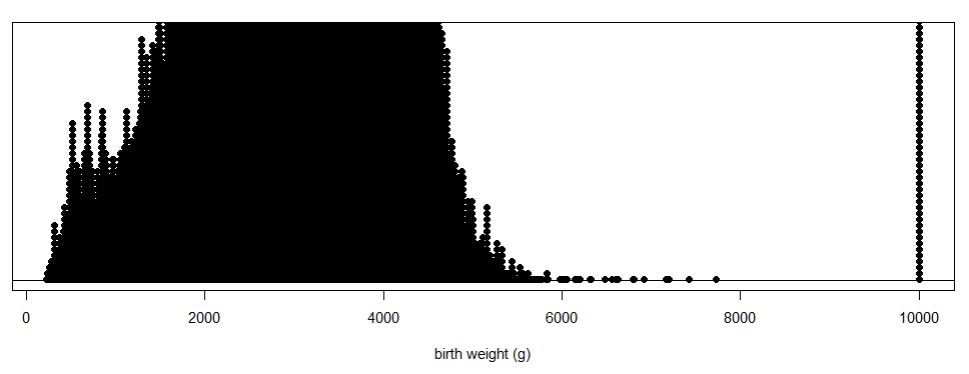
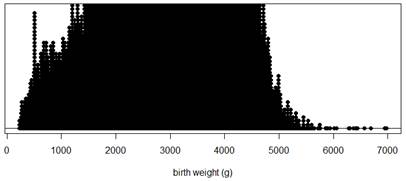
Expected output:
R dotplot of birth weights showing distribution
Hint 2. JMP Instructions
JMP Graph Builder interface for creating dotplots
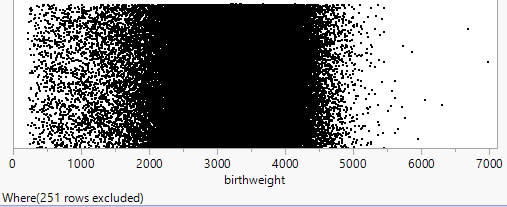
Expected output:
JMP dotplot of birth weights showing distribution
Solution.
A dotplot shows each numerical value individually (and is best with smaller datasets). Some packages may actually "bin" the values if the data set is large. If the dataset includes many distinct (non-repeated) values, this can make it more difficult to see the "clumping" in the data.

5. Describe dotplot.

Describe what you see.
Solution.
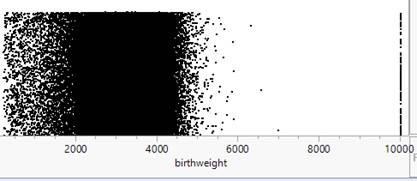
There are too many observations to display well in the dotplot, but we do notice a "stack" by itself around 10,000.

Handling Missing Data.

The observations at 9999 don’t seem to belong. The User Guide or "codebook" for these data states that the largest birth weight is 8165 grams and for other variables it lists 99, 999, or 9999 as values for "not stated" or unknown.
Snippet from CDC codebook showing data positions
You could convert these observations to the missing value designator in your software or you can create a new data set that does not include those rows (subsetting the data).
Aside: R Note.
Aside: JMP Note.

6. Technology Detour β€” Subsetting the Data.

Remove the observations with birthweight = 9999 (missing values) from the dataset.
Hint 1. R Instructions
Use logical subsetting to create a new dataset without the missing values:
births2 = births[which(births$birthweight < 9999), ]  # selects rows that satisfy condition
                                                         # notice the comma!
nrow(births2)
# Refer to the new data using births2$birthweight
Expected output: 297,558 births
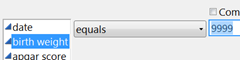
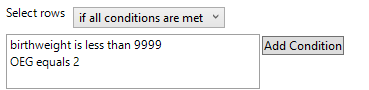
Hint 2. JMP Instructions
JMP Row Selection dialog for subsetting data
Expected output:
JMP data table with excluded rows
Solution.
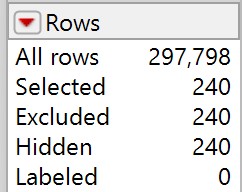
After subsetting, you should have 297,558 observations (240 rows with birthweight = 9999 were removed from the original 297,798 observations).

7. Recreate dotplot with subsetted data.

Recreate the dotplot with the subsetted data and describe what you see.
Hint 1. R Output
Hint 2. JMP Output
Solution.
We now have 297,558 observations. The stack is gone and we see a distribution with a center around 3000 grams and most of the observations between 1800 and 4500 grams.

Using Histograms.

It may still be difficult to see much in the dotplot with such a large data set, especially if there are many distinct (non-repeated) values. One solution is to "bin" the observations. Some software packages (e.g., Minitab) will do that automatically even with a dotplot. Another approach is to use a different type of graph, a histogram, that groups the data into intervals of equal width (e.g., 1000-2000, 2000-3000, …) and then construct a bar for each interval with the height of the bar representing the number or proportion of observations in that interval. Notice these bars will be touching, unlike in a bar graph, to represent the continuous rather than categorical nature of the data.

8. Technology Detour β€” Creating Histograms.

Create a histogram for the subsetted birth weight data (births2).
Hint 1. R Instructions
Use the hist function to create a histogram:
hist(births2$birthweight, xlab="birth weight")
# Note you can also use breaks=x to change the number of intervals to x.
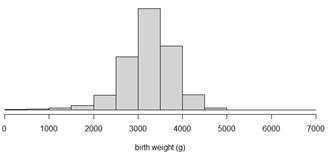
Expected output:
R histogram of birth weights showing distribution
Hint 2. JMP Instructions
JMP Analyze Distribution dialog for creating histograms
Expected output:
JMP histogram of birth weights showing distribution
Solution.
A histogram groups data into intervals of equal width and displays bars with heights representing the frequency or proportion of observations in each interval. The bars touch each other to represent the continuous nature of quantitative data.

9. Compare dotplot and histogram.

Create a histogram for the subsetted data (births2) and compare the information revealed by the dotplots and the histograms. Do you feel one display is more effective at displaying information about birth weights than the other? Explain.
Solution.
The histogram is more effective; the dataset is too large to show individual dots.

Describing Distributions of Quantitative Data.

In describing the distribution of quantitative data, there are three main features:
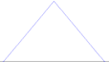
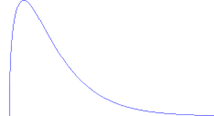
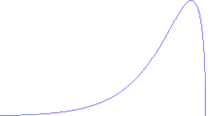
  • Shape: What is the pattern to the distribution? Is it symmetric or skewed? Is it unimodal or is there more than one main peak/cluster? Are there any individual observations that stand out/don’t follow the overall pattern? If so, investigate these "outliers" and see whether you can explain why they are there.
    Symmetric
    Example of a symmetric distribution
    Skewed to the Right
    Example of a right-skewed distribution
    Skewed to the Left
    Example of a left-skewed distribution
  • Center: Where is the distribution centered or clustered? What are typical values?
  • Variability: How spread out is the distribution? How far do the observations tend to fall from the middle of the distribution? What is the overall range (max – min) of the distribution?
It is also very important to note any observations that do not follow the overall pattern (e.g., "outliers") as they may reveal errors in the data or other important features to pay attention to.

10. Characterize the distribution.

How would you characterize the shape, center, and variability of these birthweights? (Remember to put your comments in context, e.g., "The distribution of January birthweights in 2024 was …")
Solution.
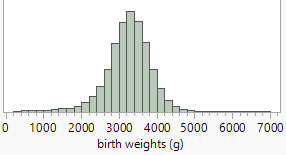
The distribution of January 2024 birthweights is slightly skewed to the left. Most of the weights are between 2000 and 5000 grams, with a peak around 3200 grams.

11. Explain lower weight babies.

You may have noticed a few more lower weight babies than we might have expected (if we assume a "random" biological characteristic will be fairly symmetric and bell-shaped). Can you suggest an explanation for the excess of lower birth weights seen in this distribution?
Solution.
Premature births? This would explain a cluster of lower birth weights.
Now, further subset the births2 data based on whether or not the pregnancy lasted at least 37 weeks.

12. Subset by gestation period.

How many observations do you end up with?
Hint 1. R Hints
Edit the previous command births2 = births[which(births$birthweight < 9999), ] to create births3 from births2, using "==" for an equality comparison (i.e., OEG == 2).
Hint 2. JMP Hints
Return to the Rows menu and select Row Selection > Select Where to add the second condition
JMP output showing selected rows
Solution.
265,676 observations
R command: births3=births2[which(births2$OEG == 2 ), ]

13. Assess symmetry after subsetting.

After this step do we have a more symmetric distribution?
What is a downside to subsetting the dataset in this way?
Solution.
The distribution does look more symmetric, however we can no longer generalize any of our conclusions to premature babies.

Numerical Summaries.

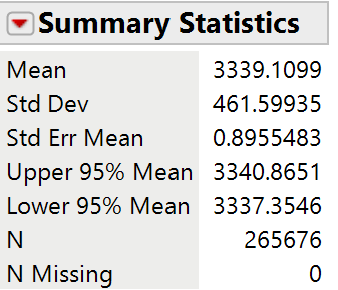
Let’s use this as our final dataset and use technology to calculate some helpful numerical summaries of the distribution, namely ones that describe the center (e.g., mean, median), variability (e.g., standard deviation), and skewness. The skewness statistic involves \(\Sigma((y_i-\bar{y})/s)^3\text{,}\) so positive values indicate a distribution that is skewed right, negative values indicate a distribution that is skewed left, and values near zero indicate a symmetric distribution.

14. Technology Detour β€” Numerical Summaries.

Calculate numerical summaries (mean, median, standard deviation, skewness) for the subsetted birth weight data (births3).
Hint 1. R Instructions
Use the iscamsummary function to get numerical summaries:
attach(births3)    # Optional step if this is final data to work with
iscamsummary(births3$birthweight, digits=2)
# Entering "digits = " specifies the number of digits you want displayed 
# after the decimal. Default is 3.
Expected output:
R numerical summaries for birth weights
Hint 2. JMP Instructions
See the Analyze > Distribution output from creating the histogram and/or use Analyze > Tabulate for custom summaries.
Expected output:
JMP numerical summaries for birth weights
Solution.
The numerical summaries provide measures of center (mean, median), spread (standard deviation, IQR), and shape (skewness). These complement the visual displays and allow for more precise descriptions of the distribution.

15. Report numerical summaries.

Determine the mean, standard deviation, and skewness of these data.
Mean:
Standard deviation:
Skewness:

16. Interpret numerical summaries.

Interpret the mean, standard deviation, and skewness values in context.
Solution.
The mean tells us the average birthweight of these full term babies was 3336.6 grams.
The standard deviation tells us that a "typical" deviation from the mean was 460.6 grams.
The skewness statistic is slightly positive indicating a few larger observations.

17. Effect of outliers.

How would the mean and standard deviations values compare if we had not removed the 9999 and low birthweight values?
Solution.
The 9999 values would enlarge the mean and the standard deviation. The low birthweight babies would lower the mean but enlarge the standard deviation. A large number of low birthweight babies could even create a negative skewness statistic.

Fitting a Model.

Recall from Chapter 1 the normal probability distribution has some very nice properties and allows us to predict the behavior of our variable. For example, we might want to assume birth weights follow a normal distribution and estimate how often a baby will be of low birth weight (under 2500 grams according to the International Statistical Classification of Diseases, 10th revision, World Health Organization, 2011) based on these data.

18. Assess normality.

Do these birth weight data appear to behave like a normal distribution? How are you deciding?
Solution.
Discussion may vary.

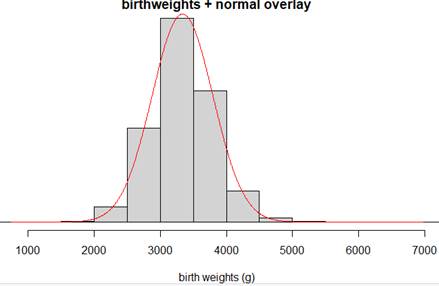
19. Technology Detour β€” Normal Distribution Overlay.

Add an overlay of a theoretical normal distribution to see how well it matches the birth weight data, using the mean and standard deviation from the observed data.
Hint 1. R Instructions
First create a histogram, then use iscamaddnorm to add the normal curve overlay:
hist(births3$birthweight, xlab="birth weight (g)", main="Birth Weights with Normal Overlay")
iscamaddnorm(births3$birthweight)
Expected output:
R histogram with normal overlay for birth weights
Hint 2. JMP Instructions
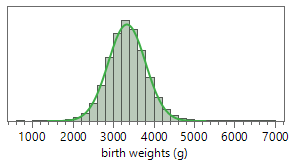
In the Distribution output, use the red triangle (hot spot) next to the variable name and select Continuous Fit > Normal.
Expected output:
JMP histogram with normal overlay for birth weights
Solution.
The normal curve overlay allows you to visually assess how well a normal distribution with the same mean and standard deviation fits your data. Look for areas where the bars deviate substantially from the curve.

20. Assess normal overlay fit.

Discuss any deviations from the pattern of a normal distribution.
Solution.
The fit or agreement looks pretty good. Hard to see from this graph any obvious non-normal behavior, but we do notice some observations much further out in the tails than we might expect with a normal distribution.

21. Technology Detour β€” Checking Normal Distribution Properties.

Another method for comparing your data to a theoretical normal distribution is to see whether certain properties of a normal distribution hold true. In Chapter 1, you learned that 95% of observations in a normal distribution should fall within two standard deviations of the mean.
Calculate the percentage of the birthweights (in births3) that fall within 2 standard deviations of the mean.
Hint 1. R Instructions
Create a Boolean (true/false) variable to identify observations within 2 SD:
within2sd = (births3$birthweight > mean(births3$birthweight) - 2*sd(births3$birthweight)) & 
            (births3$birthweight < mean(births3$birthweight) + 2*sd(births3$birthweight))
# Note: Make sure you copy this code with no line breaks
table(within2sd)/length(births3$birthweight)
Hint 2. JMP Instructions
  • Calculate (by hand) the mean Β± 2SD limits using your numerical summaries.
  • In the data window, double click on an empty column to activate it and name it "within2sd"
  • Right click on the column name and select Formula
  • From Functions (grouped) select Conditional. Enter conditions for birth weight to be between the two limits to equal 1, 0 otherwise.
  • Then use Analyze > Distribution on this column and report the mean (the proportion of ones).
Solution.
About 95% of these birthweights fall within two standard deviations of the mean birthweight, just as we would predict for a normal distribution.

22. Percentage within 2 SD.

Report the percentage of the birthweights that fall within 2 standard deviations of the mean.
Percentage: %
Solution.
Using the mean of 3339.1 and the standard deviation of 461.6, our 2SD limits would be 2415.9 and 4262.3. So then our ratio is 252915/265676 β‰ˆ 0.95

23. Compare to normal prediction.

How well does this percentage match to what would be predicted if the data were behaving like a normal distribution?
Solution.
Should find very close to the predicted 95% indicatign our (subsetted) data is behaving like a normal distribuiton in this respect.

24. Technology Detour β€” Normal Probability Plots.

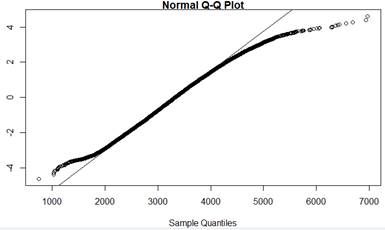
Create a normal probability plot (also called a quantile plot) for the subsetted birth weight data. Probability plots work by comparing the observed data to the z-scores expected for a normal distribution; if the points "line up" along a straight line, this supports that the data are behaving like a normal distribution.
Hint 1. R Instructions
Use the qqnorm and qqline functions to create a normal probability plot:
qqnorm(birthweight, datax=TRUE)    # "datax=TRUE" puts observed values on x-axis
qqline(birthweight, datax=TRUE)
Expected output:
R normal probability plot for birth weights
Hint 2. JMP Instructions
In the Distribution window, use the red triangle (hot spot) next to the variable name and select Normal Quantile Plot.
Expected output:
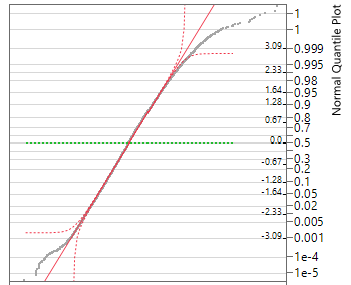
JMP normal probability plot for birth weights
Solution.
A normal probability plot is often easier to interpret than comparing a histogram to a curve. If the points follow a straight line, the data are consistent with a normal distribution. Deviations from the line, especially in the tails, indicate departures from normality.

25. Assess normal probability plot.

Do the observations deviate much from a line? If so how?
What does this suggest about how the birth weight data values differ from what we would predict for a normal distribution (e.g., smallest values are smaller than expected or larger than expected)? Is this consistent with what you saw in the histogram?
Solution.
The graph is fairly linear except for the ends. The lowest values seem smaller than they should be and the largest values seem larger than they should be. You may or may not have seen these "heavier tails" as easily in the histogram.

Discussion.

Some software packages report a p-value with the normal probability plot. The null hypothesis here is that the data do follow a normal distribution, so if you fail to reject this null hypothesis you can say that the data do not provide strong evidence that they do not arise from a normally distributed population. (But keep in mind that large sample sizes will drive the p-value down, regardless of the actual shape of the population.) There are several different types of significance tests for normality, but in this text, we will focus on the visual judgement of whether the probability plot appears to follow a straight line.
Suppose we were willing to assume that in general birth weights are approximately normally distributed with mean 3339 grams and standard deviation 462 grams. We can use this model to make predictions, like how often a baby will be of low birth weight, defined as 2500 grams or less.

26. Calculate low birth weight probability.

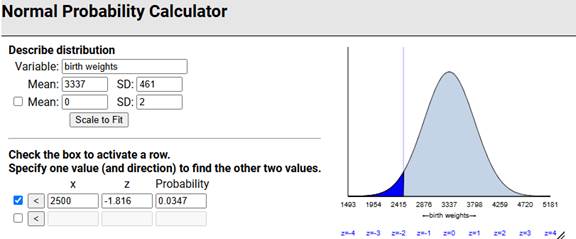
Use technology (e.g., Normal Probability Calculator applet) to calculate the normal distribution probability that a randomly selected baby will be of low birth weight. (Be sure to make sure your answer is consistent with a well-labeled sketch with the shaded area of interest!)
Hint.
Expected output:
Normal probability calculation for low birth weight
probability (decimal):
Solution.
We estimate that in the long run about 3.5% of full term babies will be of low birth weight.

27. Compare to actual data.

Now examine the births3 data: What percentage of the birth weights in this data set were at most 2500 grams? [Hint: Create a Boolean variable?] How does this compare to the prediction in the previous question? Does this surprise you? Explain.
Hint.
Expected output:
Calculation showing percentage of low birth weights in data
Solution.
In this sample, 3.2% of the full term babies were of low birth weight. Using the normal distribution very slightly overpredicted how often this would happen. We might have expected the normal distribution to underpredict based on the heavier tails in the sample we saw earlier, though it is less about the percentage "out there" and more about how far out there based on 95% of the distribution falling within 2SD but still seeing the heavier tails in the normal probability plot.

Discussion.

We can often use a theoretical model to predict how data will behave. However, it is often unclear whether the model we are using is appropriate. Sometimes we have to consider the context (e.g., biological characteristic) and presume a particular model. We can also use existing data to create a model, but we need to consider what population the data are representative of and how stable we think the data generating process is (e.g., not changing over time). In this case, a normal distribution predicts 3.5% of babies will be of low birth weight (compared to 3.2% in the data file) and that about 5% of birth weights will be beyond two standard deviations from the mean (compared to 4.8% in the dataset). The model appears to be quite accurate (once we remove the non full term babies and missing values) and useful for other predictions.

Subsection 8.1.2 Practice Problem 2.1A

The data in MLB_FCI_22.txt, compiled by Team Marketing Report, includes various costs for attending a Major League Baseball game in the 2022 season. The "Fan Cost Index" is defined as the price of a family of four to attend a game, assuming 4 adult average-price tickets, parking for one car, and the cheapest (at that park) price for two draft beers, four soft drinks, four hot dogs, and two caps.
Note: Make sure the columns parse correctly (e.g., Data > Text to Columns in Excel?) and remove the last row before you start analyzing the data.

Checkpoint 8.1.3. Compare dotplot and histogram.

Create a dotplot and a histogram of the FCI values. Which graph do you prefer? Why?

Checkpoint 8.1.4. Assess normality with probability plot.

Create a normal probability plot of the FCI values. What do you conclude from this graph? Explain your reasoning.

Checkpoint 8.1.5. Analyze FCIPctChange distribution.

Create and include a dotplot of the FCIPctChange values which represent the percentage change in the FCI values from the previous year. Also report and summarize what you learn from the median.

Checkpoint 8.1.6. Identify outlier team.

The distribution of the FCIPctChange values shows a low visual outlier. Identify this team by name. What is special about this team?

Checkpoint 8.1.7. Identify unusual cap price.

Examine and include a stemplot of the cap prices. We see one team with an unusual value. Identify this team by name and suggest an explanation for its unusual cap price.
Hint.
We are not talking about the largest or smallest value this time!

Subsection 8.1.3 Practice Problem 2.1B

The AnthemTimes2025.txt file has data on the length of the performance of the national anthem preceding the National Football League’s Super Bowl for games from 1980 (Super Bowl 14) to 2025 (Super Bowl 58). Note: There are two columns for times (the first is from a colleague of mine watching and timing each one, the second one is from sportsbettingdime). Using sbdTime:

Checkpoint 8.1.8. Create dotplot with active title.

Create a well-labeled dotplot of the performance lengths. Include an "active title." Report your axis labels and your title.

Checkpoint 8.1.9. Describe distribution.

Give a brief description, in context, of the distribution, as if to someone who can’t see your graph.

Checkpoint 8.1.10. Create boxplot and identify outliers.

Create and include a modified boxplot of the performance lengths. Identify any outliers shown in the boxplot by name.

Checkpoint 8.1.11. Report summary statistics.

Report the mean, median, and standard deviation. Include measurement units.

Checkpoint 8.1.12. Predict next Super Bowl length.

Give one number to predict the performance length in the next Super Bowl. Also include some indication of how accurate you think your prediction will be. (Cite any external information/additional analysis that you use.)

Subsection 8.1.4 Practice Problem 2.1C

Checkpoint 8.1.13. Generate random normal data and create probability plot.

Use statistical software to generate a random sample of 100 observations from a normal distribution with mean 2 and standard deviation 5. Create a normal probability plot of the generated data. Do the data follow a straight line?
Hint 1. In R
mydata = rnorm(100, 2, 5)
qqnorm(mydata); qqline(mydata)
Hint 2. In JMP
In new worksheet, choose Columns > New Column. Under Initialize Data set the Number of rows to 100. Under Column Properties, select Formula. Then select Random > Random Normal and specify (2,5).

Checkpoint 8.1.14. Generate skewed data and compare probability plot.

Repeat the previous question for data that are skewed to the right. How does the behavior of the probability plot change? How would you interpret this plot without looking at the histogram?
Hint 1. In R
mydata = rchisq(100, 2)
qqnorm(mydata); qqline(mydata)
Hint 2. In JMP
Select Random > Random ChiSquare and enter 2 as the "df"
You have attempted of activities on this page.