A tree is a data structure that consists of nodes connected by directed edges. When describing the locations of nodes and their relationships, we tend to use a mix of tree and family metaphors. The topmost node is called the root, and nodes can have children and parents. Two nodes that share the same parent are called siblings. Nodes with no children are called leaves because they dangle at the end of branches. Nodes that are not leaves are called internal nodes.
Figure31.1.1.A simple tree. The circles are nodes and black lines edges. Arrows point from parent to child. The 10 node is the root of the tree because it has no parent. We would describe 5 and 15 as siblings because they share the same parent, 10.
Although that diagram uses arrows to indicate the direction of the edges, they are not always drawn. Often times, we simply draw lines to show connections and the higher node is assumed to be the parent.
These properties are true of every tree. Other features can vary. For instance, some trees require that each node have at most two children (these are called binary trees), while others allow nodes to have many children. Some trees require that the children of a node be ordered in some way, while others do not. We will explore these variations as we encounter them.
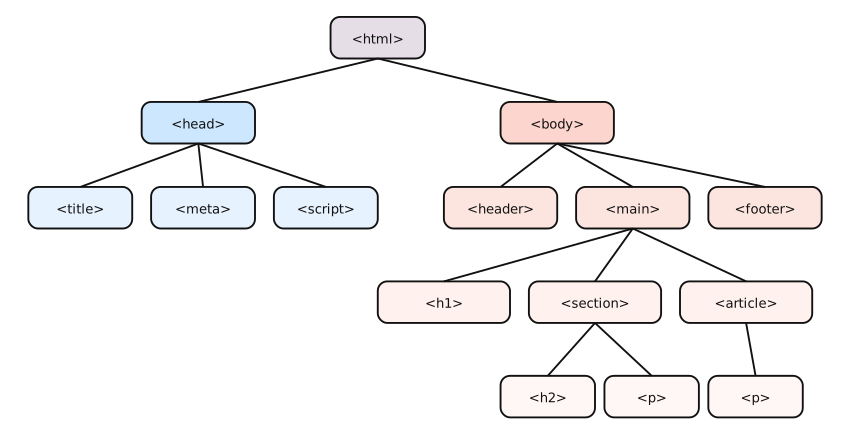
The trees we will be most concerned with are ones that are used as the building blocks for general data structures (to build a set or a map). However, trees are also used in many other contexts. For instance, the structure of an HTML document (web page) can be represented as a tree, where each element is a node and child elements are children of their parent elements.
This structure is used to help browsers understand how to layout the contents of the page. For example, in the diagram above, we can see that the <section> is inside the <main> and right after the <h1>. Notice that some nodes have many children. In a real HTML page, there might be dozens of nodes that were all children of a particular node.
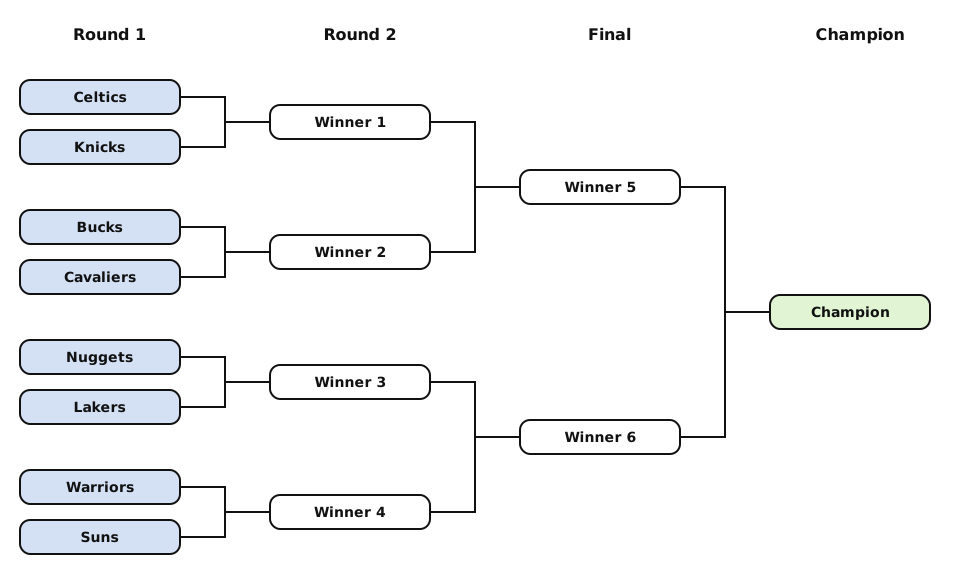
Figure31.1.3.An 8 team basketball tournament bracket. The root node is the champion on the right. The leaf nodes are on the left. Teams play each other and the winners advance to the next node to the right.