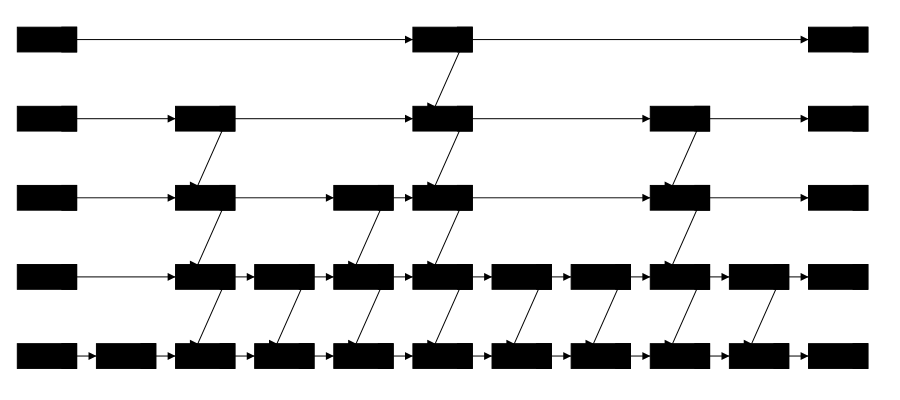
The final “self-balancing tree” structure we will look at is the Skip List. A skip list is not actually a tree at all. But it can be used to provide the same logarithmic time complexity for search, insertion, and deletion operations as the other self-balancing trees we have looked at.
A skip list is a linked list with multiple levels. The bottom level is a regular linked list that contains all the values in sorted order. Each higher level is a subset of the level below it, and contains pointers that allow us to skip over large sections of the list when searching for a value.
Any search process, including finding a location to insert a new value, starts at the head of the highest level. We move across that list as long as the next value is less than the value we are looking for. Once we can’t move across any more, we drop down to the next level and repeat the process. We continue this process until we reach the bottom level. At that point, we are at the position where the value we are looking for should be, and we can check if it is there or not.
The skip list below is set to find the value 800. Press the > button to step through the process of finding that value. Notice how the skip list uses the higher levels to quickly skip over large sections of the list, and then drops down to lower levels to find the exact value.
You can click and drag on the animation area to pan around. Use the Ctrl + mouse wheel (or touchpad scroll gesture) while over the animation area to zoom in and out.
Every time we insert a new value, we flip a coin to determine how many levels it should be on. If the coin comes up heads, we add the value to the next level up. We keep flipping the coin until we get tails. This means that on average, half of the values will be on the first level, a quarter of the values will be on the second level, an eighth of the values will be on the third level, and so on.
You can click and drag on the animation area to pan around. Use the Ctrl + mouse wheel (or touchpad scroll gesture) while over the animation area to zoom in and out.
First, let’s focus on the expected height of the skip list. In a list of \(n\) values, we expect about \(n/2\) values to be on the first level, \(n/4\) values to be on the second level, \(n/8\) values to be on the third level, and so on. This means that the expected number of levels is about \(\log_2 n\text{.}\) So, the expected height of the skip list is logarithmic with respect to the number of values.
Now, working backwards from a node that was found at the end of the lowest level (the worst case), let’s consider how many moves it took to get to that location. Every time we move to the left (working back towards the head), there is a 50% chance that we can step up a level. (Because every node that reached this level got a coin flip to decide if it should be on the level above this one.) So, on average, every two times we move left, we can also move up a level. We expect to have to move up \(\log_2 n\) times. If we move left two times for each move up, that means we expect to move left about \(2 \log_2 n\) times. So, the expected number of moves either up or to the left is \(O(3 \log_2 n) = O(\log n)\text{.}\)
So, the expected time complexity for search, insertion, and deletion operations in a skip list is \(O(\log n)\text{.}\) However, like with a treap, this is a probabilistic guarantee, not a strict guarantee. It is possible to get unlucky with the random coin flips and end up with a very unbalanced skip list.
We also might wonder about the space required to store all of those extra levels. We expect that each level has about half as many nodes as the level below it. So if the first level has \(n\) nodes, the number of nodes in the other levels is \(n/2 + n/4 + n/8 + \cdots\text{.}\) That sequence converges to \(n\text{,}\) so all of the extra levels combine to \(O(n)\) extra space, which is the same order of magnitude as the space required to store the values themselves.
Aside from being an interesting alternate way of achieving logarithmic time complexity, skip lists have some practical advantages over self-balancing trees. One key benefit is that insertions and deletions have minimal impact on the rest of the structure. In self-balancing trees, those operations can cause a series of rotations that affect the structure of the tree in other places.
In data structures designed to support concurrent access by multiple threads, this property can be a big advantage. In a self-balancing tree, if one thread is performing an insertion or deletion that causes rotations, it is hard to determine when other threads can safely access the tree. In a skip list, insertions and deletions only affect the local structure around the inserted or deleted node, so other threads can continue to access the rest of the skip list without waiting.
Real world examples of skip list can be found in Java, which provides a ConcurrentSkipListMap class that is more performant than the standard TreeMap class in concurrent scenarios, and the popular in-memory database Redis, which uses skip lists to implement sorted sets.