In the previous section, we saw how stack diagrams visualize the state of a program’s functions and variables. At different points in the program, different variables were available. And, at different points in time, a name like x could refer to different variables in different stack frames.
Scope is the term used to describe the area of a program where a given variable can be used. Only the values in the current stack frame are in scope and useable by the code that is running.
The scope of a variable in C++ is controlled by the block of code in which it is declared. Each function is a block of code and thus defines its own scope. Variables declared in that function can only be used in that function. We call variables that are only visible in a particular function local variables.
For example, consider the program below. The variables that are in scope in main are x , y, and z, but not num or result. In doubleValue the only things in scope are num and result.
#include <iostream>
using namespace std;

int doubleValue(int num) {
    int result = 2 * num;
    return result;
}

int main() {
    int x = 5;
    int y = doubleValue(x);
    int z = doubleValue(12);
    cout << y << endl;
    cout << z;
}
If main tries to directly use result, or doubleValue tries to directly use x, it is a compile error. The compiler will say that those variables are not defined. Which is true - they are not defined in that location, they are defined elsewhere and are out of scope where we are trying to use them. Here is a broken version of the program above that tries to access x outside of its scope:
Scope also is usually linked to the lifetime of a variable. If a variable has local scope, it is created when the function is called and destroyed when the function returns. Each time the function is called, a new instance of the variable is created.
This idea of scope helps enforce the abstraction of functions. The parameters and local variables in doubleValue are not visible to main, and vice versa. This mean that the code in one place can’t directly affect the code in another. All the different parts can do is communicate via the clear channels provided by the parameters and return values.
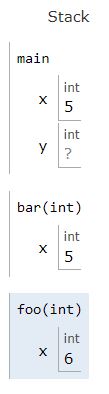
It is possible for different stack frames to have variables with the same name. Below is a stack diagram for a program with three functions, all of which have a variable x:
Note that the different xs can have different values, like bar’s x and foo ’s x. Or they can have the same value, like main’s x and bar’s x. The three x’s are all different variables - you can not assume that they are related in any way. (You might know three people all named “John”. That does not mean they are all related. It is possible, but there is no reason to assume so.)
It can help to think of there being two programmers involved in writing code involving a function. There is one programmer who writes the function. They don’t know anything about what is going on in the rest of the program. There is another programmer who is using the function. They don’t know anything about what happens inside the function (other than the information they are passing in and what should come back).
This is literally the case when you use a function from a library. You don’t know how cos works and the person who wrote the function has no idea what programs you are going to use it in.
But even if you are the person who is writing and using the function, do your best to pretend there are two different “you”s — one working on the function and one who works on the rest of the code. Don’t assume that either you knows much about what they other is doing!
int superSecretFunction(int n) {
  int x = 0;
  return (2 + (n * n) - 5 * n / 7) * x;
}

int main() {
  int x = 1;
  cout << "After using the super secret function, we get " << superSecretFunction (x);
}
We’re using the same variable.
We are actually using two different variables that happen to have the same name.
Although the name of both variables is x, they represent different locations in memory, and thus are different variables.
One x is a local variable of superSecretFunction while the other is a local variable of main .
We assign them different values. If both were initialized to 0, then we’d get an error.
Since they are not in the same storage location, they can store any value, including the same value.
We’re not allowed to do this. The code will result in an error.
A variable that is declared outside of any functions is called a global variable. Global variables have global scope. That means they are visible in all functions in the program and last as long as the program is running.
It may sound useful to have a variable that is available everywhere, but using global variables is almost always a bad idea. They make it so any function can make a change that affects all the other code in the program. This makes it much harder to understand how the parts of the program interact.
One exception to the rule “avoid global variables” is for constants. Because we never have to worry about where a constant is being changed, it is considered OK to make constants be global. If you do, you can use them in any function.