Section 21.16 Regular Expression Use
Subsection 21.16.1 Regular Expressions in Text Editors
Regular expressions are often built into text editors to allow for advanced search and replace functionality. For example, in editors like Visual Studio Code, Sublime Text, and Notepad++, you can enable regex mode in the search dialog to use regular expressions for finding text patterns.
This can be particularly useful for tasks like reformatting data, extracting information, or performing bulk edits based on patterns. The figure below shows an example of using a regular expression in Visual Studio Code’s search dialog on this book’s source code:
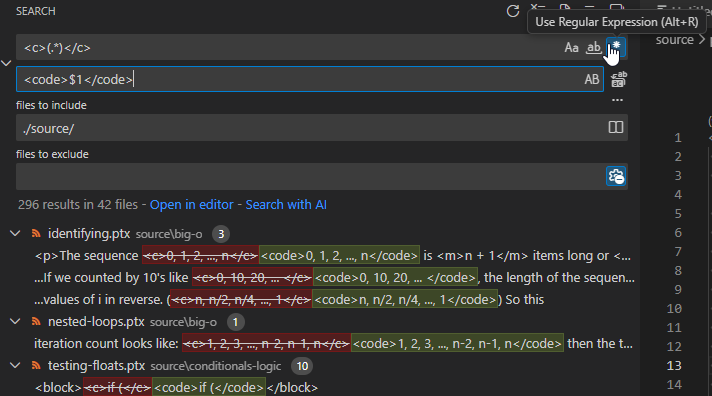
Key things to note:
-
Regex mode was enabled with the b
.*button. (The hand pointer is partially covering it). -
The regex
<c>(.*)</c>was used to find any text enclosed inctags. The parentheses create a capturing group for the text inside the tags. -
The replacement string can access the captured group by using
$1for the first group,$2for the second, and so on. Here, the replacement string<code>$1</code>says to write a<code>tag, then the captured text, and finally a closing</code>tag. -
Below the input boxes, there is a preview of the matches and replacements that will be made.
Subsection 21.16.2 Regular Expressions in C++
Most programming languages provide a library for working with regular expressions. In C++, the
<regex> library provides support for regex operations.
Here is a simple example of using regular expressions in C++ to find and print all the phone numbers from a block of text:
The comments explain key steps in the code. But it is worth highlighting a few important parts:
-
sregex_iteratoris a type of iterator, like the ones we use with containers such asvectorormap. On line 25 we create an iterator that will advance from the start to end of the string, finding matches of the regex pattern. -
As the iterator advances, it points to each match in turn. Eventually it will reach the end of the sequence and compare equal to the default-constructed end iterator.
-
Each match is represented by an
smatchobject, which contains the matched text and any captured groups. We can access these using the subscript operator[].
The code has some complexity, but imagine the crazy sequence of if/else statements and string manipulations you would need to write to do the same thing without regular expressions. Compared to what that would look like, the regex approach is much cleaner.
You have attempted of activities on this page.

