The next structure we will explore is the B-tree. A B-tree is a generalization of the binary search tree that allows each node to have more than two children. Instead of containing just one value, each node can have a variable numbers of values stored in sorted order.
Each node will always have one more child pointer than it has values. Conceptually, the pointers are interleaved with the values. There is one pointer to the left of the first value, one pointer between each pair of values, and one pointer to the right of the last value. They point to child subtrees that contain values in the appropriate ranges. The first pointer points to a subtree with values less than the first value, the second pointer points to a subtree with values between the first and second values, and so on. The last pointer points to a subtree with values greater than the last value.
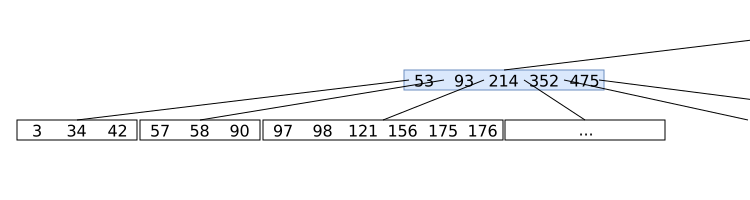
For example, consider the node shown in the figure below. It has 5 values (53, 93, 214, 352, and 457) and 6 children. The first child pointer points to a subtree with values less than 53, the second child pointer points to a subtree with values between 53 and 93, the third child pointer points to a subtree with values between 93 and 214, and so on. The last child pointer points to a subtree with values greater than 457.
The degree of a B-tree is the maximum number of children (pointers) that any node can have. (Which is one more than the maximum number of values it can have.) In the tree above, which is only partially shown, the degree is 7. That means that each node can have at most 6 values and 7 child pointers. The last node shown in the figure (97, 98, 121, 156, 175, 176) has 6 values, so it is full. The highlighted node we were just discussing has 5 values, so it is not full.
In addition to an upper bound on the number of values and children, there is also a lower bound. Typically, each node (except the root) must have at least half the maximum number of children. So, if the degree is 7, each node must have at least 4 child pointers (and therefore at least 3 values). The root node is an exception to this rule. It can have as few as one value (and therefore two child pointers) unless the tree is empty.
To keep things manageable, we will focus on B-trees of degree 3. This means that each node can have at most 2 values and 3 child pointers. The minimum number of children for a non-root node is 2 (\(ceil(3/2)\) = 2) and thus the minimum number of values is 1.
You can click and drag on the animation area to pan around. Use the Ctrl + mouse wheel (or touchpad scroll gesture) while over the animation area to zoom in and out.
The way we maintain balance in a B-tree is by ensuring that all leaf nodes are at the same depth. When we insert a new value, we always add it to a leaf node. If that leaf node is full (has the maximum number of values), we split it into two nodes and promote the middle value to the parent node. This process may continue up the tree if the parent node also becomes full. If the root node becomes full, we create a new root node and increase the height of the tree by one.
Then insert 25 (type 25 into the Value text field and press Insert) and step through that insertion as well. This will cause a split in the leaf node, promoting a value to the parent.
Finally, insert 400 (type 400 into the Value text field and press Insert) and step through that insertion. This will cause a split at the leaf node, which causes the parent (the root) to split as well, increasing the height of the tree.
You can click and drag on the animation area to pan around. Use the Ctrl + mouse wheel (or touchpad scroll gesture) while over the animation area to zoom in and out.
As with a BST, when we are removing a value in non-leaf node, we won’t actually remove it directly. Instead, we will find either the in-order predecessor (the largest value in the left subtree) or the in-order successor (the smallest value in the right subtree), swap that value into the node to be deleted, and then remove the value from the leaf node where it originally resided. This ensures that we are always removing from a leaf node, simplifying the balancing process.
Then, if the leaf node has fewer than the minimum number of values after the removal, we will need to perform some rebalancing operations. This can involve borrowing a value from a sibling node or merging with a sibling node if it also has the minimum number of values. The rebalancing may propagate up the tree if the parent node also falls below the minimum number of values.
First try removing 85 (type 85 into the Value text field and press Remove). Press the > button to watch the removal. We will end up stealing from the right sibling to maintain balance.
Then reset and try removing 325. This will end up stealing from the right child. But since that creates an empty node, we will then do a rotation to fix things up. (A value from the parent moves down to fill the empty spot, and a value from the left sibling moves up to the parent.)
Finally, reset and remove 400. Step through that removal. Then remove 325. This will cause a sibling merge, which will cause the parent to lose a value. Since the parent will then have too few values, we will need to continue rebalancing up the tree.
You can click and drag on the animation area to pan around. Use the Ctrl + mouse wheel (or touchpad scroll gesture) while over the animation area to zoom in and out.
![Root has 1 value: 444. The left child of root has 1 value: 208. The right child of root has 2 values: [576, 746]. The left child of 208 has 1 value: 18. The right child of 208 has 2 values: 322 and 393. The left child of [576, 746] has 1 value: 526. The middle child of [576, 746] has 1 value: 578. The right child of [576, 746] has 2 values: [780, 800].🔗](external/images/balanced-trees/btree-ex-1.svg)

