Section31.8Smallest and Largest Values in a Binary Search Tree
Finding the smallest or largest value in a binary search tree is a simple process. Because of the search tree property, the smallest value will always be found by following left child pointers until we reach a node with no left child. Similarly, the largest value will always be found by following right child pointers until we reach a node with no right child.
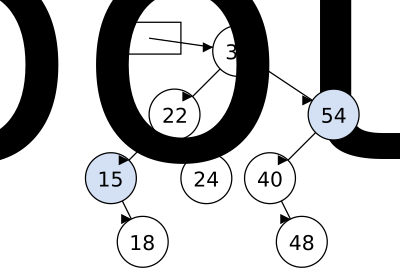
Because every node is a root of a smaller binary search tree, we can use the same logic to find the smallest or largest value in any subtree. If we want to find the smallest value in the subtree rooted at a particular node, we simply start at that node and follow left child pointers until we reach a node with no left child. Starting from 54 in the diagram above, we would follow left pointers to 40, which is the smallest value in that subtree.
This is a simple recursive algorithm. If the current node has no left child, then its value is the smallest in the tree. Otherwise, we make a recursive call on the left child. The algorithm for finding the largest value is similar, but follows right child pointers instead.
int findMin(Node* node) {
    if (node->left == nullptr) {
        return node->data;  // Base case: smallest value found
    }
    else {
        // Recurse on left subtree and return its smallest value
        return findMin(node->left);
    }
}
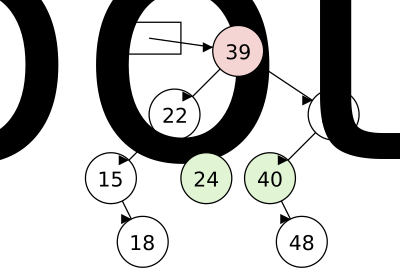
Identifying the smallest or largest value in a subtree is a critical part of removing value from a binary search tree. Consider the same tree shown above. If we want to remove the node with value 39, we need to replace it with something. Whatever value takes its place needs to maintain the search tree property.
Promoting one of the children might violate the binary search tree property. If we moved 22 up to replace 39, the 24 on the left would now be on the wrong side.
So, we want to find a value that is either the next largest or next smallest value in the tree. In our tree, those would be 40 (the smallest value in the right subtree) or 24 (the largest value in the left subtree). Either of those values could replace 39 without violating the search tree property.
Either option works, but we typically will choose one approach and stick with it for consistency. In this book, we will always replace a removed node with the next largest value. Finding that value is simple: we just need to call our findMin function on the right child of the node being removed.
For each of the following values, try to find the next largest value in the binary search tree shown below. To do so, first find given value, then go to the right child, and then follow left child pointers to find the smallest value in that subtree.
You can click and drag on the animation area to pan around. Use the Ctrl + mouse wheel (or touchpad scroll gesture) while over the animation area to zoom in and out.
Arrange the blocks in order to show the path taken if we start from 10 and move to the next larger value. Any nodes that are not visited should not be included in your answer.
Arrange the blocks in order to show the path taken if we start from 10 and move to the next smaller value. Any nodes that are not visited should not be included in your answer.
Arrange the blocks in order to show the path taken if we start from 20 and move to the next smaller value. Any nodes that are not visited should not be included in your answer.