A binary search tree (BST) is a binary tree (max two children per node) that maintains a specific ordering property (the search tree property). For each node in the tree, all values in the left subtree are less than the node’s value, and all values in the right subtree are greater than or equal to the node’s value. This structure is designed to be the basis of an associative container, such as a map or set, where keys are stored in a sorted order and can be efficiently searched, inserted, and deleted. The structure of the tree will make those operations efficient, but it will not easily support random access by index.
Equal values can get different treatments. Some BST’s do not allow duplicates, others might handle them by storing multiple copies in a list at the node. However, if duplicates are allowed in either the right or left subtree, they must only be allowed on one side and be consistent throughout the tree.
The search tree property ensures that if we read off all the values in the tree in an in-order traversal, we get a sorted sequence. Try it out in this animation.
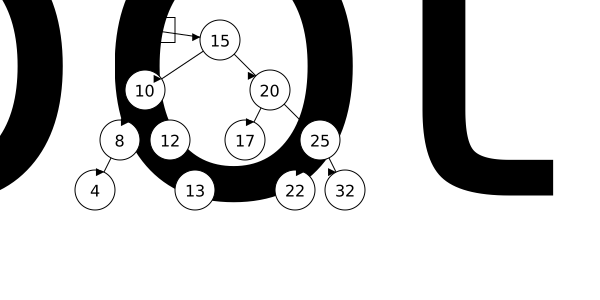
The binary search tree for the values \(15, 10, 20, 8, 12, 17, 25\) is shown below. We are prepared to do an in-order traversal of the tree. Use the > button to step through the traversal.
You can click and drag on the animation area to pan around. Use the Ctrl + mouse wheel (or touchpad scroll gesture) while over the animation area to zoom in and out.
The search property also lets us find a value without doing a full traversal of the tree. Starting at the root, we can compare the target value to the current node’s value. If they are equal, we have found the value. If the target is less than the current node’s value, we move to the left child and repeat the process. If the target is greater, we move to the right child and repeat. This process continues until we either find the value or reach a null pointer (indicating that the value is not in the tree).
You can click and drag on the animation area to pan around. Use the Ctrl + mouse wheel (or touchpad scroll gesture) while over the animation area to zoom in and out.
Note how this process does not need to traverse the entire tree. We are able to take a single linear path from the root to the node we are looking for (or to a null pointer if the value is not present).
To implement a binary search tree, we will create a class that manages a tree structure of the Nodes we previously defined. It will store a pointer to the root node of the tree and provide functions for common operations like insertion, finding, and deletion. We will use the class IntBST as our working example. As the name implies, it will only store integers. But, we could easily turn it into a template class to store any type that supports a few comparison operators. (We will need to be able to compare values to decide if they are < or == to other values.)
Although most of our tree algorithms will be recursive, the public member function will not do that work. They will typically just be a wrapper that calls a recursive helper function starting at the root. For example, here is how we might implement the find member function:
// Non-recursive member function that starts the recursive search
bool IntBST::find(int target) {
    // Start the recursive search at the root
    return findRecursive(root, target);
}
It simply calls a recursive helper function findRecursive, passing in the root of the tree and the target value to search for. When a value comes back from the helper, it is returned to the caller.
The recursive function that does the real work has two base cases where there is an easy, obvious answer. One is that we are at a node with the desired value. In that case, the answer to “do we have the value”. if clearly yes. The other is that we have reached a null pointer. In that case, we have run out of tree to search and the value is not present. So the answer is no.
In the general case, where we still have more tree to search, we need to make a recursive call. If the target value is less than the current node’s value, we make a recursive call on the left child. If the target value is greater than the current node’s value, we make a recursive call on the right child.
bool findRecursive(Node* node, int target) {
    if (node == nullptr) {
        return false;  // Base case: target not found
    }
    if (node->data == target) {
        return true;   // Base case: target found
    }
    else if (target < node->data) {
        return findRecursive(node->left, target);  // Search left subtree
    }
    else {
        return findRecursive(node->right, target); // Search right subtree
    }
}
Note31.4.2.
The find algorithm does have two recursive calls, but we will only ever take one of those paths. This will be important to remember when we analyze the performance of binary search trees.