If we keep inserting items into a hash table, eventually we will run out of space in out array. Even before that point, we will start to see more and more collisions, which will degrade the performance of our hash table. As the table gets more full, the average time for insertions and lookups will increase.
To measure how full a hash table is, we use the concept of load factor, which is defined as the number of items in the table (not including tombstones) divided by the size of the array. A load factor of 0 means the table is empty, while a load factor of 1 means the table is full.
\begin{equation*}
\text{load factor} = \frac{\text{number of items}}{\text{size of array}}
\end{equation*}
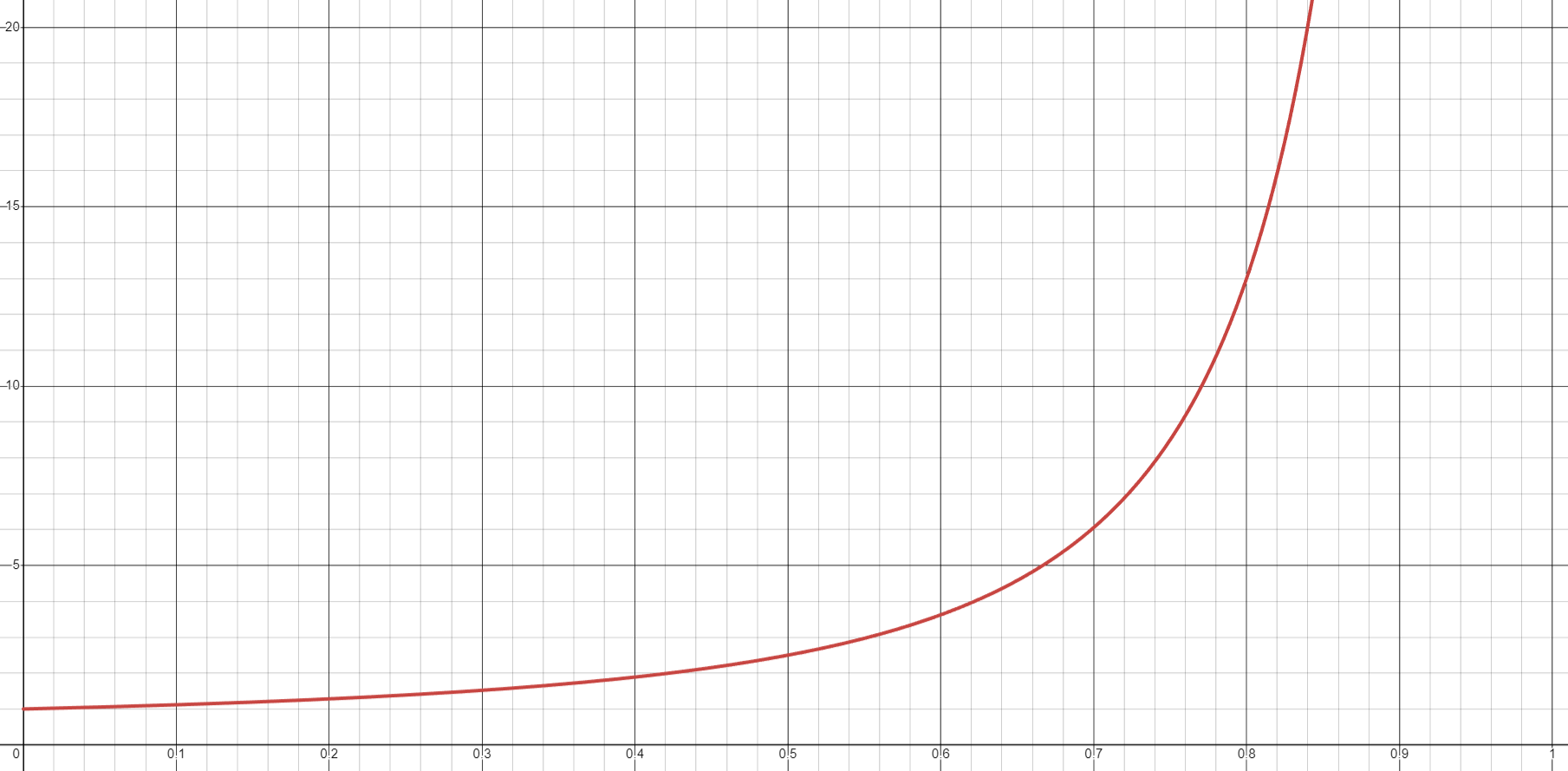
We can estimate the number of probes required for insertions and lookups based on the load factor. For example, with linear probing, the average number of cells that will be checked while doing an insertion or unsuccessful lookup is approximately \(\frac{1}{2} \cdot (1 + (\frac{1}{1 - \alpha})^2)\text{,}\) where \(\alpha\) is the load factor. The graph of this function is shown below.
Note that the graph is relatively flat until the load factor reaches something around 0.7. After that point, the number of probes starts increasing rapidly. So, in order to maintain good performance, we want to keep the load factor below that amount. This means that instead of waiting until the table is completely full, we will want to grow the table when the load factor reaches a certain threshold.
In some respects, the growth process is similar to the growth process for an array list. When we grow the table, we will create a new array that is larger than the old one and copy items over from the old array to the new one. However, there is an important difference. When we grow an array list, we can simply copy items from the old array to the same index in the new array. When we grow a hash table, we cannot do that because the size of the array has changed, which means that the value of \(key \mod size\) has changed for every key. This means that we will need to rehash every item in the old array and insert it into the new array.
The basic strategy involves temporarily tracking the old array and then resetting the hash table itself to an empty state with a new, larger array. We then iterate over the old array as if it was a list of items we were inserting into the hash table for the first time. The animation below demonstrates the growth process.
(Note that the load factor is currently only 4/8 = 0.5, so we did not really need to grow the table yet. But this way there are fewer items to rehash and insert.)
You can click and drag on the animation area to pan around. Use the Ctrl + mouse wheel (or touchpad scroll gesture) while over the animation area to zoom in and out.
// assumes member variables
// Type* m_table  - the array storing items
// int m_size     - the number of items currently in the table
// int m_capacity - the size of the array
void grow() {
    oldCapacity = m_capacity                  // Keep track of the old capacity
    oldTable = m_table                        // Make a pointer to the old array
    m_capacity *= 2                           // Double the capacity of the table
    m_table = new Type[m_capacity]            // Create a new array with the new size
    m_size = 0                                // Reset size to 0 before re-inserting items
    for (i = 0 to oldCapacity - 1) {          // Iterate over the old array
        curItem = old[i]                      // Get the item at index i
        // If the cell is not empty or a tombstone, re-insert the item into the hash table
        if (curItem != EMPTY && curItem != TOMBSTONE) {
            insert(curItem);
            // insert should handle placing item, incrementing size, and handling collisions
        }
    }
    delete[] old;                             // Clean up the old array
}
Note33.8.1.
As mentioned earlier, prime sizes for the array can help to reduce collisions. When growing, we can either do extra work (possibly by calculating a list of sizes to use ahead of time) to ensure that the new size is prime, or we can use a simple formula like \(2 \cdot oldSize + 1\) to ensure that the new size is at least odd.