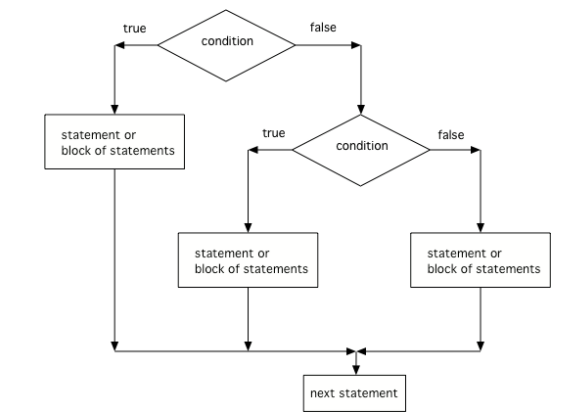
Using if/else statements, you can even pick between 3 or more possibilites. Just add else if for each possibility after the first if, and else before the last possibility.
Another way to handle 3 or more conditional cases is to use the switch and break keywords. However, in the context of this book, we will not be utilizing them. Instead, we will focus on conditional logic using if-else statements, which provide similar functionality as they are more versatile for handling complex conditions. For a tutorial on using switch see https://docs.oracle.com/javase/tutorial/java/nutsandbolts/switch.html.
Multi-way selection is performed using if-else-if statements such that exactly one section of code is executed based on the first condition that evaluates to true.
if (x < 0)
{
   System.out.println("x is negative");
}
else if (x == 0)
{
   System.out.println("x is zero");
}
else
{
   System.out.println("x is positive");
}
x is negative
When x is equal to -5 the condition of x < 0 is true.
x is zero
This will only print if x has been set to 0. Has it?
x is positive
This will only print if x is greater than zero. Is it?
if (x < 0)
{
   System.out.println("x is negative");
}
else if (x == 0)
{
   System.out.println("x is zero");
}
else
{
   System.out.println("x is positive");
}
x is negative
This will only print if x has been set to a number less than zero. Has it?
x is zero
This will only print if x has been set to 0. Has it?
x is positive
The first condition is false and x is not equal to zero so the else will execute.
The else-if connection is necessary if you want to hook up conditionals together. In the following code, there are 4 separate if statements instead of the if-else-if pattern. Will this code print out the correct grade? First, trace through the code to see why it prints out the incorrect grade. Use the Code Lens button. Then, fix the code by adding in 3 else’s to connect the if statements and see if it works.
Finish the following code so that it prints “Plug in your phone!” if the battery is below 50, “Unplug your phone!” if it is above 100, and “All okay!” otherwise. Change the battery value to test all 3 conditions.