Section 13.5 Basic Git Workflow
Review this video for an overview of how git works:
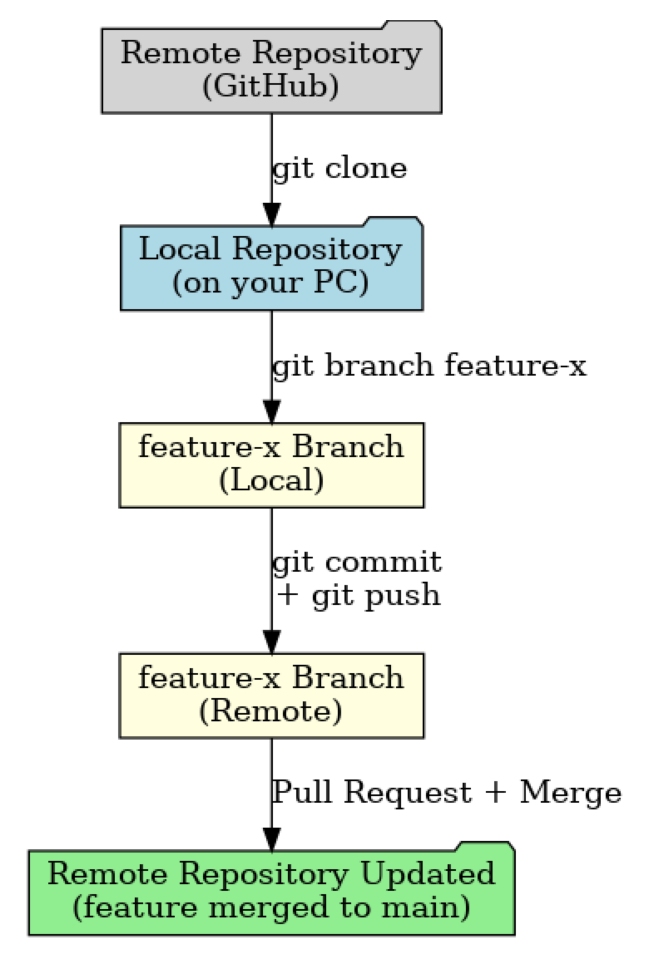
Here’s a simplified version of how Git fits into the development cycle:
-
Clone the repository to your local machine.
-
Make changes in your working directory.
-
Stage the changes you want to include in your next commit.
-
Commit the staged changes with a descriptive message.
-
Push your commit to the remote repository.
-
Pull updates from the remote repository to stay in sync with your team.
Version Control Best Practices
-
Commit Early, Commit Often: Frequent commits with meaningful messages make it easier to track progress and debug issues.
-
Use Branches: Keep your main branch stable and use feature branches for new work.
-
Pull Before You Push: Always get the latest version of the code before uploading your own changes to avoid conflicts.
-
Write Clear Commit Messages: Summarize what was changed and why in a concise way.
Getting comfortable with Git is a game changer for any developer. It helps you keep your own work organized and makes it way easier to collaborate with others, whether you’re working on a group project for class or building something big with a team at work.
You have attempted of activities on this page.

