A string holds characters in a sequence. Each character is at a position or index which starts with 0 as shown below. An index is a number associated with a position in a string. The length of a string is the number of characters in it including any spaces or special characters. The string below has a length of 14.
All of the String method descriptions are included in the refrence sheet that you get during the exam so you don’t have to memorize them. Just make sure you understand how they work.
String substring(int from, int to) method returns a new string with the characters in the current string starting with the character at the from index and ending at the character before the to index (if the to index is specified, and if not specified it will contain the rest of the string).
int indexOf(String str) method searches for the string str in the current string and returns the index of the beginning of str in the current string or -1 if it isn’t found.
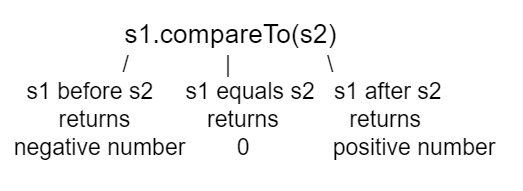
int compareTo(String other) returns a negative value if the current string is less than the other string alphabetically, 0 if they have the same characters in the same order, and a positive value if the current string is greater than the other string alphabetically.
boolean equals(String other) returns true when the characters in the current string are the same as the ones in the other string. This method is inherited from the Object class, but is overriden which means that the String class has its own version of that method.
Run the code below to see the output from the String methods length, substring, and indexOf. The length method returns the number of characters in the string, not the last index which is length -1. The str.substring(from,to) method returns the substring from the from index up to (but not including) the to index. The method str.indexOf(substring) searches for the substring in str and returns the index of where it finds substring in str or -1 if it is not there.
This code shows the output from String methods length, substring, and indexOf. How many letters does substring(0,3) return? What does indexOf return when its argument is not found?
Remember that substring(from,to) does not include the character at the to index! To return a single character at index i, use str.substring(index, index + 1).
This would be true if substring returned all the characters from the first index to the last inclusive, but it does not include the character at the last index.
b
This would be true if it was s1.substring(0,1)
ba
This would be true if it was s1.substring(0,2)
bab
Substring returns all the characters from the starting index to the last index -1.
We can compare primitive types like int and double using operators like == and < or >, which you will learn about in the next unit. However, with reference types like String, you must use the methods equals and compareTo, not == or < or >.
The method compareTo compares two strings character by character. If they are equal, it returns 0. If the first string is alphabetically ordered before the second string (which is the argument of compareTo), it returns a negative number. And if the first string is alphabetically ordered after the second string, it returns a positive number. (The actual number that it returns does not matter, but it is the distance in the first letter that is different, e.g. A is 7 letters away from H.)
The equals method compares the two strings character by character and returns true or false. Both compareTo and equals are case-sensitive. There are case-insensitive versions of these methods, compareToIgnoreCase and equalsIgnoreCase.
Run the example below to see the output from compareTo and equals. Since “Hello!” would be alphabetically ordered after “And”, compareTo returns a positive number. Since “Hello!” would be alphabetically ordered before “Zoo”, compareTo returns a negative number. Notice that equals is case-sensitive.
There are lots of other methods in the String class. You can look through the Java documentation for the String class online. You don’t have to know all of these for the exam, but you can use them if you want to on the exam.
An Application Programming Interface (API) is a library of prewritten classes that simplify complex programming tasks for us. These classes are grouped together in a package like java.lang and we can import these packages (or individual classes) into our programs to make use of them. For instance, we have just discussed the String library built into the default java.lang package - it takes care of the detailed work of manipulating strings for us. There are many other useful library packages as well, both in the java.lang package and in other packages. Documentation for APIs and libraries are essential to understanding how to use these classes.
Strings are immutable which means that they can’t change. Anything that you do to modify a string (like creating a substring or appending strings) returns a new string.
String s1 = new String("hi there");
int pos = s1.indexOf("e");
String s2 = s1.substring(0,pos);
hi th
The substring method returns the string starting at the first index and not including the last index. The method indexOf returns the index of the first place the string occurs.
hi the
This would be correct if substring returned all characters between the first index and last index, but does it?
hi ther
This would be correct if indexOf returned the last position the string str was found in the current string, does it?
hi there
This would be correct if indexOf returned the last position the string str was found in the current string and if substring included all characters between the start and end index. Check both of these.
Using == to test if two strings are equal. This is actually a test to see if they refer to the same object. Usually you only want to know if they have the same characters in the same order. In that case you should use equals or compareTo instead.
String objects are immutable, meaning that String methods do not change the String object. Any method that seems to change a string actually creates a new string.
int compareTo(String other) : returns a value < 0 if this is less than other; returns zero if this is equal to other; returns a value > 0 if this is greater than other.