What do Android phones, Minecraft, and Netflix have in common? They’re all programmed in Java! Many of the apps you use in an Android phone or tablet are written in Java. If you’ve used App Inventor before, those apps are translated to Java before they are run on a phone or tablet. Netflix uses Java for some of its software too. Java is a programming language that is used worldwide to create software that we all use.
Every program in Java is written as a class. Java is an object-oriented language and we’ll learn more about classes and objects in later chapters. Inside the class, there can be a main method that starts the program. When you ask the Java run-time to run a class, it will always start execution in the main method. Here is the template for a simple Java program with a main method:
During the lab, we will see how we run Java locally in an integrated development environment (IDE) on your computer. One important takeaway here is that all code (programs) in Java must be defined inside a class in a source file, and the name of the class must match the file name.
System.out.println("Hi there!"); prints out the characters between the first " and the second " followed by a new line. The "Hi there!" is called a string literal, and it can have zero to many characters enclosed in starting and ending double quotes.
Most command keywords in Java must be in lowercase, but class names such as System and String are capitalized. Commands in Java must end with a semicolon (;). Think of the semicolon (;) in Java like a period (.) in English. You use a semicolon (;) to show the end of a Java statement, just the way you use a period (.) to show the end of an English sentence.
Computers don’t actually speak Java so we have to compile (translate) Java source files that we write into class files which is code that a computer can understand and run. In this e-book, the Java code is actually being sent to a Java server to compile and run, and the output is sent back to show on the same page.
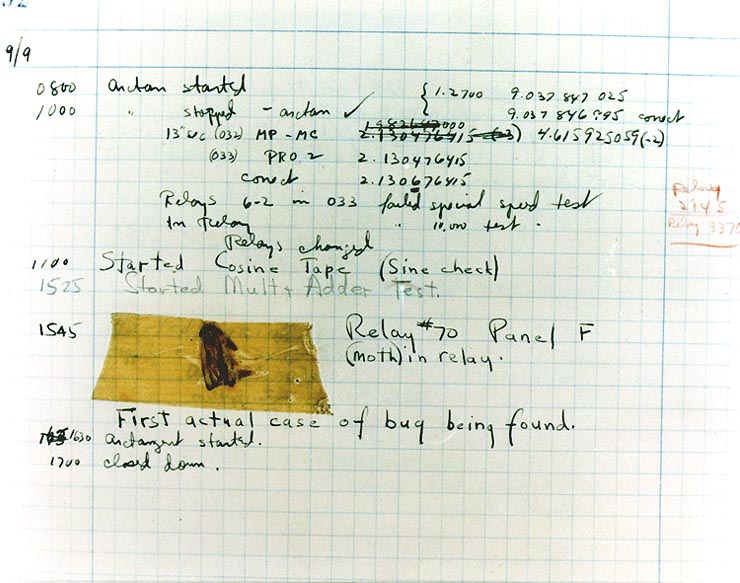
Syntax errors are reported to you by the compiler if your Java code is not correctly written. Examples of syntax errors are a semicolon ; missing or if the code has a open curly brace { or open quote ", but no close curly brace } or close quote ". Informally, a syntax error is called a bug, and the process of removing errors is called debugging. An early computer science pioneer Grace Hopper documented a real bug, a moth that flew into a computer in 1947!
The compiler tries to run your code, but if your code has syntax errors, you will see error messages displayed below the code. Compiler error messages will tell the line number that the compiler found the error and the type of error. The error messages are not always easy to understand and sometimes the actual error is before the line that the compiler says is the problem.
Watch the following video to see that all coders get bugs. Debugging is a normal part of coding. It can be frustrating at times, but you will get better at it with practice! Sometimes another pair of eyes really helps, so ask a friend if you get stuck or try explaining your code line by line to someone or even a rubber duck. Rubber duck debugging is a lot of fun!
The following has all the correct code to print out “Hi my friend!” when the code is run, but the code is mixed up. Drag the blocks from left to right and put them in the correct order. Click on the “Check Me” button to check your solution. You will be told if any of the blocks are in the wrong order or if you need to remove one or more blocks. After three incorrect attempts you will be able to use the Help Me button to make the problem easier.
The following has all the correct code to print out “Hi there!” when the code is run, but the code is mixed up and contains some extra blocks with errors. Drag the needed blocks from left to right and put them in the correct order. Click on the “Check Me” button to check your solution.
Click on the Run button below to try and run the following code. Look for an error message after the code. This is called a compile time error because it is an error detected by the compiler.
What is wrong? Can you fix it? The error message will tell you the line number that it thinks is causing the error (FirstClass.java:5: error: unclosed string literal). Check line 5 to make sure that everything looks correct. One good thing to check is that all { have a matching } and all ( have a matching ) and all starting " have a ending " as well. Try putting in the missing symbol and run again. This is called debugging.
Click on the Run button below to try and run the following code. Look for an error message after the code. What is wrong this time? Can you fix it? One good thing to check is that all { have a matching } and all ( have a matching ) and all starting " have a ending " as well.
Click on the Run button below to try and run the following code. What is wrong this time? Can you fix it? After you fix the first error, you may encounter a 2nd error! Fix that one too! Hints: How do you end a command in Java? Also, check for capitalization.
In Java and many text-based coding languages, // is used to mark the beginning of a comment. For multi-line comments, use /* to start the comment and */ to end the comment. The compiler will skip over comments. However, it is a good idea to use comments to make notes to yourself and other programmers working with you. Here are some examples of good commenting:
public class MyClass
{
public static void main(String[] args)
{
System.out.println("Hi there!");
}
}
A Java program starts with public class NameOfClass { }. If you are using your own files for your code, each class should be in a separate file that matches the class name inside it, for example NameOfClass.java.
A compiler translates Java code into a class file that can be run on your computer. Compiler or syntax errors are reported to you by the compiler if the Java code is not correctly written. Some things to check for are ; at end of command lines, matching { }, (), and “”.
System.out.println("Roses are red, ") // Line 1;
System.out.println("Violets are blue, ") // Line 2;
System.out.print("Unexpected '}' ") // Line 3;
System.out.print("on line 32. ") // Line 4;
The code segment is intended to produce the following output but may not work as intended.