Note 6.8.1.
object.method(); is used to call an object’s method.
Player class, methods like heal() and attack() give Player objects the ability to heal and attack.
p1.heal(); calls p1’s heal method. These are called object methods or non-static methods. An object method must be called on an object of the class that the method is defined in. Object methods work with the attributes of the object, such as the direction the turtle is heading or its position.
() after method names are there in case you need to give the method parameters (data) to do its job, which we will see in the next lesson. You must always include the parentheses after the method name.
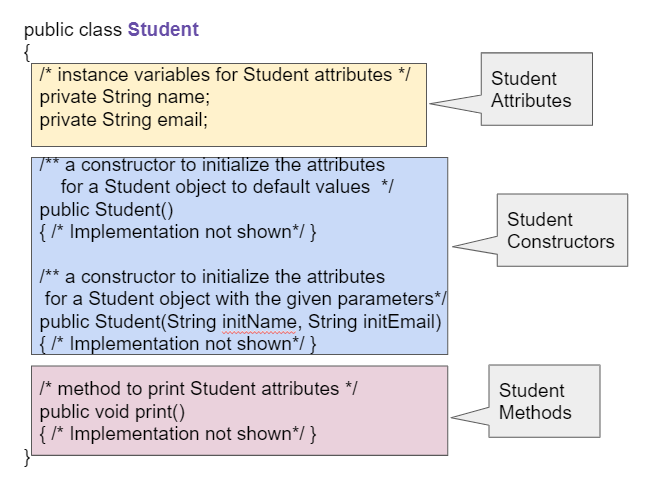
Student class with a method signature public void print() which has an empty parameter list with no parameters. Methods are defined after the instance variables (attributes) and constructors in a class.
main method in the current class. Then, the flow of control skips from method to method as they are called. The Song’s print method calls the chorus() and animal() methods to help it print out the whole song.
methodName(), but to call non-static methods in another class or from a main method, you must first create an object of that class and then call its methods using object.methodName().
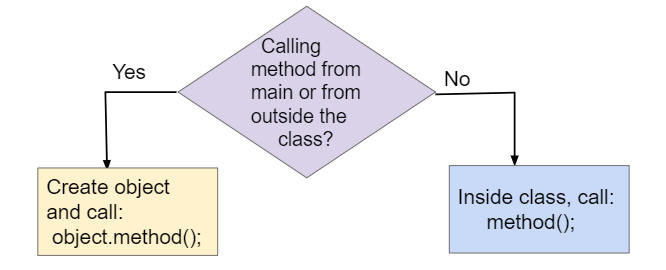
main or from outside of the current class, you must make sure that you have created and initialized an object. Remember that if you just declare an object reference without setting it to refer to a new object the value will be null meaning that it doesn’t reference an object. If you call a method on a variable whose value is null, you will get a NullPointerException error, where a pointer is another name for a reference.
null. This usually means that you forgot to create the object using the new operator followed by the class name and parentheses.
  public class Song
  {
    public void print()
    {
        System.out.print("I like to ");
        eat();
        eat();
        eat();
        fruit();
    }

    public void fruit()
    {
        System.out.println("apples and bananas!");
    }

    public void eat()
    {
       System.out.print("eat ");
    }

    public static void main(String[] args)
    {
       Song s = new Song();
       s.print();
    }
}
public class Party
{
    private int numInvited;
    private boolean partyCancelled;

    public Party()
    {
        numInvited = 1;
        partyCancelled = false;
    }

    public void inviteFriend()
    {
        numInvited++;
    }

    public void cancelParty()
    {
        partyCancelled = true;
    }
}
public class Cat
{
    public void meow()
    {
        System.out.print("Meow ");
    }

    public void purr()
    {
        System.out.print("purr");
    }

    public void welcomeHome()
    {
        purr();
        meow();
    }
    /* Constructors not shown */
}
Cat a = new Cat();
Cat.meow();
Cat.purr();
Cat a = new Cat();
a.welcomeHome();
Cat a = new Cat();
a.meow();
a.purr();
Cat a = new Cat().welcomeHome();
Cat a = new Cat();
a.meow();
public class Player {
    private int x, y;
    private String direction; // Possible values: "up", "down", "left", "right"

    public Player() {
        this.x = 0;
        this.y = 0;
        this.direction = "up"; // Default direction
    }

    public Player(int x, int y) {
        this.x = x;
        this.y = y;
        this.direction = "up"; // Default direction
    }

    public void forward(int distance) {
        y += distance;

    }

    public void turnLeft() {
        direction = "left";
    }

    public void turnRight() {
        direction = "right";
    }

    public void faceUp() {
        direction = "up";
    }

    public void faceDown() {
        direction = "down";
    }

    public int[] getPosition() {
        return new int[]{x, y};
    }

    public void printStatus() {
        System.out.println("Player Position: (" + x + ", " + y + ")");
        System.out.println("Facing: " + direction);
    }
}

