A variable in Java is similar to a variable in other high level programming languages where it is a name associated with a memory location in the computer, where you can store a value that can change or vary. Watch the following video if you need a refresher video explaining what a variable is with a couple of real word examples of variables.
There are two types of variables in Java: primitive variables that hold primitive types and object or reference variables that hold a reference to an object of a class. A reference is a way to find the object (like a UPS tracking number helps you find your package). Java has eight primitive data type:
char - Used to store a single character, such as a letter, digit, or symbol. Characters are enclosed in single quotes. Examples include ’a’, ’Z’, ’3’, and ’$’.
long - Used to store larger integers that exceed the range of int. Examples include 9223372036854775807 or -9223372036854775808. To declare a long literal, you can add an L or l at the end, such as 123456789L.
float - Used to store smaller floating-point numbers compared to double. While it takes less memory, it is less precise. To declare a float literal, you can add an F or f at the end, such as 5.75F.
Another essential data type that is worth mentioning is String which is one of the Java object types and is the name of a class in Java. A string object has a sequence of characters enclosed in a pair of double quotes - like “Hello”. You will learn more about String objects later in the course.
A type defines a set of values (its domain) and the operations that can be performed on those values. For example, you can perform addition with int and double types, but not with boolean or String types.
While you could use an int, this would throw away any digits after the decimal point, so it isn’t the best choice. You might want to round up a grade based on the average (89.5 or above is an A).
double
An average is calculated by summing all the values and dividing by the number of values. To keep the most amount of information this should be done with decimal numbers so use a double.
boolean
Is an average true or false?
String
While you can use a string to represent a number, using a number type (int or double) is better for doing calculations.
While you could use an int and use 0 for false and 1 for true this would waste 31 of the 32 bits an int uses. Java has a special type for things that are either true or false.
double
Java has a special type for variables that are either true or false.
boolean
Java uses boolean for values that are only true or false.
String
While you can use a string to represent "True" or "False", using a boolean variable would be better for making decisions.
To create a variable, you must tell Java its data type and its name. Creating a variable is also called declaring a variable. The type is a keyword like int, double, or boolean, but you get to make up the name for the variable. When you create a primitive variable Java will set aside enough bits in memory for that primitive type and associate that memory location with the name that you used.
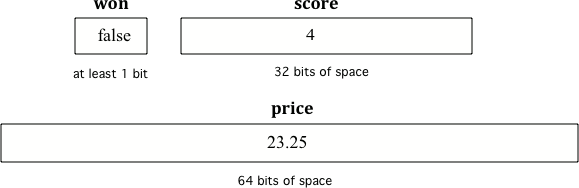
Computers store all values using bits (binary digits). A bit can represent two values and we usually say that the value of a bit is either 0 or 1. When you declare a variable, you have to tell Java the type of the variable because Java needs to know how many bits to use and how to represent the value. Primitive types can require a different number of bits. An integer gets 32 bits of memory, a double gets 64 bits of memory and a boolean could be represented by just one bit.
To declare (create) a variable, you specify the type, leave at least one space, then the name for the variable and end the line with a semicolon (;). Java uses the keyword int for integer, double for a floating point number (a double precision number), and boolean for a Boolean value (true or false).
Or you can set an initial value for the variable in the variable declaration. Here is an example that shows declaring a variable and initializing it all in a single statement.
When you are printing out variables, you can use the string concatenation operator + to add them to another string inside System.out.print. Never put variables inside quotes “” because that will print out the variable name letter by letter. You do not want to print out the variable name, but the value of the variable in memory. If you’re not sure what this means, try putting quotes around the variable and see what happens. In the print out, if you want spaces between words and variables, you must put the space in the quotes. If you forget to add spaces, you will get smushed output like “HiJose” instead of “Hi Jose”.
Run the following code to see what is printed. Then, change the values and run it again. Try adding quotes to variables and removing spaces in the print statements to see what happens.
Variables are never put inside quotes (“”) in System.out.print statements. This would print the variable name out letter by letter instead of printing its value.
The equal sign here = doesn’t mean the same as it does in a mathematical equation where it implies that the two sides are equal. Here it means set the value in the memory location associated with the variable name on the left to a copy of the value on the right. The first line above sets the value in the box called score to 4. A variable always has to be on the left side of the = and a value or expression on the right.
The following code declares and initializes variables for storing a number of visits, a person’s temperature, and if the person has insurance or not. It also includes extra blocks that are not needed in a correct solution. Drag the needed blocks from the left area into the correct order (declaring numVisits, temp, and hasInsurance in that order) in the right area. Click on the “Check Me” button to check your solution.
The keyword final can be used in front of a variable declaration to make it a constant that cannot be changed. Constants are traditionally capitalized.
Try the following code and notice the syntax error when we try to change the constant PI. Put the comment symbols // in front of that line to remove the error and run it again.
While you can name your variable almost anything, there are some rules. A variable name should start with an alphabetic character (like a, b, c, etc.) and can include letters, numbers, and underscores _. It must be all one word with no spaces.
The name of the variable should describe the data it holds. A name like score helps make your code easier to read. A name like x is not a good variable name in programming, because it gives no clues as to what kind of data it holds. On the other hand, you do not want to name your variables crazy things like thisIsAReallyLongName. You want to make your code easy to understand, not harder.
Variable names are case-sensitive and spelling sensitive! Each use of the variable in the code must match the variable name in the declaration exactly.
The convention in Java and many programming languages is to always start a variable name with a lower case letter and then uppercase the first letter of each additional word, for example gameScore. Variable names can not include spaces so uppercasing the first letter of each additional word makes it easier to read the name. Uppercasing the first letter of each additional word is called camel case because it looks like the humps of a camel. Another option is to use underscore _ to separate words, but you cannot have spaces in a variable name.
Which of the following pairs of declarations are the most appropriate to store a student’s average course grade in the variable GPA and the number of students in the variable numStudents?