Section 9.4 Priority Queue Implementation
We now will implement a priority queue, using a binary heap as our implementation approach. A binary heap is a binary tree, which we’ve looked at previously... but it’s not a binary search tree. It is still the case that each node has 0, 1, or 2 children, but there are some very significant differences from a binary search tree that we’ll look at in the next sections.
Subsection 9.4.1 The Structure Property
A binary heap is a particular kind of balanced binary tree. Specifically, it is a complete binary tree, which means that each level has all of its nodes. The exception to this is the bottom level of the tree, which we fill in from left to right. Figure 9.4.1 shows an example of a complete binary tree.
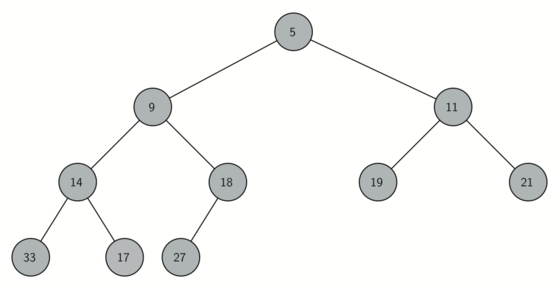
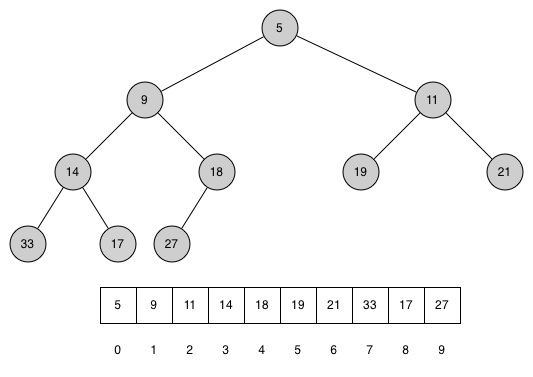
An interesting property of a complete tree is that we can represent it using a single list. We do not need to use nodes and references. Because the tree is complete, the left child of a parent (at position \(p\)) is the node that is found in position \(2p + 1\) in the list. Similarly, the right child of the parent is at position \(2p + 2\) in the list. To find the parent of any node in the tree, we can use Kotlin’s integer division. Given that a node is at position \(n\) in the list, the parent is at position \((n - 1) / 2\text{.}\) Figure 9.4.2 shows a complete binary tree and also gives the list representation of the tree. Note the \(2p + 1\) and \(2p + 2\) relationship between parent and children. The list representation of the tree, along with the full structure property, allows us to efficiently traverse a complete binary tree using only a few simple mathematical operations. We will see that this also leads to an efficient implementation of our binary heap.
Subsection 9.4.2 The Heap Order Property
The method that we will use to store items in a heap relies on maintaining the heap order property. The heap order property is as follows: in a heap, for every node \(x\) with parent \(p\text{,}\) the node \(p\) is smaller than or equal to the node \(x\text{.}\) Figure 9.4.2 also illustrates a complete binary tree that has the heap order property.
Aside: Min-heap vs max-heap.
Subsection 9.4.3 Priority Queue Operations
We will begin our binary heap implementation of a priority queue with the constructor. For now, we will focus on the default constructor that constructs an empty heap. Since the entire binary heap can be represented by a single list, all we need to do is initialize the list. Listing 9.4.3 shows the code for the class header.
class BinaryHeapPriorityQueue<E: Comparable<E>>() : PriorityQueueADT<E> {

    var heap = mutableListOf<E>()

    // more code to follow...
}
The next method we will implement is
insert. The easiest, and most efficient, way to add an item to a list is to append the item to the end of the list. The good news about appending is that it guarantees that we will maintain the complete tree property. The bad news about appending is that we will very likely violate the heap structure property. However, it is possible to write a method that will allow us to regain the heap structure property by comparing the newly added item with its parent. If the newly added item is less than its parent, then we can swap the item with its parent. Figure 9.4.4 shows the series of swaps needed to percolate the newly added item up to its proper position in the tree.
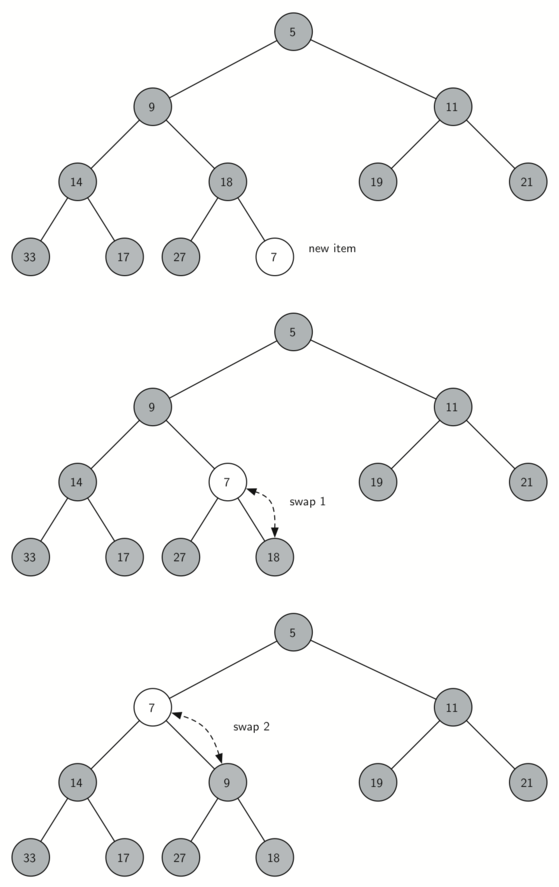
Notice that when we percolate an item up, we are restoring the heap property between the newly added item and the parent. We are also preserving the heap property for any siblings. Of course, if the newly added item is very small, we may still need to swap it up another level. In fact, we may need to keep swapping until we get to the top of the tree. Listing 9.4.6 shows the
percolateUp method, which percolates a new item as far up in the tree as it needs to go to maintain the heap property. This method is private as it is an internal operation. The parent of the current node can be computed by subtracting 1 from the index of the current node and dividing the result by 2.
We are now ready to write the
insert method (see Listing 9.4.7). Most of the work in the insert method is really done by percolateUp. Once a new item is appended to the tree, percolateUp takes over and positions the new item properly.
First, let’s define a convenience methods for swapping two items given their indexes:
private fun swapItemsAt(index1: Int, index2: Int) {
    val temporary = heap[index1]
    heap[index1] = heap[index2]
    heap[index2] = temporary
}
Now the methods for percolating up and inserting:
percolateUp Methodprivate fun percolateUp(index: Int) {
var index = index
while (index > 0) {
val parentIndex = (index - 1) / 2
if (heap[index] < heap[parentIndex]) {
swapItemsAt(index, parentIndex)
}
index = parentIndex
}
}
insert Methodoverride fun insert(element: E) {
heap.add(element)
percolateUp(heap.count() - 1)
}
With the
insert method properly defined, we can now look at the delete method. Since the heap property requires that the root of the tree be the smallest item in the tree, finding the minimum item is easy. The hard part of delete is restoring full compliance with the heap structure and heap order properties after the root has been removed. We can restore our heap in two steps.
First, we will restore the root item by taking the last item in the list and moving it to the root position. Moving the last item maintains our heap structure property. However, we have probably destroyed the heap order property of our binary heap. Second, we will restore the heap order property by pushing the new root node down the tree to its proper position. Figure 9.4.8 shows the series of swaps needed to move the new root node to its proper position in the heap.
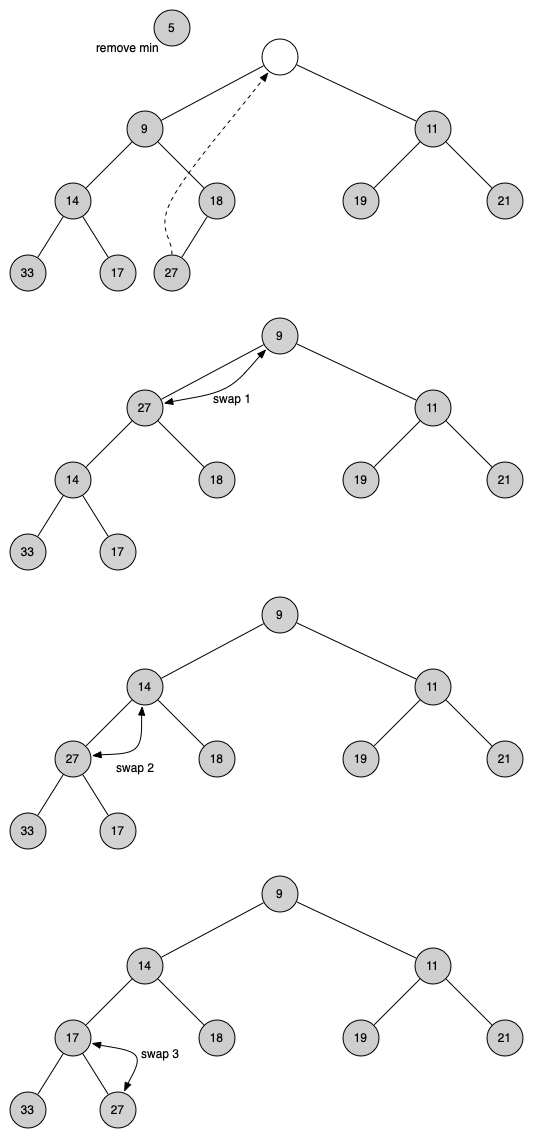
In order to maintain the heap order property, we need to swap the root with its smaller child that is less than the root. After the initial swap, we may repeat the swapping process with a node and its children until the node is swapped into a position on the tree where it is already less than both children. The code for percolating a node down the tree is found in the
percolateDown and getSmallerChild methods in Listing 9.4.9.
percolateDown and getSmallerChild Methodsprivate fun percolateDown(index: Int) {
var index = index
while (2 * index + 1 < heap.count()) {
val smallerChild = getSmallerChild(index)
if (heap[index] > heap[smallerChild]) {
swapItemsAt(index, smallerChild)
} else {
break
}
index = smallerChild
}
}
private fun getSmallerChild(index: Int): Int {
if (2 * index + 2 > heap.count() - 1) {
return 2 * index + 1
}
if (heap[2 * index + 1] < heap[2 * index + 2]) {
return 2 * index + 1
}
return 2 * index + 2
}
The code for the
delete operation is in Listing 9.4.10. Note that once again the hard work is handled by a helper function, in this case percolateDown.
delete Methodoverride fun delete(): E? {
if (heap.count() == 0) {
return null
}
val result = heap[0]
swapItemsAt(0, heap.count() - 1)
heap.removeLast()
percolateDown(0)
return result
}
To finish our discussion of binary heaps, we will return to our second constructor, which is used to build an entire heap from a list of keys. The first approach you might think of may be like the following. Given a list of keys, you could build a heap by inserting each key one at a time. Since you are starting with an empty list, it is sorted and you could use binary search to find the right position to insert the next key at a cost of approximately \(O(\log{n})\) operations. However, remember that inserting an item in the middle of the list may require \(O(n)\) operations to shift the rest of the list over to make room for the new key. Therefore, to insert \(n\) keys into the heap would require a total of \(O(n \log{n})\) operations. However, if we start with an entire list then we can build the whole heap in \(O(n)\) operations. Listing 9.4.13 shows the code to build the entire heap from a list using an approach called heapify.
private fun heapify(nonHeap: List<E>) {
if (nonHeap.count() > 0) {
heap = nonHeap.toMutableList() // copies list
var currIndex = heap.count() / 2 - 1
while (currIndex >= 0) {
percolateDown(currIndex)
currIndex -= 1
}
}
}
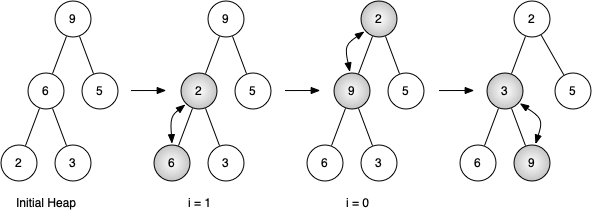
Figure 9.4.12 shows the swaps that the
heapify method makes as it moves the nodes in an initial tree of [9, 6, 5, 2, 3] into their proper positions. Although we start out in the middle of the tree and work our way back toward the root, the percolateDown method ensures that the largest child is always moved down the tree. Because the heap is a complete binary tree, any nodes past the halfway point will be leaves and therefore have no children. Notice that when i = 0, we are percolating down from the root of the tree, so this may require multiple swaps. As you can see in the rightmost two trees of Figure 9.4.12, first the 9 is moved out of the root position, but after 9 is moved down one level in the tree, percolateDown ensures that we check the next set of children farther down in the tree to ensure that it is pushed as low as it can go. In this case it results in a second swap with 3. Now that 9 has been moved to the lowest level of the tree, no further swapping can be done. It is useful to compare the list representation of this series of swaps with the tree representation shown in Figure 9.4.12
start [9, 6, 5, 2, 3] i = 1 [9, 2, 5, 6, 3] i = 0 [2, 3, 5, 6, 9]
The assertion that we can build the heap in \(O(n)\) may seem a bit mysterious at first, and a proof is beyond the scope of this book. However, the key to understanding that you can build the heap in \(O(n)\) is to remember that the \(\log{n}\) factor is derived from the height of the tree. For most of the work in the heapify algorithm, the tree is shorter than \(\log{n}\text{.}\)
Using the fact that you can build a heap from a list in \(O(n)\) time, you will construct a sorting algorithm that uses a heap and sorts a list in \(O(n\log{n})\) as an exercise at the end of this chapter.
Now that the
heapify method has been written, we need to create a second constructor for the class so that we can create a new binary heap using it.
class BinaryHeapPriorityQueue<E: Comparable<E>>() : PriorityQueueADT<E> {
var heap = mutableListOf<E>()
constructor(nonHeap: List<E>): this() {
heapify(nonHeap)
}
In the above definition, we have created a secondary constructor. The idea is that instead of constructing an empty heap, via:
val myPq = BinaryHeapPriorityQueue<Int>()
we can instead create one from a list of values, such as:
val myPq = BinaryHeapPriorityQueue<Int>(listOf(9, 6, 5, 2, 3))
The declaration
constructor in line 5 means that we are creating a different constructor than the first. Every constructor that isn’t the default constructor must call the default constructor first, which is why we include the call to this in line 5.
Subsection 9.4.4 Complete implementation
The complete binary heap implementation can be seen in Listing 9.4.14.
BinaryHeapPriorityQueue Classclass BinaryHeapPriorityQueue<E: Comparable<E>>() : PriorityQueueADT<E> {
var heap = mutableListOf<E>()
constructor(nonHeap: List<E>): this() {
heapify(nonHeap)
}
private fun heapify(nonHeap: List<E>) {
if (nonHeap.count() > 0) {
heap = nonHeap.toMutableList() // copies list
var currIndex = heap.count() / 2 - 1
while (currIndex >= 0) {
percolateDown(currIndex)
currIndex -= 1
}
}
}
private fun swapItemsAt(index1: Int, index2: Int) {
val temporary = heap[index1]
heap[index1] = heap[index2]
heap[index2] = temporary
}
private fun percolateUp(index: Int) {
    var index = index
    while (index > 0) {
        val parentIndex = (index - 1) / 2
        if (heap[index] < heap[parentIndex]) {
            swapItemsAt(index, parentIndex)
        }
        index = parentIndex
    }
}
override fun insert(element: E) {
    heap.add(element)
    percolateUp(heap.count() - 1)
}
private fun percolateDown(index: Int) {
    var index = index
    while (2 * index + 1 < heap.count()) {
        val smallerChild = getSmallerChild(index)
        if (heap[index] > heap[smallerChild]) {
            swapItemsAt(index, smallerChild)
        } else {
            break
        }
        index = smallerChild
    }
}

private fun getSmallerChild(index: Int): Int {
    if (2 * index + 2 > heap.count() - 1) {
        return 2 * index + 1
    }
    if (heap[2 * index + 1] < heap[2 * index + 2]) {
        return 2 * index + 1
    }
    return 2 * index + 2
}
override fun delete(): E? {
    if (heap.count() == 0) {
        return null
    }

    val result = heap[0]
    swapItemsAt(0, heap.count() - 1)
    heap.removeLast()
    percolateDown(0)
    return result
}
override fun peek(): E? {
if (heap.count() == 0) {
return null
} else {
return heap[0]
}
}
override fun isEmpty(): Boolean {
return heap.count()==0
}
override fun size(): Int {
return heap.count()
}
override fun toString(): String {
return heap.toString()
}
}
Here is the program we saw in Section 9.3:
You have attempted of activities on this page.

