1.
Write a function named
buildTree that returns a tree using the nodes and references implementation that looks like this:
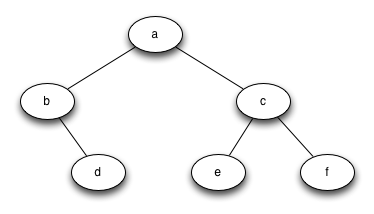
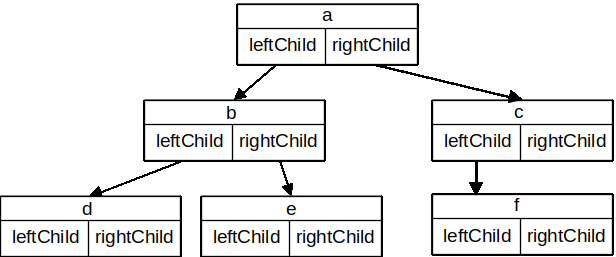
leftChild and rightChild will become references to other instances of the BinaryTree class. For example, when we insert a new left child into the tree, we create another instance of BinaryTree and modify leftChild in the root to reference the new tree.
class BinaryTree<T>(var key: T) {
    var leftChild: BinaryTree<T>? = null
    var rightChild: BinaryTree<T>? = null

    // more code here...
}
BinaryTree class.
leftChild attribute of the root to refer to this new object. The code for insertLeft is shown in Listing 7.5.3.
fun insertLeft(newNode: T): BinaryTree<T> {
     if (leftChild == null) {
         val newChild = BinaryTree(newNode)
         leftChild = newChild
         return newChild
     } else {
         val newChild = BinaryTree(newNode)
         newChild.leftChild = leftChild
         leftChild = newChild
         return newChild
     }
 }
else statement on line 6 of Listing 7.5.3. In both cases, we then return the new node that has been created. For the test code in this section, we just ignore this return value, but it is helpful in future sections to be able to have easy access to the subtree that was just created and to know that it is not null.
insertRight must consider a symmetric set of cases. There will either be no right child, or we must insert the node between the root and an existing right child. The insertion code is shown in Listing 7.5.4.
fun insertRight(newNode: T): BinaryTree<T> {
    if (rightChild == null) {
        val newChild = BinaryTree(newNode)
        rightChild = newChild
        return newChild
    } else {
        val newChild = BinaryTree(newNode)
        newChild.rightChild = rightChild
        rightChild = newChild
        return newChild
    }
}
key, leftChild, and rightChild. Notice that both the left and right children of the root are themselves distinct instances of the BinaryTree class. As we said in our original recursive definition for a tree, this allows us to treat any child of a binary tree as a binary tree itself.
!! operator to ignore null safety checks. We are choosing in this example to do so to keep the code brief, to make it easier to see what’s happening.
BinaryTree ClassbuildTree that returns a tree using the nodes and references implementation that looks like this:

