Section 4.11 Exploring a Maze
In this section we will look at a problem that has relevance to the expanding world of robotics: how do you find your way out of a maze? If you had a robotic vacuum cleaner for your dorm room (don’t all college students?) perhaps you would wish to reprogram it using what you have learned in this section.
The problem we want to solve is to help our turtle find its way out of a virtual maze. The maze problem has roots as deep as the Greek myth about Theseus, who was sent into a maze to kill the Minotaur. Theseus used a ball of thread to help him find his way back out again once he had finished off the beast. In our problem we will assume that our turtle is dropped down somewhere into the middle of the maze and must find its way out. Look at Figure 4.11.1 to get an idea of where we are going in this section.
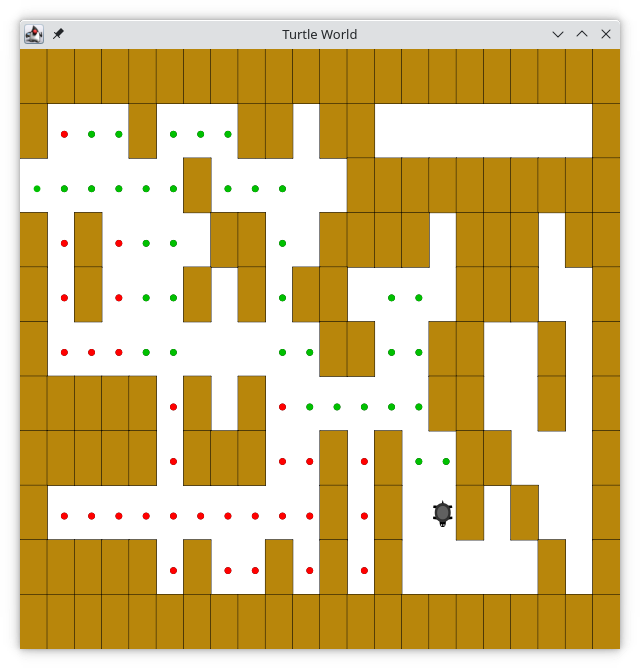
To make it easier for us, we will assume that our maze is divided up into “squares.” Each square of the maze is either open or occupied by a section of wall. The turtle can only pass through the open squares of the maze. If the turtle bumps into a wall it must try a different direction. The turtle will require a systematic procedure to find its way out of the maze. Here is the procedure:
-
From our starting position we will first try going North one square and then recursively try our procedure from there.
-
If we are not successful by trying a Northern path as the first step, then we will take a step to the South and recursively repeat our procedure.
-
If South does not work, then we will try a step to the West as our first step and recursively apply our procedure.
-
If North, South, and West have not been successful then apply the procedure recursively from a position one step to our East.
-
If none of these directions works, then there is no way to get out of the maze and we fail.
Now, that sounds pretty easy, but there are a couple of details to talk about first. Suppose we take our first recursive step by going North. By following our procedure, our next step would also be to the North. But if the North is blocked by a wall, we must look at the next step of the procedure and try going to the South. Unfortunately that step to the south brings us right back to our original starting place. If we apply the recursive procedure from there we will just go back one step to the North and be in an infinite loop.
So, we must have a strategy to remember where we have been. In this case, we will assume that we have a bag of bread crumbs we can drop along our way. If we take a step in a certain direction and find that there is a bread crumb already on that square, we know that we should immediately back up and try the next direction in our procedure. As we will see when we look at the code for this algorithm, backing up consists of returning from a recursive function call.
As we do for all recursive algorithms let us review the base cases. Some of them you may already have guessed based on the description in the previous paragraph. In this algorithm, there are four base cases to consider:
-
The turtle has run into a wall. Since the square is occupied by a wall, no further exploration can take place.
-
The turtle has found a square that has already been explored. We do not want to continue exploring from this position, or we will get into a loop.
-
We have found an outside edge, not occupied by a wall. In other words, we have found an exit from the maze.
-
We have explored a square unsuccessfully in all four directions.
For our program to work we will need to have a way to represent the maze. We will store it in a file, where a plus sign represents an obstacle, spaces represent open squares, and the capital S represents our starting point:
++++++++++++++++++++++
+ + ++ ++ +
+ ++++++++++
+ + ++ ++++ +++ ++
+ + + + ++ +++ +
+ ++ ++ + +
+++++ + + ++ + +
+++++ +++ + + ++ +
+ + + S+ + +
+++++ + + + + + +
++++++++++++++++++++++
To make this even more interesting, we are going to use the
Turtle class to draw and explore our maze so we can watch this algorithm in action. The Maze object will provide the following methods for us to use in writing our search algorithm:
-
The constructor reads in a data file representing a maze, initializes the internal representation of the maze, and finds the starting position for the turtle.
-
drawMazeDraws the maze in a window on the screen. -
updatePositionUpdates the internal representation of the maze and changes the position of the turtle in the window. -
isExitChecks to see if the current position is an exit from the maze.
Listing 4.11.3 shows the beginning of the class with constants and properties.
import java.awt.Color
import java.io.File

class Maze(mazeFileName: String) {

    val START = 'S'
    val OBSTACLE = '+'
    val TRIED = '.'
    val DEAD_END = '-'
    val PART_OF_PATH = 'O'

    var habitat: World
    var t: Turtle

    var rowsInMaze = 0
    var columnsInMaze = 0
    var startRow = 0
    var startColumn = 0

    val mazeList = mutableListOf<MutableList<Char>>()

    var xTranslate = 0.0
    var yTranslate = 0.0
Lines 15-18 specify the dimensions of the maze and the starting point.
Our representation of the maze in line 20 is unusual. Each item in the mutable list will be a row of the maze, consisting of a mutable list of characters. We needed an mutable list for the rows, as we don’t know in advance how many rows will be in our text file. We don’t know how many characters are in each line either, but we can use the
toMutableList method to break the line into a list of Char, as shown below:
fun main() {
    val line = "+ ++++"
    val items = line.toMutableList()
    println(items)
}
[+, , +, +, +, +]
Next, let’s examine the initializer block in Listing 4.11.4.
init {
    var row = 0
    val lines = File(mazeFileName).readLines()
    for (line in lines) {
        val sCol = line.indexOf(START)
        if (sCol >= 0) {
            startRow = row
            startColumn = sCol
        }
        this.mazeList.add(line.toMutableList())
        row = row + 1
    }
    this.rowsInMaze = this.mazeList.count()
    this.columnsInMaze = this.mazeList[0].count()
    this.xTranslate = -this.columnsInMaze / 2.0
    this.yTranslate = this.rowsInMaze / 2.0
    this.habitat = World(
        600, 600, Color.WHITE,
        -(this.columnsInMaze - 1) / 2.0 - 0.5,
        -(this.rowsInMaze - 1) / 2.0 - 0.5,
        (this.columnsInMaze - 1) / 2.0 + 0.5,
        (this.rowsInMaze - 1) / 2.0 + 0.5
    )
    this.t = Turtle(habitat)
    t.hide()
}
Line 2 starts our row counter; we need that to determine the starting row number. Lines 3–12 read the file. Line 5 tests to see if we have the "S" in the line; if so, we can establish the starting row and column. Line 10 adds the list of individual characters (produced by
toMutableList) to the mazeList.
Lines 13–14 establish the size of the maze. Lines 15–16 calculate offsets that we will need to position the turtle properly.
Finally, 17–25 create the turtle’s world. Instead of having the mouse position in pixels, we set up the coordinate system so that the when we move the mouse by one unit, it moves one square in our drawing, not one pixel. The last four arguments to
World give the x- and y- coordinates of the lower left and upper right points in this new coordinate system.
The
drawMaze method uses this internal representation to draw the initial view of the maze on the screen.
fun drawMaze() {
    t.setDelay(0.0)
    this.habitat.setUpdating(false)
    for (y in 0..<this.rowsInMaze) {
        for (x in 0..<this.columnsInMaze) {
            if (this.mazeList[y][x] == OBSTACLE) {
                this.drawCenteredBox(
                    x + this.xTranslate,
                    -y + this.yTranslate, Color(184, 134, 11)
                )
            }
            t.setColor(Color.BLACK)
        }
    }
    this.habitat.setUpdating(true)
    t.setDelay(0.04)
}

fun drawCenteredBox(x: Double, y: Double, color: Color?) {
    t.penUp()
    t.setColor(Color.BLACK)
    t.setFillColor(color)
    t.beginFill()
    t.goTo(x + 1, y)
    t.setHeading(90.0)
    t.penDown()
    for (i in 0..3) {
        t.forward(1.0)
        t.turnRight(90.0)
    }
    t.endFill()
}
In line 2, we set the turtle movement delay to zero so that the turtle moves as quickly as possible. Line 3 will not update the drawing every time the turtle moves; this again saves time when running the program.
Lines 7–10 will draw a brown box when the maze has an obstacle.
Line 15 resumes updating, which will display everything that we have drawn in the loops, and line 16 will set the delay to a small amount so the animation doesn’t go too fast.
The
updatePosition method, as shown in Listing 4.11.6 moves the turtle to the given row and column. If the method is given a non-null String as its third parameter, it will update the internal representation with TRIED (’.’) or DEAD_END (’-’) to indicate that the turtle has visited a particular square or if the square is part of a dead end. If the status has changed, updatePosition calls dropBreadCrumb to display the new status.
fun updatePosition(row: Int, col: Int, value: Char?) {
    moveTurtle(col.toDouble(), row.toDouble())
    if (value != null) {
        mazeList[row][col] = value

        var color: Color? = null
        if (value == PART_OF_PATH) {
            color = Color(0, 192, 0) //bright green
        } else if (value == OBSTACLE) {
            color = Color.RED
        } else if (value == TRIED) {
            color = Color.BLACK
        } else if (value == DEAD_END) {
            color = Color.RED
        }

        if (color != null) {
            dropBreadCrumb(color)
        }
    }
}

fun moveTurtle(x: Double, y: Double) {
    t.penUp()
    t.show()
    t.setHeading(t.towards(x + this.xTranslate, -y + this.yTranslate))
    t.goTo(x + xTranslate + 0.5, -y + this.yTranslate - 0.5)
}

fun dropBreadCrumb(color: Color?) {
    val saveColor = t.getColor()
    t.setColor(color)
    t.drawDot(0.25)
    t.setColor(saveColor)
}
The
dropBreadCrumb method draws a dot in the given color.
Finally, the
isExit method uses the current position of the turtle to test for an exit condition. An exit condition occurs whenever the turtle has navigated to the edge of the maze, either row zero or column zero, or the far-right column or the bottom row.
fun isExit(row: Int, col: Int): Boolean {
    return (row == 0 ||
            row == rowsInMaze - 1 ||
            col == 0 ||
            col == columnsInMaze - 1
            )
}
Let’s examine the code for the search function which we call
searchFrom. The code is shown in Listing 4.11.8. Notice that this function takes two parameters: a the starting row and the starting column. This is important because as a recursive function the search logically starts again with each recursive call.
fun searchFrom(startRow: Int, startColumn: Int): Boolean {
     /*
      * try each of the four directions from this point until we find
      * a way out.
      */
     updatePosition(startRow, startColumn, null)

     /*
      *  Base case return values:
      *  1. We have run into an obstacle; return false
      */
     val value = getItem(startRow, startColumn)
     if (value == OBSTACLE) {
         return false
     }

     /* 2. We have found a square that has already been explored */
     if (value == TRIED || value == DEAD_END) {
         return false
     }

     /* 3. We have found an outside edge not occupied by an obstacle */
     if (isExit(startRow, startColumn)) {
         updatePosition(startRow, startColumn, PART_OF_PATH)
         return true
     }

     updatePosition(startRow, startColumn, TRIED)

     /*
      * Otherwise, use logical short circuiting to try each direction
      * in turn (if needed)
      */
     val found = (searchFrom(startRow - 1, startColumn)
             || searchFrom(startRow + 1, startColumn)
             || searchFrom(startRow, startColumn - 1)
             || searchFrom(startRow, startColumn + 1)
             )

     if (found) {
         updatePosition(startRow, startColumn, PART_OF_PATH)
     } else {
         updatePosition(startRow, startColumn, DEAD_END)
     }
     return found
 }

 fun getItem(row: Int, col: Int): Char {
     return mazeList[row][col]
 }
As you look through the algorithm you will see that the first thing the code does (line 6) is call
updatePosition. This is to help you visualize the algorithm so that you can watch exactly how the turtle explores its way through the maze. Next, the algorithm checks for the first three of the four base cases: Has the turtle run into a wall (line 13)? Has the turtle circled back to a square already explored, or is it a dead end (line 18)? Has the turtle found an exit (line 23)? If none of these conditions is true, then we continue the search recursively.
You will notice that in the recursive step there are four recursive calls to
searchFrom. It is hard to predict how many of these recursive calls will be used since they are all connected by the || operator. If the first call to searchFrom returns true, then none of the last three calls would be needed. You can interpret this as meaning that a step to (row - 1, column) (or north if you want to think geographically) is on the path leading out of the maze. If there is not a good path leading out of the maze to the north then the next recursive call is tried; this one to the south. If south fails then try west, and finally east. If all four recursive calls return false then we have found a dead end. You should download or type in the whole program and experiment with it by changing the order of these calls.
The
getItem method (lines 48–50) is a convenience method for extracting the status of the maze at the given row and column.
The complete program is shown in Listing 4.11.9. This program uses the data file
maze2.txt shown in Listing 4.11.2.
import java.awt.Color
import java.io.File

class Maze(mazeFileName: String) {

    val START = 'S'
    val OBSTACLE = '+'
    val TRIED = '.'
    val DEAD_END = '-'
    val PART_OF_PATH = 'O'

    var habitat: World
    var t: Turtle

    var rowsInMaze = 0
    var columnsInMaze = 0
    var startRow = 0
    var startColumn = 0

    val mazeList = mutableListOf<MutableList<Char>>()

    var xTranslate = 0.0
    var yTranslate = 0.0

    init {
        var row = 0
        val lines = File(mazeFileName).readLines()
        for (line in lines) {
            val sCol = line.indexOf(START)
            if (sCol >= 0) {
                startRow = row
                startColumn = sCol
            }
            this.mazeList.add(line.toMutableList())
            row = row + 1
        }
        this.rowsInMaze = this.mazeList.count()
        this.columnsInMaze = this.mazeList[0].count()
        this.xTranslate = -this.columnsInMaze / 2.0
        this.yTranslate = this.rowsInMaze / 2.0
        this.habitat = World(
            600, 600, Color.WHITE,
            -(this.columnsInMaze - 1) / 2.0 - 0.5,
            -(this.rowsInMaze - 1) / 2.0 - 0.5,
            (this.columnsInMaze - 1) / 2.0 + 0.5,
            (this.rowsInMaze - 1) / 2.0 + 0.5
        )
        this.t = Turtle(habitat)
        t.hide()
    }


    fun drawMaze() {
        t.setDelay(0.0)
        this.habitat.setUpdating(false)
        for (y in 0..<this.rowsInMaze) {
            for (x in 0..<this.columnsInMaze) {
                if (this.mazeList[y][x] == OBSTACLE) {
                    this.drawCenteredBox(
                        x + this.xTranslate,
                        -y + this.yTranslate, Color(184, 134, 11)
                    )
                }
                t.setColor(Color.BLACK)
            }
        }
        this.habitat.setUpdating(true)
        t.setDelay(0.04)
    }

    fun drawCenteredBox(x: Double, y: Double, color: Color?) {
        t.penUp()
        t.setColor(Color.BLACK)
        t.setFillColor(color)
        t.beginFill()
        t.goTo(x + 1, y)
        t.setHeading(90.0)
        t.penDown()
        for (i in 0..3) {
            t.forward(1.0)
            t.turnRight(90.0)
        }
        t.endFill()
    }

    fun updatePosition(row: Int, col: Int, value: Char?) {
        moveTurtle(col.toDouble(), row.toDouble())
        if (value != null) {
            mazeList[row][col] = value

            var color: Color? = null
            if (value == PART_OF_PATH) {
                color = Color(0, 192, 0) //bright green
            } else if (value == OBSTACLE) {
                color = Color.RED
            } else if (value == TRIED) {
                color = Color.BLACK
            } else if (value == DEAD_END) {
                color = Color.RED
            }

            if (color != null) {
                dropBreadCrumb(color)
            }
        }
    }

    fun moveTurtle(x: Double, y: Double) {
        t.penUp()
        t.show()
        t.setHeading(t.towards(x + this.xTranslate, -y + this.yTranslate))
        t.goTo(x + xTranslate + 0.5, -y + this.yTranslate - 0.5)
    }

    fun dropBreadCrumb(color: Color?) {
        val saveColor = t.getColor()
        t.setColor(color)
        t.drawDot(0.25)
        t.setColor(saveColor)
    }

    fun isExit(row: Int, col: Int): Boolean {
        return (row == 0 ||
                row == rowsInMaze - 1 ||
                col == 0 ||
                col == columnsInMaze - 1
                )
    }

    fun searchFrom(startRow: Int, startColumn: Int): Boolean {
        /*
         * try each of the four directions from this point until we find
         * a way out.
         */
        updatePosition(startRow, startColumn, null)

        /*
         *  Base case return values:
         *  1. We have run into an obstacle; return false
         */
        val value = getItem(startRow, startColumn)
        if (value == OBSTACLE) {
            return false
        }

        /* 2. We have found a square that has already been explored */
        if (value == TRIED || value == DEAD_END) {
            return false
        }

        /* 3. We have found an outside edge not occupied by an obstacle */
        if (isExit(startRow, startColumn)) {
            updatePosition(startRow, startColumn, PART_OF_PATH)
            return true
        }

        updatePosition(startRow, startColumn, TRIED)

        /*
         * Otherwise, use logical short circuiting to try each direction
         * in turn (if needed)
         */
        val found = (searchFrom(startRow - 1, startColumn)
                || searchFrom(startRow + 1, startColumn)
                || searchFrom(startRow, startColumn - 1)
                || searchFrom(startRow, startColumn + 1)
                )

        if (found) {
            updatePosition(startRow, startColumn, PART_OF_PATH)
        } else {
            updatePosition(startRow, startColumn, DEAD_END)
        }
        return found
    }

    fun getItem(row: Int, col: Int): Char {
        return mazeList[row][col]
    }
}

fun main() {
    val myMaze = Maze("maze2.txt")
    myMaze.drawMaze()
    myMaze.updatePosition(myMaze.startRow, myMaze.startColumn, null)
    myMaze.searchFrom(myMaze.startRow, myMaze.startColumn)
    myMaze.t.setHeading(90.0)
}
Exercises Self Check
Modify the maze search program so that the calls to
searchFrom are in a different order. Watch the program run. Can you explain why the behavior is different? Can you predict what path the turtle will follow for a given change in order?
You have attempted of activities on this page.

