Section 7.6 Parse Tree
With the implementation of our tree data structure complete, we now look at an example of how a tree can be used to solve some real problems. In this section we will look at parse trees. Parse trees can be used to represent real-world constructions like sentences or mathematical expressions.
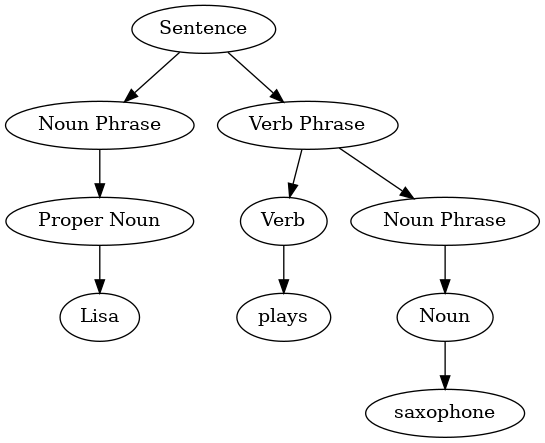
Figure 7.6.1 shows the hierarchical structure of a simple sentence. Representing a sentence as a tree structure allows us to work with the individual parts of the sentence by using subtrees.
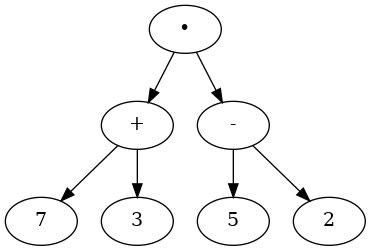
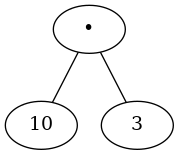
We can also represent a mathematical expression such as \(((7 + 3) \cdot (5 - 2))\) as a parse tree, as shown in Figure 7.6.2. We have already looked at fully parenthesized expressions, so what do we know about this expression? We know that multiplication has a higher precedence than either addition or subtraction. Because of the parentheses, we know that before we can do the multiplication we must evaluate the parenthesized addition and subtraction expressions. The hierarchy of the tree helps us understand the order of evaluation for the whole expression. Before we can evaluate the top-level multiplication, we must evaluate the addition and the subtraction in the subtrees. The addition, which is the left subtree, evaluates to 10. The subtraction, which is the right subtree, evaluates to 3. Using the hierarchical structure of trees, we can simply replace an entire subtree with one node once we have evaluated the expressions in the children. Applying this replacement procedure gives us the simplified tree shown in Figure 7.6.3.
In the rest of this section we are going to examine parse trees in more detail. In particular we will look at
-
How to build a parse tree from a fully parenthesized mathematical expression.
-
How to evaluate the expression stored in a parse tree.
-
How to recover the original mathematical expression from a parse tree.
The first step in building a parse tree is to break up the expression string into a list of tokens. There are four different kinds of tokens to consider: left parentheses, right parentheses, operators, and operands. We know that whenever we read a left parenthesis we are starting a new expression, and hence we should create a new tree to correspond to that expression. Conversely, whenever we read a right parenthesis, we have finished an expression. We also know that operands are going to be leaf nodes and children of their operators. Finally, we know that every operator is going to have both a left and a right child.
Using the information from above we can define four rules as follows:
-
If the current token is a
"(", add a new node as the left child of the current node, and descend to the left child. -
If the current token is one of
["+", "-", "/", "*"], set the key value of the current node to the operator represented by the current token. Add a new node as the right child of the current node and descend to the right child. -
If the current token is a number, set the key value of the current node to the number and return to the parent.
-
If the current token is a
")", go to the parent of the current node.
Before writing the Kotlin code, let’s look at an example of the rules outlined above in action. We will use the expression \((3 + (4 * 5))\text{.}\) We will parse this expression into the following array of character tokens:
["(", "3", "+", "(", "4", "*", "5", ")", ")"]. Initially we will start out with a parse tree that consists of an empty root node. Figure 7.6.4 illustrates the structure and contents of the parse tree as each new token is processed.
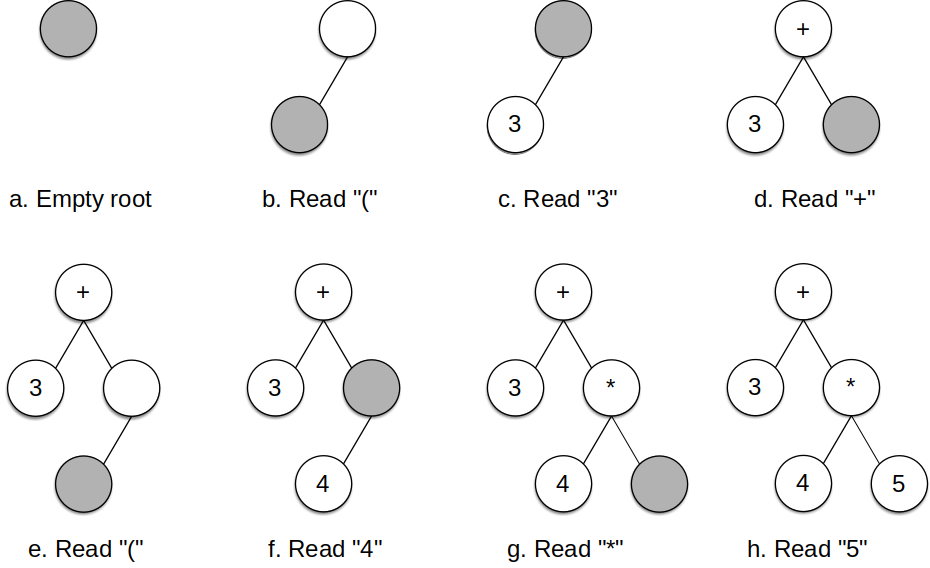
Using Figure 7.6.4 and the example expression from the previous paragraph, let’s walk through the example step by step:
-
Create an empty tree.
-
Read
(as the first token. By rule 1, create a new node as the left child of the root. Make the current node this new child. -
Read
3as the next token. By rule 3, set the root value of the current node to 3 and go back up the tree to the parent. -
Read
+as the next token. By rule 2, set the root value of the current node to + and add a new node as the right child. The new right child becomes the current node. -
Read
(as the next token. By rule 1, create a new node as the left child of the current node. The new left child becomes the current node. -
Read
4as the next token. By rule 3, set the value of the current node to 4. Make the parent of 4 the current node. -
Read
*as the next token. By rule 2, set the root value of the current node to * and create a new right child. The new right child becomes the current node. -
Read
5as the next token. By rule 3, set the root value of the current node to 5. Make the parent of 5 the current node. -
Read
)as the next token. By rule 4 we make the parent of * the current node. -
Read
)as the next token. By rule 4 we make the parent of + the current node. At this point there is no parent for +, so we are done.
From the example above, it is clear that we need to keep track of the current node as well as the parent of the current node. The
BinaryTree class provides us with a way to get children of a node through the leftChild and rightChild attributes, but how can we keep track of the parent? A solution to keeping track of parents as we traverse the tree is to use a stack. Whenever we want to descend to a child of the current node, we first push the current node on the stack. When we want to return to the parent of the current node, we pop the parent off the stack.
Using the rules described above, along with the
ListStack and BinaryTree operations, we are now ready to write a Kotlin method to create a parse tree. The code for our parse tree builder is presented in Listing 7.6.5.
// Given a fully-parenthesized expression, return its parse tree.
fun buildParseTree(expr: String): BinaryTree<String> {
    val tokenList = expr.split(" ")
    val parentStack = ListStack<BinaryTree<String>>()
    val exprTree = BinaryTree("")

    parentStack.push(exprTree)

    var currentTree: BinaryTree<String> = exprTree

    for (token in tokenList) {
        if (token == "(") {
            val newLeftChild = currentTree.insertLeft("")
            parentStack.push(currentTree)
            currentTree = newLeftChild
        } else if (token in "+-*/") {
            currentTree.key = token
            val newRightChild = currentTree.insertRight("")
            parentStack.push(currentTree)
            currentTree = newRightChild
        } else if (token.toIntOrNull() != null) {
            currentTree.key = token
            val parent = parentStack.pop()
            currentTree = parent
        } else if (token == ")") {
            currentTree = parentStack.pop()
        } else {
            throw IllegalArgumentException(
                "Unknown token $token"
            )
        }
    }
    return exprTree
}
The four rules for building a parse tree are coded as the first four clauses of the
if..else if statements on lines 12, 16, 21, and 25 of Listing 7.6.5. In each case you can see that the code implements the rule, as described above, with a few calls to the BinaryTree or ListStack methods. The only error checking we do in this function is in the else clause where an IllegalArgumentException exception will be raised if we get a token from the list that we do not recognize.
Now that we have built a parse tree, we would (a) like to look at the tree structure and (b) do something useful with it. Let’s put the first of these on hold until Section 7.7, where we’ll find out how to print out the tree. To do something useful with the tree, as a first example, we will write a method to evaluate the parse tree and return the numerical result. To write this method, we will make use of the hierarchical nature of the tree. Look back at Figure 7.6.2. Recall that we can replace the original tree with the simplified tree shown in Figure 7.6.3. This suggests that we can write an algorithm that evaluates a parse tree by recursively evaluating each subtree.
As we have done with past recursive algorithms, we will begin the design for the recursive evaluation function by identifying the base case. A natural base case for recursive algorithms that operate on trees is to check for a leaf node. In a parse tree, the leaf nodes will always be operands. Since a leaf node contains
String values, the evaluate method will convert the string to its numeric value and return it. The recursive step that moves the method toward the base case is to call evaluate on both the left and the right children of the current node. The recursive call effectively moves us down the tree, toward a leaf node.
To put the results of the two recursive calls together, we can apply the operator stored in the parent node to the results returned from evaluating both children. In the example from Figure 7.6.3 we see that the two children of the root evaluate to themselves, namely 10 and 3. Applying the multiplication operator gives us a final result of 30.
The code for a recursive
evaluate function is shown in Listing 7.6.6. First, we obtain references to the left and the right children of the current node. If both the left and right children evaluate to null, then we know that the current node is really a leaf node. This check is on line 5. If the current node is not a leaf node, get the operator in the current node and apply it to the results from recursively evaluating the left and right children (lines 7–8) We do this in the apply function (lines 15–32), which we have made into a separate function so that the flow of evaluateis easier to read.
Let’s finish this topic by tracing the
evaluate function on the parse tree we created in Figure 7.6.4. When we first call evaluate, we pass the root of the entire tree as the parameter parseTree. Then we obtain references to the left and right children to make sure they exist. We begin by looking up the operator in the root of the tree (line 6), which is "+". We must now evaluate the operands for this operator, which we do with the recursive calls in lines 7 and 8. As we are using left-to-right evaluation, the first recursive call to evaluate function is given the left subtree. We find that the node has no left or right children, so we are in a leaf node. When we are in a leaf node, we return the value stored in the leaf node as the result of the evaluation (line 11). In this case we return the value 3.
At this point we have one operand evaluated for the operation. But we are not done yet. Continuing the left-to-right evaluation of the parameters, we now make a recursive call to evaluate the right child of the root. We find that the node has both a left and a right child, so we look up the operator stored in this node,
"*", and evaluate its left and right children as the parameters. At this point, you can see that both recursive calls will be to leaf nodes, which will evaluate to the numbers 4 and 5 respectively. With the two operands evaluated, we return the result of mutliplying them (lines 25–26). At this point we have evaluated the operands for the top level "+" operator, and all that is left to do is finish the addition of the numbers (lines 21–22). The result of the evaluation of the entire expression tree for \((3 + (4 * 5))\) is 23.
You have attempted of activities on this page.

