Section1.15Object-Oriented Programming in Kotlin: Defining Classes
We stated earlier that Kotlin is an object-oriented programming language. So far, we have used a number of built-in classes to show examples of data and control structures. One of the most powerful features in an object-oriented programming language is the ability to allow a programmer (problem solver) to create new classes that model data that is needed to solve the problem.
Remember that we use abstract data types to provide the logical description of what a data object looks like (its state) and what it can do (its methods). By building a class that implements an abstract data type, a programmer can take advantage of the abstraction process and at the same time provide the details necessary to actually use the abstraction in a program. Whenever we want to implement an abstract data type, we will do so with a new class.
A very common example to show the details of implementing a user-defined class is to construct a class to implement the abstract data type Fraction. We have already seen that Kotlin provides a number of numeric classes for our use. There are times, however, that it would be most appropriate to be able to create data objects that look like fractions to the user.
A fraction such as \(\frac{3}{5}\) consists of two parts. The top value, known as the numerator, can be any integer. The bottom value, called the denominator, can be any integer greater than 0 (negative fractions have a negative numerator). Although it is possible to create a floating point approximation for any fraction, in this case we would like to represent the fraction as an exact value.
The operations for the Fraction type will allow a Fraction data object to behave like any other numeric value. We need to be able to add, subtract, multiply, and divide fractions. We also want to be able to show fractions using the standard “slash” form, for example 3/5. In addition, all fraction methods should return results in their lowest terms so that no matter what computation is performed, we always end up with the most common form.
provides the framework for us to define the class. We normally start off by specifying the properties that are automatically set when an object is created. These are declared on the first line of the class, in something that is called the primary constructor.
class Fraction(var numerator: Int, var denominator: Int) {
}
The primary constructor defines the way in which objects are created. To create a Fraction object, we will need to provide two pieces of data, the numerator and the denominator.
To create an instance of the Fraction class, we must invoke the constructor. This happens by using the name of the class and passing actual values for the necessary properties. For example,
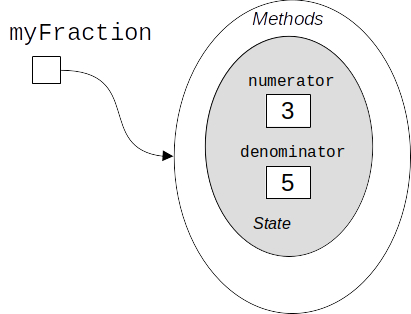
creates an object called myFraction representing the fraction \(\frac {3}{5}\) (three-fifths). Figure 1.15.1 shows this object as it is now implemented.
Sometimes, you want to do some additional work at the time of initialization beyond just creating and setting the instance variables. You can do that additional work with an init block. For example, we could check the denominator isn’t zero, as shown below:
The next thing we need to do is implement the behavior that the data type requires. To begin, consider what happens when we try to print a Fraction object in this program:
The Fraction object, myFraction, does not know how to respond to this request to print. The println function requires that the object convert itself into a string so that the string can be written to the output. The default method gives us the class name and the memory address of the reference. This is not what we want.
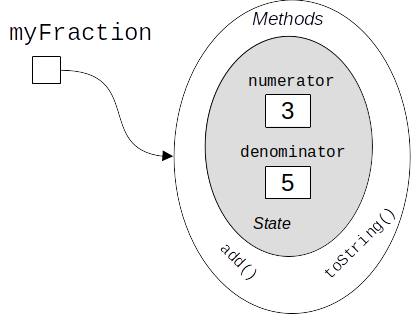
There are two ways we can solve this problem. One is to define a method called show that will allow the Fraction object to print itself as a string. Unfortunately, writing a show() method does not work in general. In order to make printing work properly, we need to override Kotlin’s default method for converting a Fraction to a string. We do this by writing a method named toString() that has no parameters and returns a String. This goes into the Fraction class:
It is important to note that the toString method doesn’t have parameters. It doesn’t need any extra information because it builds the string representation by using the object’s internal state data to “fill in the blanks” in the format string.
Let us now turn our attention to adding two fractions. We will write a method called add, which will add the fraction that we are currently working with to another fraction. Two fractions must have the same denominator to be added. The easiest way to make sure they have the same denominator is to use the product of the two denominators as a common denominator so that \(\frac {a}{b} + \frac {c}{d} = \frac {ad}{bd} + \frac {cb}{bd} = \frac{ad+cb}{bd}\text{.}\) The implementation, which is part of the Fraction class, is shown in Listing 1.15.3.
fun add(other: Fraction): Fraction {
     val newNumerator = this.numerator * other.denominator +
             this.denominator * other.numerator
     val newDenominator = this.denominator * other.denominator
     return Fraction(newNumerator, newDenominator)
 }
The add function returns a new Fraction object with the numerator and denominator of the sum. We can use this method by writing a standard arithmetic expression involving fractions, assigning the result of the addition, and then printing our result.
val f1 = Fraction(1, 4)
val f2 = Fraction(1, 2)
val f3 = f1.add(f2)
println(f3)
On the third line, the call f1.add(f2) will use f1 as this (the object we are currently working with), and f2 will be the value for the formal parameter other.
Using the keyword this is optional, and if it is left out, Kotlin will automatically refer to the object we are currently working with. For example, the above code could be abbreviated as:
fun add(other: Fraction): Fraction {
     val newNumerator = numerator * other.denominator +
             denominator * other.numerator
     val newDenominator = denominator * other.denominator
     return Fraction(newNumerator, newDenominator)
 }
Some Kotlin programmers use this explicitly everywhere; others leave it out except when it helps with clarity (such as in the first version of the add method). Choose a style for your own code. In this book, we will generally leave this out except for cases where it particularly assists in clarity.
The addition method works as we desire, but one thing could be better. Note that \(6/8\) is the correct result (\(\frac {1}{4} + \frac {1}{2}\)) but that it is not in the “lowest terms” representation. The best representation would be \(3/4\text{.}\) In order to be sure that our results are always in the lowest terms, we need a helper function that knows how to reduce fractions. This function will need to look for the greatest common divisor, or GCD. We can then divide the numerator and the denominator by the GCD and the result will be reduced to lowest terms.
The best-known algorithm for finding the greatest common divisor is Euclid’s algorithm, which will be discussed in detail in Chapter 8. It states that the greatest common divisor of two integers \(m\) and \(n\) is \(n\) if \(n\) divides \(m\) evenly. However, if \(n\) does not divide \(m\) evenly, then the answer is the greatest common divisor of \(n\) and the remainder of \(m\) divided by \(n\text{.}\) We will provide an iterative implementation here (see Listing 1.15.5). Note that this implementation of the GCD algorithm works only when the denominator is positive. This is acceptable for our fraction class because we have said that a negative fraction will be represented by a negative numerator.
fun gcd(number1: Int, number2: Int): Int {
    var m = number1
    var n = number2
    while (m % n != 0) {
        val saveM = m
        m = n
        n = saveM % n
    }
    return n
}
Aside:Parameters to functions are always val.
Now we can use this function to help reduce any fraction. To put a fraction in lowest terms, we will divide the numerator and the denominator by their greatest common divisor. So, for the fraction \(6/8\text{,}\) the greatest common divisor is 2. Dividing the top and the bottom by 2 creates a new fraction, \(3/4\) (see Listing 1.15.6).
An additional method that we need to include in our example main function will allow two fractions to compare themselves to one another. Consider this code:
val f4 = Fraction(3, 5)
val f5 = f4
val f6 = Fraction(3, 5)

println(f4 == f5)
println(f4 == f6)
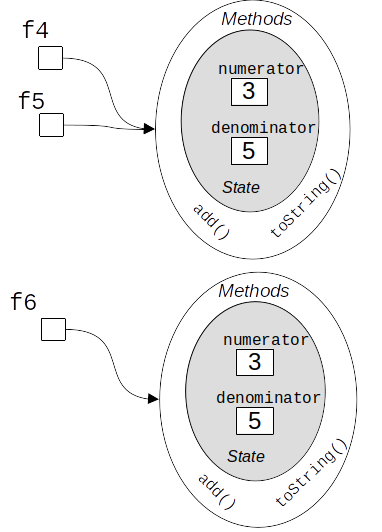
The assignment f5 = f4 copies the reference for f4 into f5; we now have two references to the same object in memory. f6, on the other hand, refers to a completely different area of memory, as depicted in Figure 1.15.8. When we do the comparison f4 == f5, the == operator does a shallow equality comparison: it only checks to see that the references are the same, and evaluates as true. The shallow comparison f4 == f6 will evaluate as false because the references are not the same.
We can create deep equality–equality by the same value, not the same reference–by implementing an equals() method (see Figure 1.15.8). This method will compare the contents of the objects (in their state), not merely their references.
In Kotlin, all classes automatically have a method named equals, which they automatically inherit from the built-in class Any?. Whenever the == operator is used, it calls the equals method on that object. Therefore, we can override the equals method in the Fraction class by again putting the two fractions in common terms and then comparing the numerators (see Listing 1.15.9).
override fun equals(other: Any?): Boolean {
    if (other !is Fraction) {
        return false
    }
    val product1 = this.numerator * other.denominator
    val product2 = this.denominator * other.numerator

    return product1 == product2
}
There are some particular details in the equals method above that we should note. The equals method must take a parameter of type Any?. That’s because this method is powerful enough to allow equality between different types, if desired. For example, consider the following code:
val f1 = Fraction(6,2)
val num1 = 3
println(f1 == num1)
Mathematically, the fraction 6/2 should be equal to the integer 3. From a Kotlin perspective, we are comparing two different types: a Fraction and an Int. Anytime Kotlin sees the == operator, it converts to a call to the equals method. So in the above code, f1 == num1 would be implicitly converted to f1.equals(num1). If we had defined the method equals as taking a Fraction as a parameter, we wouldn’t be able to do comparisons such as the one above. To keep things simple here, we will only allow comparisons between two Fraction objects, but the equals method could in principle be extended to allow more functionality.
This helps to explain why the equals method needs to take a parameter of type Any?; in general, one might wish to compare an object reference with any other, even null. In our particular case, we want to only permit comparisons between Fraction objects, hence the check that we do in lines 2-4 of Listing 1.15.9. The is operator in Kotlin checks to see if the type of the first object is either equal to, or a subtype of, the second object. So the check in line 2 determines if other is a Fraction object. If it is not, equals returns false.
If we now evaluate f4 == f6 in our FractionTest program, this will implicitly be converted to f4.equals(f6), and the equals() method will do a deep equality comparison and evaluate as true.
Subsection1.15.5Adding Fractions with the + operator
Perhaps you found the way we added fractions: f1.add(f2) to be a bit strange. As it currently stands, add is a method; we need to invoke add on an object of the Fraction class (in our example, that is f1).
val f7 = Fraction(1, 2)
val f8 = Fraction(1, 3)
val f9 = f7 + f8
println(f9)
Kotlin provides the capability to redefine many common operators, such as +, so that that they call methods on objects. Specifically, Kotlin allows us to define an operator method. If we use the name plus for a method and declare it as an operator method, then f7 + f8 will work as expected. Here is our code for that:
This is what you need to know to create most of the classes we will use in this book. This is, after all, a review of basic Kotlin, and our goal is to teach you data structures, not Kotlin. However, we will also need the more advanced concepts of inheritance, polymorphism, interfaces, composition, and generics. See Appendix A for an overview of these concepts. We have put them in an Appendix so that this section can be kept to a reasonable length.
To make sure you understand how methods work in Kotlin classes, write some methods to implement subtract(), multiply(), and divide(). Also implement a method named compareTo(), which compares this to some other fraction (thus, the method will have only one parameter). Your method will return -1 if this is less than other, 0 if this is equal to other, and 1 if this is greater than other.