Section 4.6 Stack Frames: Implementing Recursion
Suppose that instead of concatenating the result of the recursive call to
convert with the string from digitStrings, we modified our algorithm to push the strings onto a stack instead of making the recursive call. The code for this modified algorithm is shown in Listing 4.6.1.
Each time we go through the first
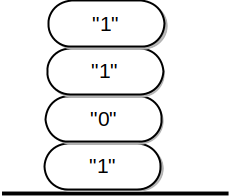
while loop in lines 9–16, we push a character on the stack. When converting 13 to base 2, we see that when the loop exits, the stack would look like Figure 4.6.2. Now we can pop the characters off the stack and concatenate them into the final result, "1101".
The previous example gives us some insight into how Kotlin implements a recursive function call. When a function is called in Kotlin, a stack frame is allocated to handle the local variables of the function. When the function returns, the return value is left on top of the stack for the calling function to access. Figure 4.6.3 illustrates the call stack after the return statement on line 22.
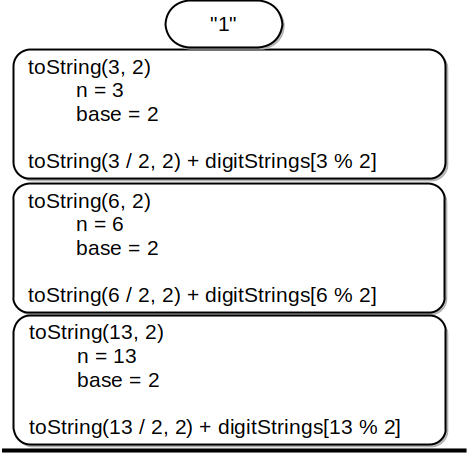
toString(13, 2)Notice that the call to
toString(2 / 2, 2) defined in Listing 4.4 leaves a return value of "1" on the stack. This return value is then used in place of the function call (toString(1, 2)) in the expression "1" + digitStrings[3 % 2], which will leave the string "11" on the top of the stack. In this way, the Kotlin call stack takes the place of the stack we used explicitly in Listing 4.6.1. In our list-summing example, you can think of the return value on the stack taking the place of an accumulator variable.
The stack frames also provide a scope for the variables used by the function. Even though we are calling the same function over and over, each call creates a new scope for the variables that are local to the function.
You have attempted of activities on this page.

