Section3.22Implementing an Unordered List: Linked Lists
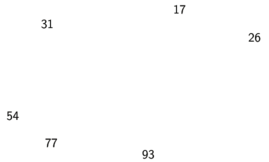
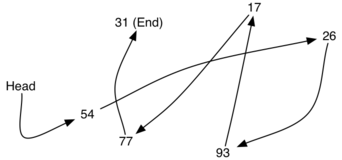
We’ll now consider an alternative approach for implementing an unordered list, using what is commonly known as a linked list. Recall that we need to be sure that we can maintain the relative positioning of the items. However, there is no requirement that we maintain that positioning in contiguous memory. For example, consider the collection of items shown in Figure 3.22.1. It appears that these values have been placed randomly. If we can maintain some explicit information in each item, namely the location of the next item (see Figure 3.22.2), then the relative position of each item can be expressed by following the link from one item to the next.
It is important to note that the location of the first item of the list must be explicitly specified. Once we know where the first item is, the first item can tell us where the second is, and so on. The external reference is often referred to as the head of the list. Similarly, the last item needs to know that there is no next item.
The basic building block for the linked list implementation is the node. Each node object must hold at least two pieces of information. First, the node must contain the list item itself. We will call this the data field of the node. In addition, each node must hold a reference to the next node. Listing 3.22.3 shows the Kotlin implementation. We will use a data class, which creates a class that automatically has the properties indicated, as well as built-in toString function to make it easier to see the contents.
data class Node<T>(var data: T, var next: Node<T>? = null)
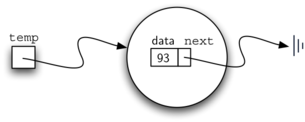
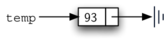
To construct a node, you need to supply the initial data value for the node. Evaluating the assignment statement below will yield a Node object containing the value 93 (see Figure 3.22.4). You should note that we will typically represent a node object as shown in Figure 3.22.5.
The special Kotlin reference value null will play an important role in the Node class and later in the linked list itself. A reference to null will denote the fact that there is no next node. Note in the constructor that a node is initially created with next set to null by default if no other node is specified. Since this is sometimes referred to as “grounding the node,” we will use the standard “electrical ground” symbol to denote a reference that is referring to null. It is always a good idea to explicitly assign null to your initial next reference values.
As we suggested above, the unordered linked list will be built from a collection of nodes, each linked to the next by explicit references. As long as we know where to find the first node (containing the first item), each item after that can be found by successively following the next links. With this in mind, the LinkedUnorderedList class must maintain a reference to the first node. Listing 3.22.6 shows the constructor. Note that each list object will maintain a single reference to the head of the list.
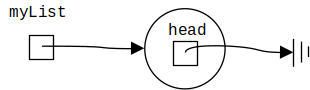
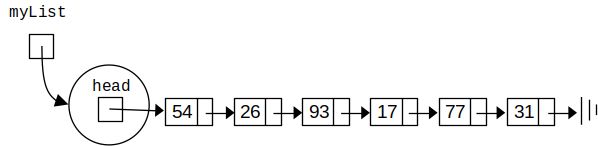
creates the linked list representation shown in Figure 3.22.7. As we discussed in the Node class, the special reference null will again be used to state that the head of the list does not refer to anything. Eventually, the example list given earlier will be represented by a linked list as shown in Figure 3.22.8. The head of the list refers to the first node, which contains the first item of the list. In turn, that node holds a reference to the next node (the next item), and so on. It is very important to note that the list class itself does not contain any node objects. Instead it contains a single reference to only the first node in the linked structure.
The isEmpty function, shown in Listing 3.22.9, checks to see if the head of the list is a reference to null. The result of the boolean expression this.head == null will only be true if there are no nodes in the linked list. Since a new list is empty, the constructor and the check for empty must be consistent with one another. This shows the advantage to using the reference null to denote the end of the linked structure. In Kotlin, null can be compared to any reference. Two references are equal if they both refer to the same object. We will use this often in our remaining methods.
override fun isEmpty(): Boolean {
    return head == null
}
So how do we get items into our list? We need to implement the various add functions. We’ll demonstrate the addFirst function here. For this function, we will create a new new node at the head, or beginning, of the list. The existing items will need to be linked to this new first item so that they follow.
Note that since 31 is the first item added to the list, it will eventually be the last node on the linked list as every other item is added ahead of it. Also, since 54 is the last item added, it will become the data value in the first node of the linked list.
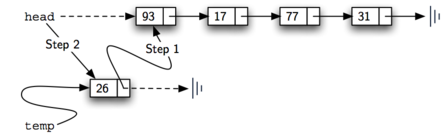
The addFirst method is shown in Listing 3.22.10. Each item of the list must reside in a node object. Line 2 creates a new node and places the item as its data. Now we must complete the process by linking the new node into the existing structure. This requires two steps as shown in Figure 3.22.11. Step 1 (line 3) changes the next reference of the new node to refer to the old first node of the list. Now that the rest of the list has been properly attached to the new node, we can modify the head of the list to refer to the new node. The assignment statement in line 4 sets the head of the list.
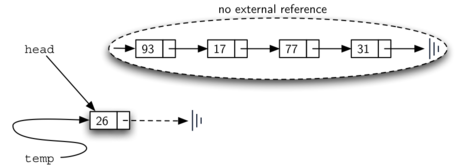
The order of the two steps described above is very important. What happens if the order of line 3 and line 4 is reversed? If the modification of the head of the list happens first, the result can be seen in Figure 3.22.12. Since the head was the only external reference to the list nodes, all of the original nodes are lost and can no longer be accessed.
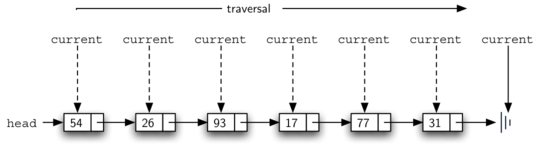
The next functions that we will implement–size, indexOf, and remove–are all based on a technique known as linked list traversal. Traversal refers to the process of systematically visiting each node. To do this we use an external reference that starts at the first node in the list. As we visit each node, we move the reference to the next node by “traversing” the next reference.
To implement the size function, we need to traverse the linked list and keep a count of the number of nodes that occurred. Listing 3.22.13 shows the Kotlin code for counting the number of nodes in the list. The external reference is called current and is initialized to the head of the list in line 2. At the start of the process we have not seen any nodes, so the count is set to zero. Lines 4–7 actually implement the traversal. As long as the current reference has not seen the end of the list (null), we move current along to the next node via the assignment statement in line 6. Again, the ability to compare a reference to null is very useful. Every time current moves to a new node, we add 1 to count. Finally, count gets returned after the iteration stops. Figure 3.22.14 shows this process as it proceeds down the list.
Searching for a value in a linked list implementation of an unordered list also uses the traversal technique. As we visit each node in the linked list, we will ask whether the data stored there matches the item we are looking for. In this case, however, we may not have to traverse all the way to the end of the list. In fact, if we do get to the end of the list, that means that the item we are looking for must not be present. Also, if we do find the item, there is no need to continue.
Listing 3.22.15 shows the implementation for the indexOf method, which searches a list for an item and returns the index of its location. As in the size method, the traversal is initialized to start at the head of the list (line 2), and we initialize the location where we are looking (line 3). We continue to iterate over the list as long as there are more nodes to visit, incrementing the location as we go. The question in line 5 asks whether the data item is present in the current node. If so, we return location immediately. If the loop exits without returning, indicating that we failed to find the item, we return an index of -1.
override fun indexOf(item: T): Int {
var current = head
var location = 0
while (current != null) {
if (current.data == item) {
return location
}
current = current.next
location++
}
return -1
}
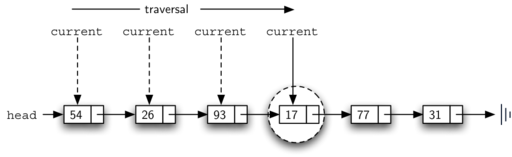
As an example, consider invoking the indexOf method looking for the item 17.
var index = myList.indexOf(17);
println(index); // prints 3
Since 17 is in the list, the traversal process needs to move only to the node containing 17. At that point, the condition in line 5 becomes true and we return the location as the result of the search. This process can be seen in Figure 3.22.16.
The remove method requires two logical steps. First, we need to traverse the list looking for the first occurrence of the item we want to remove. Once we find the item, we must remove it. If the item is not in the list, we leave the list unchanged.
The first step is very similar to indexOf. Starting with an external reference set to the head of the list, we traverse the links until we discover the item we are looking for.
When the item is found and we break out of the loop, current will be a reference to the node containing the item to be removed. But how do we remove it? One possibility would be to replace the value of the item with some marker that suggests that the item is no longer present. The problem with this approach is the number of nodes will no longer match the number of items. It would be much better to remove the item by removing the entire node.
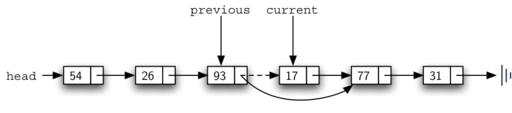
In order to remove the node containing the item, we need to modify the link in the previous node so that it refers to the node that comes after current. Unfortunately, there is no way to go backward in the linked list. Since current refers to the node ahead of the node where we would like to make the change, it is too late to make the necessary modification.
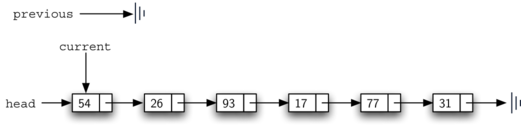
The solution to this dilemma is to use two external references as we traverse down the linked list. current will behave just as it did before, marking the current location of the traversal. The new reference, which we will call previous, will always travel one node behind current. That way, when current stops at the node to be removed, previous will refer to the proper place in the linked list for the modification.
Listing 3.22.17 shows the complete remove method. Lines 2–3 assign initial values to the two references. Note that current starts out at the list head as in the other traversal examples. previous, however, is assumed to always travel one node behind current. For this reason, previous starts out with a value of null since there is no node before the head (see Figure 3.22.18).
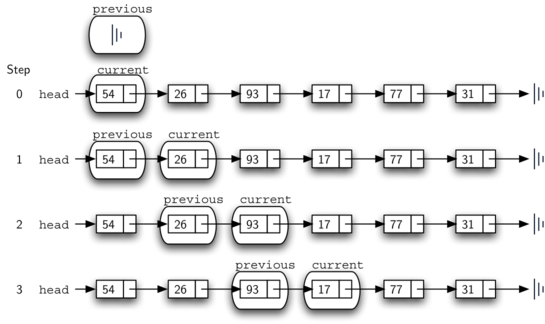
In line 5 we decide whether to continue the loop or not. We continue if we haven’t reached the end of the list (the first condition) and the item at the current location isn’t the one we’re looking for (the second condition). If we do not find the item, previous and current must both be moved one node ahead.
Again, the order of these two statements is crucial. previous must first be moved one node ahead to the location of current. At that point, current can be moved. This process is often referred to as inchworming, as previous must catch up to current before current moves ahead. Figure 3.22.19 shows the movement of previous and current as they progress down the list looking for the node containing the value 17.
override fun remove(item: T) {
var current = head
var previous: Node<T> = null
while (current != null && (current.data != item)) {
previous = current
current = current.next
}
if (current != null) {
if (previous == null) {
head = current.next
} else {
previous.next = current.next
}
}
}
Figure3.22.18.Initial Values for the previous and current References
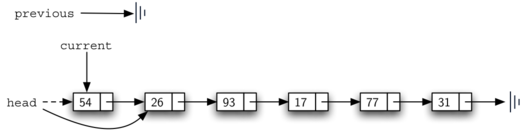
Once the searching step of the remove has been completed, we need to remove the node from the linked list. Figure 3.22.20 shows the link that must be modified. However, there is a special case that needs to be addressed. If the item to be removed happens to be the first item in the list, then current will reference the first node in the linked list. This also means that previous will be null. We said earlier that previous would be referring to the node whose next reference needs to be modified in order to complete the removal. In this case, it is not previous but rather the head of the list that needs to be changed (see Figure 3.22.21). Another special case occurs if the item is not in the list. In that case current != null evaluates to false and we leave the list unchanged.
Line 10 allows us to check whether we are dealing with the special case described above. If previous did not move, it will still have the value null when the loop breaks. In that case, the head of the list is modified to refer to the node after the current node (line 11), in effect removing the first node from the linked list.
However, if previous is not null, the node to be removed is somewhere down the linked list structure. In this case the previous reference is providing us with the node whose next reference must be changed. Line 13 modifies the next property of the previous to accomplish the removal. Note that in both cases the destination of the reference change is current.next. One question that often arises is whether the two cases shown here will also handle the situation where the item to be removed is in the last node of the linked list. We leave that for you to consider.
while (current != null && (current.data != item)) {
We want to keep looping as long as we haven’t hit the end of the list and haven’t found the item we want to delete. But what if currentisnull? Why doesn’t the current.data fail, or cause concerns with null safety? The answer is short-circuit evaluation. When Kotlin evaluates boolean expressions, it works from left to right. As soon as a final result can be determined, Kotlin stops.
When current != null is true, Kotlin has to evaluate the second condition to determine the result. But when current is null, the first condition returns false. That means that, no matter what the second condition is, the result has to be false (it can only be true when both conditions are true). Kotlin doesn’t need to look at the second condition, and immediately yields false for the expression. The current.data expression never happens.
class LinkedUnorderedList<T> : UnorderedListADT<T> {
private var head: Node<T>? = null
// Add a new first item to the beginning of the list
override fun addFirst(item: T) {
    val temp = Node<T>(item)
    temp.next = head
    head = temp
}
// Returns the number of items in the list.
override fun size(): Int {
    var current = head
    var count = 0
    while (current != null) {
        count = count + 1
        current = current.next
    }
    return count
}
// Find index of first occurrence of item in list.
// Returns -1 if not found.
override fun indexOf(item: T): Int {
    var current = head
    var location = 0
    while (current != null) {
        if (current.data == item) {
            return location
        }
        current = current.next
        location++
    }
    return -1
}
// Removes item from list.
override fun remove(item: T) {
var current = head
var previous: Node<T>? = null
while (current != null && (current.data != item)) {
previous = current
current = current.next
}
if (current != null) {
if (previous == null) {
head = current.next
} else {
previous.next = current.next
}
}
}
// Returns true if there are no items in the list;
// false otherwise.
override fun isEmpty(): Boolean {
return head == null
}
override fun toString(): String {
var current: Node<T>? = head
var result = "[ "
while (current != null) {
result = result + current.data.toString() + " "
current = current.next
}
result = result + "]"
return result
}
}
Listing 3.22.24 shows a program to test the UnorderedList class.
The remaining functions add, addLast, get, and set are left as exercises. Remember that each of these must take into account whether the change is taking place at the head of the list or someplace else.
In the previous problem, you most likely created an addLast function that was \(O(n)\text{.}\) If you add an instance variable to the LinkedUnorderedList class you can create an addLast method that is \(O(1)\text{.}\) Modify your addLast method to be \(O(1)\text{.}\) Be careful! To really do this correctly, you will need to consider a couple of special cases that may require you to simultaneously write the add function as well.