We stated in Section 1.7 that Kotlin supports the object-oriented programming paradigm. This means that Kotlin considers data to be the focal point of the problem-solving process. In Kotlin, as well as in any other object-oriented programming language, we define a class to be a description of what the data look like (the state) and what the data can do (the behavior). Classes are analogous to abstract data types because a user of a class only sees the state and behavior of a data item. Data items are called objects in the object-oriented paradigm. An object is an instance of a class.
We will begin our review by considering the atomic data types. Kotlin has two main built-in numeric data types that implement integers and floating-point values. These Kotlin types are called Int and Double. The standard arithmetic operators, +, -, *, and / can be used with parentheses forcing the order of operations away from normal operator precedence. Another very useful operator is the remainder (modulo) operator (%). Note that when two integers are divided, the result is an integer.
To do exponentiation, you use the built-in extension function pow() method, which always yields a Double result. You’ll see an example below: the following listing shows some arithmetic expressions and their results. The // introduces a Kotlin comment; Kotlin ignores everything from the // to the end of the line. point.
The Kotlin Boolean data type is quite useful for representing truth values. The possible values for a Boolean variable are true and false, with the standard Boolean operators, && (and), || (or), and ! (not).
Boolean values are also used as results for comparison operators such as equality (==) and greater than (\(>\)). In addition, relational operators and logical operators can be combined together to form complex logical expressions. Table 1.8.1 shows the relational and logical operators.
One or the other operand is true for the result to be true
logical not
!
Negates the truth value, false becomes true, true becomes false
Here are examples of boolean expressions using these operators. Notice that, in the last example, you must fully write out both conditions; unlike some languages, you cannot write it as 2 < 7 < 12.
Identifiers are used in programming languages as names. In Kotlin, identifiers consist of a sequence of Unicode letters, digits, dollar sign ($), or underscore (_). The first character must be a letter, dollar sign ($), or an underscore (_). Identifiers are case sensitive and can be of any length. Remember that it is always a good idea to use names that convey meaning so that your program code is easier to read and understand.
By convention, Kotlin names consisting of more than one word use camel case, where the first word of the name starts with a lower case letter and the first letter of subsequent words are capitalized, such as salesTax and partsPerMillion.
In Kotlin, you must declare a variable before you use it. You declare a variable by putting the word val or var before the variable name. val indicates that the variable is a constant, i.e. its value cannot be changed after it has been assigned. var indicates that the variable can be modified as many times as you like.
Assignment statements provide a way to associate a name with a value. The variable will hold the data specified on the right-hand side of the assignment operator (=).
The statement var theSum = 0 creates a variable called theSum. In Kotlin, every variable must have a type. We can explicitly state the type if we wish, like this:
This explicitly states that the variable theSum should be an integer. Much of the time, it is unnecessary for us to do this because Kotlin figures it out via type inferencing. When we express
without putting a type for theSum, Kotlin infers the type based on the value we assign it to. Since 0 is an integer, Kotlin assigns Int as the type for theSum. This type is permanent for the life of the variable. Some languages, such as Python, allow you to assign a variable to a different type. Kotlin does not behave this way, which is why line 3 in the code above would result in an error if it were not commented: Kotlin will not allow assigning a Boolean value to an Int.
Line 1 is a combination of both a declaration and an assignment. Line 4 has no declaration, but it assigns the result of the calculation on the right to the variable on the left.
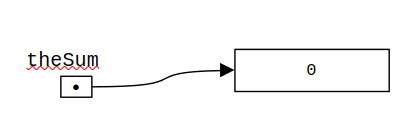
In Kotlin, variables are references to the data. We can think of each variable as being associated an object, which is stored elsewhere in the computer’s memory Figure 1.8.2 illustrates the variable theSum after line 1 has executed.
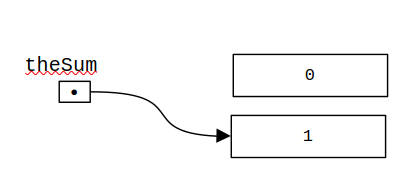
When a variable is reassigned in Kotlin, such as in line 4, we change its reference to refer to a new object. In line 4 above, we first calculate the right hand side of the assignment statement, which is theSum = theSum + 1. This creates a new object, which is an Int with value 1. The variable theSum then refers to this new object. A background process called the garbage collector then frees up the object containing 0 at some point in the future. See Figure 1.8.3 for an illustration.
In addition to the numeric and boolean types, Kotlin has a number of very powerful built-in collection classes. Lists and strings are ordered collections that are very similar in structure but have specific differences that must be understood for them to be used properly. Sets and maps are unordered collections.
Notice that the data type String starts with a capital letter. By convention, all class names in Kotlin begin with a capital letter. Objects in Kotlin often have functions associated with them, that are often used to do actions associated with that object. In this textbook, we will refer to these functions as methods.
To invoke an method for an object, you use dot notation: give the variable name, then a dot, then the method or property desired. For example, to find the length of a String, you use the count() method:
Note1.8.4.Member functions, extension functions, and methods.
The Kotlin language provides two different capabilities for creating functions associated with objects. One of them, referred to in the Kotlin documentation as a member function, is the same thing as what is referred to as a method in languages such as Python and Java. We will create member functions ourselves later in this book. Kotlin offers a second capability referred to as an extension function, which looks identical to a member function when using it, but has some internal differences. In practice, this distinction does not typically matter at all when using one of these functions; it relates to how the code is written when it is defined. For simplicity, in this book we will follow a somewhat-established convention 1
Sebastian Aigner, Roman Elizarov, Svetlana Isakova, and Dmitry Jemerov. Kotlin in Action, Second Edition. Manning, 2024.
where we will refer to both member functions and extension functions as methods. If we need to distinguish between the two, we’ll use the more precise terminology.
The + operator allows you to concatenate Strings. When concatenating a String followed by a number, the number will be converted to a String. When a number appears first, however, it attempts to do numeric addition. Note that the order of operations is important:
Returns the character at the given index. This returns a Char object. This can also be abbreviated as str[index]
substring(start, end)
str.substring(s, e)
Returns the portion of the string starting at given start index up to but not including the end index
substring(start)
str.substring(s)
Returns the portion of the string starting at given start index to the end of the string
toLowerCase
str.lowercase()
Returns the string with all letters in lower case
uppercase()
str.uppercase()
Returns the string with all letters in upper case
trim
str.trim()
Returns a string with all leading and trailing whitespace removed
split
str.split(delim1, delim2, ...)
Splits a string into a list of substrings at any of the delimiters
Of these, split will be very useful for processing data. split will take a string and return an list of strings using any of the split delimiters as a division point. The first example below uses “-” as the delimiter; the second uses a semicolon followed by a space as the delimiter; the third uses both.
You can compare strings as you can compare numbers, with double equals for equality, and the usual less-than and greater-than signs, which compare the strings alphabetically:
An array is an ordered collection of zero or more objects. The following example shows the arrayOf function, which is used for creating arrays if you want to specify each initial value.
fun main() {
    val ages = arrayOf(32, 47, 19, 62)
    val prices = arrayOf(12.95, 13.88, 10.66)
    val words = arrayOf("ant", "bee", "cat", "dog", "elk")
}
Arrays can also be created with a constructor to the Array class, which is convenient when you don’t want to specify each initial value individually. Here are examples that create arrays of a specified size, and initialize all of the values to a particular value.
fun main() {
    val ages = Array<Int>(3) { 0 }
    val prices = Array<Double>(4) { 0.0 }
    val valid = Array<Boolean>(3) { false }
    val words = Array<String>(3) { "" }
}
Arrays have a fixed number of elements; they cannot shrink or expand without doing a lot of extra work. To get around this problem, we need to investigate Kotlin collections.