Composition happens when an object is made up of other objects. For example, in a card game, we might represent a Deck as made up of a list of Card objects:
class Card(val suit: String, val num: Int) {
}

class Deck {
    val cards = mutableListOf<Card>()
}
Composition is also known as a Has-A relationship. (A Deckhas a list of Cards). Put formally, the Deck is the aggregating class, and the Card class is is the aggregated class.
The first two of these are built by the toaster company. But the company that makes toasters doesn’t build the power supply or the dial (which has circuitry to control the current flow). Instead, those are parts they order from some other companies and put into the chassis.
Before we see how composition affects the way we construct and manipulate objects, let’s give a few more instances of composition (has-a) relationships. Using composition reflects the way objects are built out of other objects (parts). Each of the sub-parts has its own attributes and things that it can do (its methods). Notice that we sometimes need multiple instances of a sub-part when constructing the larger object.
class PowerSupply(var voltage: Int) {
    // new power supplies are always turned off
    var turnedOn = false

    // initializer block
    init {
        if (voltage != 220) {
            voltage = 110
        }
    }
}

class Dial(val minValue: Int, val maxValue: Int) {
    // new dials are always set to lowest value
    var dialValue = minValue
}
Now, look at how the Toaster class starts, with line numbers for reference:
class Toaster(var numSlots: Int, var voltage: Int) {
    var numSlices = 0
    var power: PowerSupply
    var darkness: Dial

    init {
        numSlots = maxOf(1, minOf(4, numSlots))
        power = PowerSupply(voltage)
        darkness = Dial(1, 10)
    }

    fun insertBread(newSlices : Int) {
        if (numSlices + newSlices <= numSlots) {
            numSlices += newSlices
        } else {
            println("Toaster is too full!")
        }
    }
}
The constructor in has two parameters: the number of slots in the toaster and what voltage it should have. The number of slots and number of slices of bread currently in the toaster are attributes belonging to the Toaster class, and those get set directly.
The power supply is an object, which is why line 8 has to call the PowerSupply constructor to build a power supply with the desired voltage. Think of this as the toaster company calling up the power supply company and telling them “send me a 110-volt power supply” and putting that power supply into the finished toaster.
Although a real-life toaster is composed of parts, all of the controls are on the toaster’s exterior. We don’t expect—or want—the customer to have to directly access the power supply to turn the toaster on! Similarly, we want to provide methods in the Toaster class that will give programs that use the class access to the methods and attributes of power and darkness:
Without inheritance, we would have to represent the Bicycle and ElectricBicycle classes separately, but with a lot of duplicated methods between them, such as the code for color, frameSize, changing gears, etc.
That’s a lot of duplicated code when we translate it to Kotlin. We can use a concept called inheritance to say that ElectricBicycleinherits all of Bicycle’s methods and attributes. All we have to include now in ElectricBicycle are the attributes and methods that add extra capabilities to an electric bicycle.
In this example, Bicycle is called the superclass or parent class, and ElectricBicycle is called the subclass or child class. As in the real world, the child inherits things from the parent 1
With one exception: as the joke says, “Parents inherit their gray hair from their children.”
In this exercise, we will explore has-a and is-a relationships. First, state whether the relationship of the following classes is composition or inheritance:
For classes that exhibit the inheritance relationship, could you name a few data fields/attributes for the superclass? Could you name a few for the subclass only?
For example, Teacher (subclass) is-a Person (superclass). Data fields for Person are: name, age, address, etc. Data fields for Teacher are: school, hire date, etc.
Let’s use a smaller example for our continued discussion of inheritance. We’ll have an Item class, which represents an item in a store. An Item instance has a name, a SKU (stock keeping unit), and a price. This is the parent class. We also have a SaleItem class, which is a child class. In addition to a name, SKU, and price (which it inherits from the parent class), a SaleItem has a discount percentage (expressed as a decimal).
Listing A.2.7 shows the code for Item. Note that the open keyword has been added before class. This is what allows for Item to be used as a superclass. Without this keyword, it would be considered final and would not be allowed to be a parent/superclass. Similarly the open keyword in front of specialName will allow it to be overridden by a subclass.
open class Item(val name: String, val sku: String, var price: Double) {
    open val specialName = name + " " + sku

    open fun purchase(quantity: Int) : Double {
        return price * quantity
    }

    override fun toString() : String {
        return String.format("%s (%s): $%.2f", name, sku, price)
    }

    override fun equals(other: Any?) : Boolean {
        if (other !is Item) {
            return false
        }
        return name.equals(other.name) &&
            sku.equals(other.sku) &&
            price.equals(other.price)
    }

}
Let’s start on the code for SaleItem. The constructor of the subclass can pass along all the parameters that the super class needs, as shown in Listing A.2.8:
Sometimes, you want to be able to add on to some of the open attributes of the parent class. You can access the parent class’ variable with the super keyword, like with specialName:
Letter Size Envelopes - 100 count (LSE-0100): $5.75
Ten boxes of envelopes cost $57.50
Erasable marker - black (EMB-913): $2.15 - 10.0% discount
Ten markers cost $19.35
Congratulations! We’ve used inheritance, and our program works. Now it’s time to do what Joe Armstrong said in his book Erlang and OTP in Action: “Make it work, then make it beautiful, then if you really, really have to, make it fast. 90 percent of the time, if you make it beautiful, it will already be fast. So really, just make it beautiful!”
Part of making a program beautiful is getting rid of unnecessary duplication. In that spirit, let’s take a closer look at the SaleItem class’s purchase, toString and equals methods. The calculation of the base price in purchase is the same as in Item. The part of toString’s format string for the name, sku, and price is the same as in Item. Similarly, the first three lines of equals are the same as in Item.
Design a class named Person with two subclasses: Employee and Customer. The attributes for these classes are described in italics. A Person has a name, address, phone number, and email address.
A Manager has an office number and has a variable bonus based on the performance of their team. This means that a Manager should have attributes for the target bonus amount and the performance percentage.
Write starter code for all these classes showing the data fields and attributes. Make meaningful names for the attributes and give them an appropriate data type. (You do not need to create constructors or other methods for the classes.)
The XYZZY Corporation wants to retain their most loyal customers. They launch a customer retention program and offer discount to customers who have been purchasing from the company for at least one year.
Write a subclass PreferredCustomer that extends the Customer class from the preceding exercise. The PrefCust class should have two data fields: average annual purchase amount (average dollar amount purchased per year) and years (number of years they have been a customer).
Customers get a discount percentage based on their years as a customer and average purchase amount. There are three levels of Preferred Customers: bronze, silver, and gold.
Write the PrefCust class with all its data fields. Write a method named getDiscount that uses the average annual purchase amount and years as a customer to return the discount percent (as a percentage).
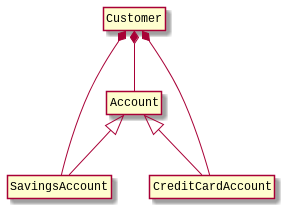
In this exercise, you will implement an Account class which represents a bank checking account. You will then create two classes that inherit from Account: SavingsAccount and CreditCardAccount.
You will then use composition to create a Customer class which includes instances of each of these account classes. Finally, you will write a program with a main method that works with these classes.
Create a two-parameter constructor that takes an account number and balance. Make sure that the balance is always greater than zero (Hint: kotlin.math.abs)
Implement these methods: void deposit(double amount) and \newline void withdraw(double amount). For both these methods, if the amount is less than zero, the account balance remains untouched. For the withdraw method, if the amount is greater than the balance, it remains untouched. These methods do not print anything.
Part 2: Next, implement the SavingsAccount class. It inherits from Account and adds a apr property, which is the annual percentage rate (APR) for interest.
Write a three-argument constructor that takes an account number, balance, and interest rate as a decimal (thus, a 3.5% interest rate is given as 0.035). Make sure that the interest rate is never less than zero.
A four-argument constructor that takes an account number, balance, interest rate as a decimal (thus, a 3.5% interest rate is given as 0.035), and credit limit. Make sure that neither the interest rate nor credit limit can be negative.
Modify toString to include the interest rate and credit limit. IMPORTANT: the value returned by the toString method must not include the monthly payment.
Override the withdraw method so that you can have a negative balance. If a withdrawal would push you over the credit limit, leave the balance untouched. Examples:
Implement a calculatePayment method that works as follows: If the balance is positive, the minimum amount you have to pay on your card per month is zero. Otherwise, your monthly payment is the minimum of 20 and $(apr/12) \cdot (−balance)$