Free-Response Question 4: 2D Array. Students will be provided with a scenario and its associated class(es). Students will write one method of a given class based on provided specifications and examples. The method requires students to use, analyze, and manipulate data in a 2D array structure.
This is also available as an AI-graded FRQ on the JuiceMind IDE for AP exam practice with rubrics and AI instant feedback. Teachers must create free accounts and assign the FRQ on JuiceMind for students to access it.
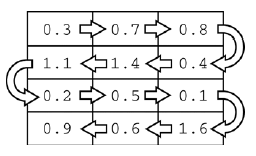
Question 4. A telescope scans a rectangular area of the night sky and collects the data into a 1-dimensional array. Each data value scanned is a number representing the amount of light detected by the telescope. The telescope scans back and forth across the sky (alternating between left to right and right to left) in the pattern indicated below by the arrows. The back-and-forth ordering of the values received from the scan is called telescope order.
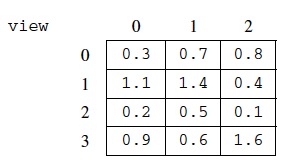
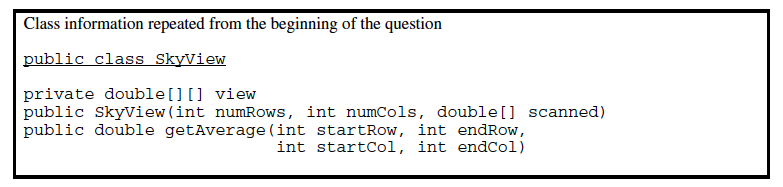
The telescope records the data in telescope order into a 1-dimensional array of double values. This 1-dimensional array of information received from a single scan will be transferred into a 2-dimensional array, which reconstructs the original view of the rectangular area of the sky. This 2-dimensional array is part of the SkyView class, shown below. In this question you will write a constructor and a method for this class.
public class SkyView {
    /** A rectangular array that holds the data representing a rectangular area of the sky. */
    private double[][] view;

    /**
     * Constructs a SkyView object from a 1-dimensional array of scan data.
     *
     * @param numRows the number of rows represented in the view Precondition: numRows > 0
     * @param numCols the number of columns represented in the view Precondition: numCols > 0
     * @param scanned the scan data received from the telescope, stored in telescope order
     *     Precondition: scanned.length == numRows * numCols Postcondition: view has been created as
     *     a rectangular 2-dimensional array with numRows rows and numCols columns and the values in
     *     scanned have been copied to view and are ordered as in the original rectangular area of
     *     sky.
     */
    public SkyView(int numRows, int numCols, double[] scanned) {
        /* to be implemented in part (a) */
    }

    /**
     * Returns the average of the values in a rectangular section of view.
     *
     * @param startRow the first row index of the section
     * @param endRow the last row index of the section
     * @param startCol the first column index of the section
     * @param endCol the last column index of the section Precondition: 0 <= startRow <= endRow <
     *     view.length Precondition: 0 <= startCol <= endCol < view[0].length
     * @return the average of the values in the specified section of view
     */
    public double getAverage(int startRow, int endRow, int startCol, int endCol) {
        /* to be implemented in part (b) */
    }

    // There may be other instance variables, constructors, and methods
}
Part a. Write the constructor for the SkyView class. The constructor initializes the view instance variable to a 2-dimensional array with numRows rows and numCols columns. The information from scanned, which is stored in the telescope order, is copied into view to reconstruct the sky view as originally seen by the telescope. The information in scanned must be rearranged as it is stored into view so that the sky view is oriented properly.
This is also available as an AI-graded FRQ on the JuiceMind IDE for AP exam practice with rubrics and AI instant feedback. Teachers must create free accounts and assign the FRQ on JuiceMind for students to access it.
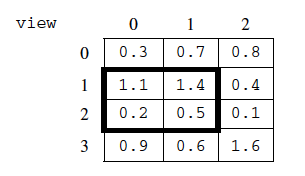
Part b. Write the SkyView method getAverage, which returns the average of the elements of the section of view with row indexes from startRow through endRow, inclusive, and column indexes from startCol through endCol, inclusive.
For example, if nightSky is a SkyView object where view contains the values shown below, the call nightSky.getAverage(1, 2, 0, 1) should return 0.8. (The average is (1.1 + 1.4 + 0.2 + 0.5) / 4, which equals 0.8). The section being averaged is indicated by the dark outline in the table below.