Logo image

Section 14.2 FRQ practice

The third FRQ on the AP CSA Exam as of 2026 will be on Data Analysis with ArrayList and worth 5 points. Students will be provided with a scenario and its associated class(es). Students will write one method of a given class based on provided specifications and examples. The method requires students to use, analyze,and manipulate data in an ArrayList structure. (Arrays will not be tested in an FRQ.)
Here are two common patterns for ArrayList traversal loops that you will need to use in this FRQ:
for (Type obj : list)
{
    if (obj ....)
        ...
}

for(int i=0; i < list.size(); i++)
{
   if (list.get(i) ....)
       ...
}

Subsection 14.2.1 Free Response Question (FRQ) 3 - ItemInventory

The following problem is a good example FRQ 3 from the 2025-2026 AP CSA Course and Exam Description (CED).

Subsection 14.2.1.1 FRQ ItemInventory Description

The ItemInfo class is used to store information about an item at a store. A partial declaration of the ItemInfo class is shown below.
public class ItemInfo
{
    /**
    * Returns the name of the item
    */
    public String getName()
    { /* implementation not shown */ }

    /**
    * Returns a value greater than 0.0 that represents the
    * cost of a single unit of the item, in dollars
    */
    public double getCost()
    { /* implementation not shown */ }

    /**
    * Returns true if the item is currently available and
    * returns false otherwise
    */
    public boolean isAvailable()
    { /* implementation not shown */ }

    /* There may be instance variables, constructors, and
    methods that are not shown. */
}
The ItemInventory class maintains an ArrayList named inventory that contains all items at the store. A partial declaration of the ItemInventory class is shown below. (Note that it contains an ArrayList of ItemInfo objects.)
public class ItemInventory
{
    /** The list of all items at the store */
    private ArrayList<ItemInfo> inventory;

    /**
    * Returns the average cost of the available items
    * whose cost is between lower and upper, inclusive
    * Precondition: lower <= upper
    * At least one available element of
    * inventory has a cost between
    * lower and upper, inclusive.
    * No elements of inventory are null.
    */
    public double averageWithinRange(double lower, double upper)
    { /* to be implemented */}

    /* There may be instance variables, constructors, and methods
    that are not shown. */
}
Write the ItemInventory method averageWithinRange. The method should return the average cost of the available items in inventory whose cost is between the parameters lower and upper, inclusive.
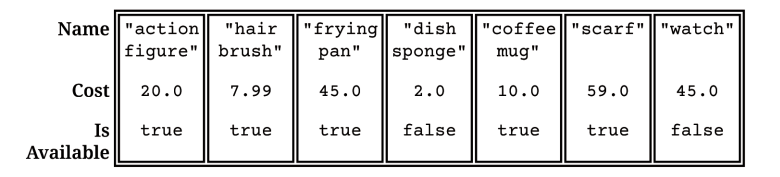
Suppose inventory contains the following seven ItemInfo objects.
Figure 14.2.1. ItemInventory with ArrayList of 7 ItemInfo objects
For the inventory shown, averageWithinRange(10.0, 50.0) should return 25.0, which is equal to the average cost of the available items within the specified range (a $20 action figure, a $45 frying pan, and a $10 coffee mug). Although the watch is within the specified range, it is not available.
Complete method averageWithinRange.
/**
 * Returns the average cost of the available items
 * whose cost is between lower and upper, inclusive
 * Precondition: lower <= upper
 * At least one available element of
 * inventory has a cost between
 * lower and upper, inclusive.
 * No elements of inventory are null.
*/
public double averageWithinRange(double lower, double upper)

Subsection 14.2.1.2 The Algorithm for averageWithinRange

The following exercises will help you to develop the algorithm for the method averageWithinRange.
Activity 14.2.1.
Which of the following loops is the most appropriate for iterating through inventory (an ArrayList of ItemInfo objects) to access each ItemInfo object when the index is not directly needed?
  • for (int i = 0; i < inventory.length; i++)
  • This loop is incorrect because ArrayList does not have a length field.
  • for (ItemInfo item : inventory)
  • Yes, the enhanced for-each loop is the most appropriate and concise way to iterate through an ArrayList when you only need to access each element and not its index.
  • while (inventory.hasNext())
  • This loop is incorrect because ArrayList does not have a hasNext() method.
  • for (int i = 0; i <= inventory.size(); i++)
  • This loop has an off-by-one error. It should use i < inventory.size() instead of i <= inventory.size(). The enhanced for-each loop is still a simpler choice than a for loop with an index.
Activity 14.2.2.
You are iterating through the inventory ArrayList using an enhanced for-each loop, and currentItem represents the ItemInfo object in the current iteration:
for (ItemInfo currentItem : inventory)
{
    // ...
}
Inside this loop, how would you get the cost of the currentItem?
  • currentItem.cost
  • Accessing cost directly like this would only be possible if cost were a public instance variable. However, according to the ItemInfo class declaration, the cost is accessed via a method.
  • currentItem.getCost()
  • Yes, the ItemInfo class provides a public double getCost() method to return the cost of the item.
  • getCost(currentItem)
  • This syntax suggests a static method call, but getCost() is an instance method that must be called on an ItemInfo object.
  • currentItem.getCost
  • Methods in Java require parentheses after their name to indicate a method call, even if they take no arguments.
Activity 14.2.3.
You are iterating through the inventory ArrayList, and currentItem is the ItemInfo object in the current iteration. Which of the following condition correctly checks if currentItem is available AND its cost is between lower and upper, inclusive ?
  • currentItem.isAvailable() &&
       currentItem.getCost() > lower && currentItem.getCost() < upper
    
  • This condition correctly checks if the item is available, but the cost range (> lower and < upper) is exclusive. The problem requires the range to be inclusive, meaning it should include lower and upper.
  • currentItem.isAvailable() ||
       (currentItem.getCost() >= lower && currentItem.getCost() <= upper)
    
  • This condition uses the logical OR operator (||), which means the code block would execute if the item is available OR if its cost is within range, but the problem requires both conditions to be true.
  • currentItem.isAvailable() &&
       currentItem.getCost() >= lower && currentItem.getCost() <= upper
    
  • Yes, this statement correctly uses the logical AND operator (&&) to combine the availability check with the cost range check. It also correctly uses >= and <= to ensure the range is inclusive of lower and upper.
  • currentItem.isAvailable() &&
      (currentItem.getCost() > lower || currentItem.getCost() < upper)
    
  • This condition uses the logical OR operator (||) for the cost range check, which is incorrect. The problem requires both conditions to be true.
The method averageWithinRange should iterate through the inventory list, checking each ItemInfo object to see if it is available and if its cost is within the specified range. If both conditions are met, the cost of the item should be added to a running total and counted. Remember that to compute the average, we need to add up the costs of all items that meet the criteria and then divide by the number of such items.

Subsection 14.2.1.3 Solve FRQ ItemInventory

Write the averageWithinRange method for the ItemInventory class.
Activity 14.2.4.
Write the averageWithinRange method for the ItemInventory class.

Subsection 14.2.1.4 Grading Rubric for FRQ 3

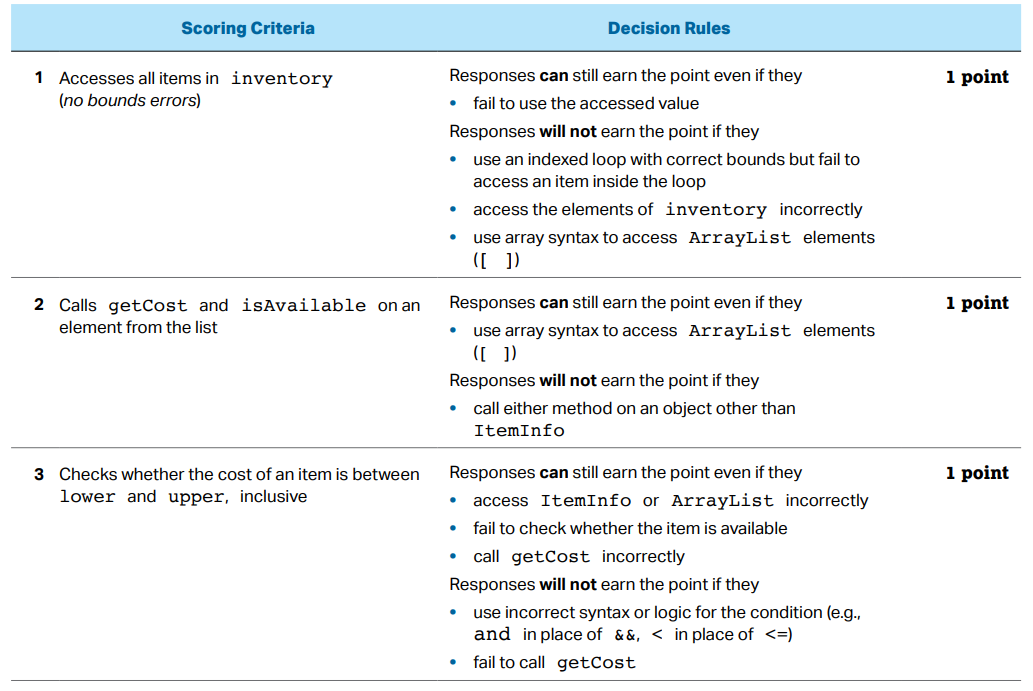
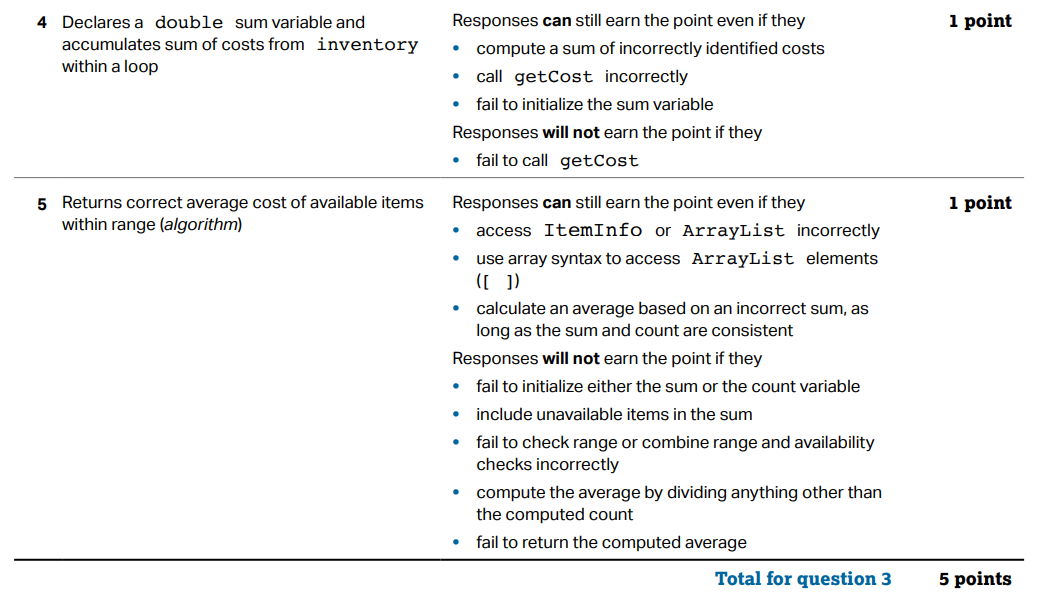
The following AP rubric is used to grade the averageWithinRange method in the ItemInventory class. Each item is worth 1 point, for a total of 5 points. Did you receive all of the points? In class, your teacher may have you grade each others’ code.
Figure 14.2.2. Rubric for averageWithinRange

Subsection 14.2.2 Free Response - Climbing Club A

The following is part a of a free response question from 2012. It was question 1 on the exam. You can see all the free response questions from past exams at https://apstudents.collegeboard.org/courses/ap-computer-science-a/free-response-questions-by-year.
Question 1. A mountain climbing club maintains a record of the climbs that its members have made. Information about a climb includes the name of the mountain peak and the amount of time it took to reach the top. The information is contained in the ClimbInfo class as declared below.
public class ClimbInfo
{
    /**
     * Creates a ClimbInfo object with name peakName and time climbTime.
     *
     * @param peakName the name of the mountain peak
     * @param climbTime the number of minutes taken to complete the climb
     */
    public ClimbInfo(String peakName, int climbTime)
    {
        /* implementation not shown */
    }

    /**
     * @return the name of the mountain peak
     */
    public String getName()
    {
        /* implementation not shown */
    }

    /**
     * @return the number of minutes taken to complete the climb
     */
    public int getTime()
    {
        /* implementation not shown */
    }

    // There may be instance variables, constructors, and methods
    // that are not shown.
}
The ClimbingClub class maintains a list of the climbs made by members of the club. The declaration of the ClimbingClub class is shown below. You will write two different implementations of the addClimb method. You will also answer two questions about an implementation of the distinctPeakNames method
public class ClimbingClub
{
    /**
     * The list of climbs completed by members of the club. Guaranteed not to be
     * null. Contains only non-null references.
     */
    private List<ClimbInfo> climbList;

    /** Creates a new ClimbingClub object. */
    public ClimbingClub()
    {
        climbList = new ArrayList<ClimbInfo>();
    }

    /**
     * Adds a new climb with name peakName and time climbTime to the list of
     * climbs.
     *
     * @param peakName the name of the mountain peak climbed
     * @param climbTime the number of minutes taken to complete the climb
     */
    public void addClimb(String peakName, int climbTime)
    {
        /* to be implemented in part (a) */
    }

    /**
     * @return the number of distinct names in the list of climbs
     */
    public int distinctPeakNames()
    {
        /* implementation shown in part (c) */
    }

    // There may be instance variables, constructors, and methods
    // that are not shown.
}
Part a. Write an implementation of the ClimbingClub method addClimb that stores the ClimbInfo objects in the order they were added. This implementation of addClimb should create a new ClimbInfo object with the given name and time. It appends a reference to that object to the end of climbList. For example, consider the following code segment.
ClimbingClub hikerClub = new ClimbingClub();
hikerClub.addClimb("Monadnock", 274);
hikerClub.addClimb("Whiteface", 301);
hikerClub.addClimb("Algonquin", 225);
hikerClub.addClimb("Monadnock", 344);
When the code segment has completed executing, the instance variable climbList would contain the following entries.

Subsection 14.2.2.1 How To Solve This

In the addClimb method you need to create a new ClimbInfo object and initialize the peakName and climbTime. How do you create a new object of a class and initialize the fields?
Once you have created the ClimbInfo object you want to add it in the order they were created. To do this you can add it to the end of the climbList. How do you add an object to the end of a list?
Activity 14.2.5.
How would you create a new object newClimb of the ClimbInfo class, with a peakName of Everest and climbTime of 600?
  • ClimbInfo newClimb = new ClimbInfo("Everest", 600);
  • Correct!
  • new ClimbInfo("Everest", 600);
  • This answer is missing the instantiation of the variable newClimb. Try again!
  • ClimbInfo newClimb = new ClimbInfo();
  • The constructor of a ClimbInfo object requires two arguments. Try again!
Activity 14.2.6.
How do you append a new item, 7, to the end of a non-empty ArrayList<Integer> list?
  • list.add(0, 7);
  • This would add 7 to the beginning of the list. Try again!
  • list.add(7);
  • Correct!
  • add(7);
  • You must reference the ArrayList list using a dot operator to use the add() method. Try again!

Subsection 14.2.2.2 Try and Solve It

Activity 14.2.7.
Complete the method addClimb in the ClimbingClub class in the code below. The code includes a main method that will test the addClimb method.

Subsection 14.2.2.3 Video - One way to code the solution

There are many possible solutions to this problem. The video below shows one solution.
The following video is also on YouTube at https://youtu.be/dAbU9_Qn92I. It walks through coding a solution.

Subsection 14.2.3 Free Response - Climbing Club B

The following is part b of a free response question from 2012. It was question 1 on the exam. You can see all the free response questions from past exams at https://apstudents.collegeboard.org/courses/ap-computer-science-a/free-response-questions-by-year.
Question 1. A mountain climbing club maintains a record of the climbs that its members have made. Information about a climb includes the name of the mountain peak and the amount of time it took to reach the top. The information is contained in the ClimbInfo class as declared below.
public class ClimbInfo
{
    /**
     * Creates a ClimbInfo object with name peakName and time climbTime.
     *
     * @param peakName the name of the mountain peak
     * @param climbTime the number of minutes taken to complete the climb
     */
    public ClimbInfo(String peakName, int climbTime)
    {
        /* implementation not shown */
    }

    /**
     * @return the name of the mountain peak
     */
    public String getName()
    {
        /* implementation not shown */
    }

    /**
     * @return the number of minutes taken to complete the climb
     */
    public int getTime()
    {
        /* implementation not shown */
    }

    // There may be instance variables, constructors, and methods
    // that are not shown.
}
The ClimbingClub class maintains a list of the climbs made by members of the club. The declaration of the ClimbingClub class is shown below. You will write two different implementations of the addClimb method. You will also answer two questions about an implementation of the distinctPeakNames method
public class ClimbingClub
{
    /**
     * The list of climbs completed by members of the club. Guaranteed not to be
     * null. Contains only non-null references.
     */
    private List<ClimbInfo> climbList;

    /** Creates a new ClimbingClub object. */
    public ClimbingClub()
    {
        climbList = new ArrayList<ClimbInfo>();
    }

    /**
     * Adds a new climb with name peakName and time climbTime to the list of
     * climbs.
     *
     * @param peakName the name of the mountain peak climbed
     * @param climbTime the number of minutes taken to complete the climb
     */
    public void addClimb(String peakName, int climbTime)
    {
        /* to be implemented in part (a) */
    }

    /**
     * @return the number of distinct names in the list of climbs
     */
    public int distinctPeakNames()
    {
        /* implementation shown in part (c) */
    }

    // There may be instance variables, constructors, and methods
    // that are not shown.
}
Part b. Write an implementation of the ClimbingClub method addClimb that stores the elements of climbList in alphabetical order by name (as determined by the compareTo method of the String class). This implementation of addClimb should create a new ClimbInfo object with the given name and time and then insert the object into the appropriate position in climbList. Entries that have the same name will be grouped together and can appear in any order within the group. For example, consider the following code segment.
ClimbingClub hikerClub = new ClimbingClub();
hikerClub.addClimb("Monadnock", 274);
hikerClub.addClimb("Whiteface", 301);
hikerClub.addClimb("Algonquin", 225);
hikerClub.addClimb("Monadnock", 344);
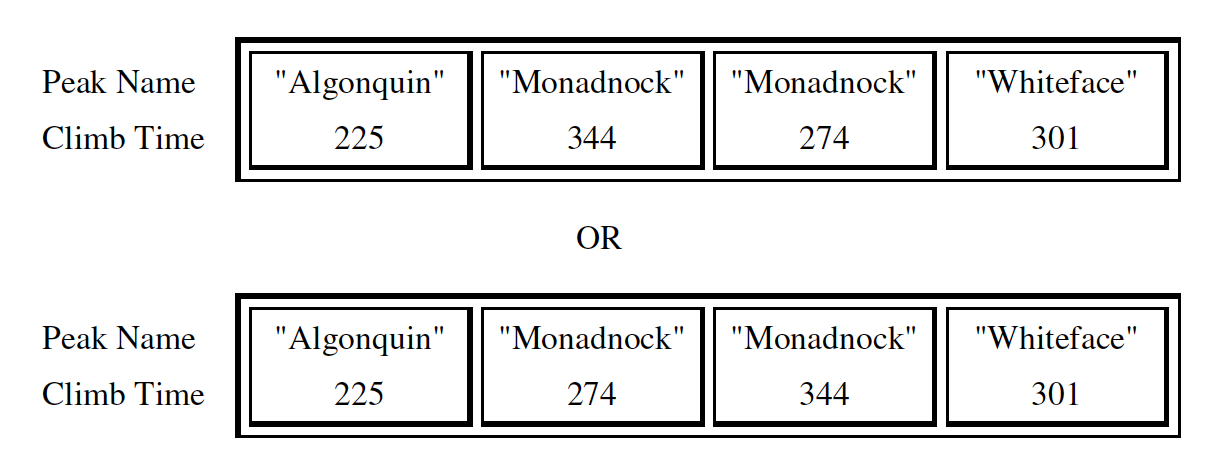
When the code segment has completed execution, the instance variable climbList would contain the following entries in either of the orders shown below.

Subsection 14.2.3.1 Walk Through the Example

  1. First you will create a new ClimbInfo object with a peakName of Monadnock and a climbTime of 274 and insert it in the empty climbList.
  2. Next you will create a new ClimbInfo object with a peakName of Whiteface and a climbTime of 301. You will compare the peakName of Whiteface to Monadnock and since it is greater you will try to continue but you will have reached the end of the climbList so you will insert it there.
  3. Next you will create a new ClimbInfo object with a peakName of Algonquin and a climbTime of 225. You will compare Algonquin to Monadnock and since Algonquin is less than Monadnock you will insert it at position 0.
  4. Next you will create a new ClimbInfo object with a peakName of Monadnock and a climbTime of 334. You will compare Monadnock to Algonquin and since it is greater you will continue. You will next check Monadnock to Monadnock and since they are equal you can insert it there.

Subsection 14.2.3.2 How To Solve This

Loop through the elements of climbList until you find the index where the new peakName is less than the peakName of the ClimbInfo object at the current index. Insert the new ClimbInfo object there.
Activity 14.2.8.
What type of loop should you use to find the first place that the new peakName is less than the current element’s peakName?
  • while
  • Correct! While loops are perfect when you don’t always need to loop through the whole list.
  • for
  • Try again. For loops are typically used when it is necessary to access every element in a list.
  • for-each
  • Try again. For each loops automatically loop through every element in a list, but this problem doesn’t require that.
Activity 14.2.9.
What ArrayList method allows you to add a new element at a specific index in a list?
  • add()
  • There are two versions of the add method for ArrayLists. Both require at least one argument.
  • add(ClimbInfo elmt)
  • This will add the element to the end of the list rather than at a specific index.
  • add(int i, ClimbInfo elmt)
  • Correct! This will add elmt at the ith index in your list.
Activity 14.2.10.
What will be stored in value after running this code:
String s1 = "Bee";
String s2 = "Kiwi";
boolean value = false;
if (s1.compareTo(s2) > 0){
    boolean value = true;
}
  • true
  • s1 starts with "B", so it is less than s1, which starts with "K". This means compareTo would return a negative number, not a positive number.
  • false
  • Correct! "Bee" is less than "Kiwi", so value would be false after running this code.

Subsection 14.2.3.3 Try and Solve It

Complete the method addClimb in the ClimbingClub class in the code below. It should create a new ClimbInfo object and insert it in alphabetical order by peakName in the climbList. The code includes a main method that will test the addClimb method.
Activity 14.2.11.
FRQ Climb Club B: complete the method addClimb below.

Subsection 14.2.3.4 Video - One way to code the solution

There are many possible solutions to this problem. The video below shows one solution.
The following video is also on YouTube at https://youtu.be/Fye33yPQk-g. It walks through coding a solution.

Subsection 14.2.4 Free Response - Climbing Club C

The following is part c of a free response question from 2012. It was question 1 on the exam. You can see all the free response questions from past exams at https://apstudents.collegeboard.org/courses/ap-computer-science-a/free-response-questions-by-year.
Question 1. A mountain climbing club maintains a record of the climbs that its members have made. Information about a climb includes the name of the mountain peak and the amount of time it took to reach the top. The information is contained in the ClimbInfo class as declared below.
public class ClimbInfo
{
    /**
     * Creates a ClimbInfo object with name peakName and time climbTime.
     *
     * @param peakName the name of the mountain peak
     * @param climbTime the number of minutes taken to complete the climb
     */
    public ClimbInfo(String peakName, int climbTime)
    {
        /* implementation not shown */
    }

    /**
     * @return the name of the mountain peak
     */
    public String getName()
    {
        /* implementation not shown */
    }

    /**
     * @return the number of minutes taken to complete the climb
     */
    public int getTime()
    {
        /* implementation not shown */
    }

    // There may be instance variables, constructors, and methods
    // that are not shown.
}
The ClimbingClub class maintains a list of the climbs made by members of the club. The declaration of the ClimbingClub class is shown below. You will write two different implementations of the addClimb method. You will also answer two questions about an implementation of the distinctPeakNames method
public class ClimbingClub
{
    /**
     * The list of climbs completed by members of the club. Guaranteed not to be
     * null. Contains only non-null references.
     */
    private List<ClimbInfo> climbList;

    /** Creates a new ClimbingClub object. */
    public ClimbingClub()
    {
        climbList = new ArrayList<ClimbInfo>();
    }

    /**
     * Adds a new climb with name peakName and time climbTime to the list of
     * climbs.
     *
     * @param peakName the name of the mountain peak climbed
     * @param climbTime the number of minutes taken to complete the climb
     */
    public void addClimb(String peakName, int climbTime)
    {
        /* to be implemented in part (a) */
    }

    /**
     * @return the number of distinct names in the list of climbs
     */
    public int distinctPeakNames()
    {
        /* implementation shown in part (c) */
    }

    // There may be instance variables, constructors, and methods
    // that are not shown.
}
Part c. The ClimbingClub method distinctPeakNames is intended to return the number of different names in climbList. For example, after the following code segment has completed execution, the value of the variable numNames would be 3.
ClimbingClub hikerClub = new ClimbingClub();
hikerClub.addClimb("Monadnock", 274);
hikerClub.addClimb("Whiteface", 301);
hikerClub.addClimb("Algonquin", 225);
hikerClub.addClimb("Monadnock", 344);
Consider the following implementation of method distinctPeakNames.
/** @return the number of distinct names in the list of climbs */
public int distinctPeakNames()
{
   if (climbList.size() == 0)
   {
      return 0;
   }

   ClimbInfo currInfo = climbList.get(0);
   String prevName = currInfo.getName();
   String currName = null;
   int numNames = 1;
   for (int k = 1; k < climbList.size(); k++)
   {
      currInfo = climbList.get(k);
      currName = currInfo.getName();
      if (prevName.compareTo(currName) != 0)
      {
         numNames++;
         prevName = currName;
      }
   }
  return numNames;
}

Activity 14.2.12.

Does this implementation of the distinctPeakNames method work as intended when the addClimb method stores the ClimbInfo objects in the order they were added as described in part (a)?
  • yes
  • Did you trace it to see what it would do?
  • no
  • This code depends on the peakNames being in alphabetical order by peakName.

Activity 14.2.13.

Does this implementation of the distinctPeakNames method work as intended when the addClimb method stores the ClimbInfo objects in alphabetical order by name as described in part (b)?
  • yes
  • This code depends on the peakNames being in alphabetical order by peakName.
  • no
  • Did you trace it to see what it would do?

Subsection 14.2.4.1 Try it Out

Activity 14.2.14.
FRQ ClimbClub C: Try the code.

Subsection 14.2.5 Free Response - CookieOrder A

The following is a free response question from 2010. It was question 1 on the exam. You can see all the free response questions from past exams at https://apstudents.collegeboard.org/courses/ap-computer-science-a/free-response-questions-by-year.
Question 1. An organization raises money by selling boxes of cookies. A cookie order specifies the variety of cookie and the number of boxes ordered. The declaration of the CookieOrder class is shown below.
public class CookieOrder
{
    /** Constructs a new CookieOrder object */
    public CookieOrder(String variety, int numBoxes)
    {
        /* implementation not shown */
    }

    /**
     * @return the variety of cookie being ordered
     */
    public String getVariety()
    {
        /* implementation not shown */
    }

    /**
     * @return the number of boxes being ordered
     */
    public int getNumBoxes()
    {
        /* implementation not shown */
    }

    // There may be instance variables, constructors, and methods that are not
    // shown.
}
The MasterOrder class maintains a list of the cookies to be purchased. The declaration of the MasterOrder class is shown below.
public class MasterOrder
{
    /** The list of all cookie orders */
    private List<CookieOrder> orders;

    /** Constructs a new MasterOrder object */
    public MasterOrder()
    {
        orders = new ArrayList<CookieOrder>();
    }

    /**
     * Adds theOrder to the master order.
     *
     * @param theOrder the cookie order to add to the master order
     */
    public void addOrder(CookieOrder theOrder)
    {
        orders.add(theOrder);
    }

    /**
     * @return the sum of the number of boxes of all of the cookie orders
     */
    public int getTotalBoxes()
    {
        /* to be implemented in part (a) */
    }

    // There may be instance variables, constructors, and methods that are not
    // shown.
}
Part a. The getTotalBoxes method computes and returns the sum of the number of boxes of all cookie orders. If there are no cookie orders in the master order, the method returns 0.

Subsection 14.2.5.1 How to Solve This

These multiple choice questions may help you write your solution.
Activity 14.2.15.
What type of loop is best for this problem?
  • while
  • While loops are better for problems where you are looping until a condition is true or false.
  • for
  • This will work, but it is more concise to use a for-each loop.
  • for-each
  • Correct! This is the most concise way to access every CookieOrder.
Activity 14.2.16.
What will you return at the end of this method?
  • The total number of cookie orders
  • The number of cookie orders is the length of the orders List. We are going one step farther in counting boxes. Try again!
  • The total number of cookie boxes
  • Correct!
  • The total number of cookies
  • We don’t know how many cookies are in each box. Try again!
Activity 14.2.17.
What is wrong with this code?
public int getTotalBoxes()
{
    for (CookieOrder co : this.orders)
    {
      int sum = sum + co.getNumBoxes();
    }
    return sum;
}
  • It does not count the total number of boxes because the sum variable’s scope is only inside the loop.
  • Correct! int sum must be initialized before the loop.
  • It counts orders, not boxes
  • co.getNumBoxes returns the number of boxes for a CookieOrder.
  • Nothing.
  • Take a closer look inside the loop.

Subsection 14.2.5.2 Mixed Up Code

Activity 14.2.18.
The method getTotalBoxes below contains the correct code for one solution to this problem, but it is mixed up. Drag the needed code from the left to the right and put them in order with the correct indention so that the code would work correctly.

Subsection 14.2.5.3 Solve Part A

Activity 14.2.19.
FRQ Cookie Order Part A: Complete the method getTotalBoxes below.

Subsection 14.2.6 Free Response - CookieOrder B

The following is a free response question from 2010. It was question 1 on the exam. You can see all the free response questions from past exams at https://apstudents.collegeboard.org/courses/ap-computer-science-a/free-response-questions-by-year.
Question 1. An organization raises money by selling boxes of cookies. A cookie order specifies the variety of cookie and the number of boxes ordered. The declaration of the CookieOrder class is shown below.
public class CookieOrder
{
    /** Constructs a new CookieOrder object */
    public CookieOrder(String variety, int numBoxes)
    {
        /* implementation not shown */
    }

    /**
     * @return the variety of cookie being ordered
     */
    public String getVariety()
    {
        /* implementation not shown */
    }

    /**
     * @return the number of boxes being ordered
     */
    public int getNumBoxes()
    {
        /* implementation not shown */
    }

    // There may be instance variables, constructors, and methods that are not
    // shown.
}
The MasterOrder class maintains a list of the cookies to be purchased. The declaration of the MasterOrder class is shown below.
public class MasterOrder
{
    /** The list of all cookie orders */
    private List<CookieOrder> orders;

    /** Constructs a new MasterOrder object */
    public MasterOrder()
    {
        orders = new ArrayList<CookieOrder>();
    }

    /**
     * Adds theOrder to the master order.
     *
     * @param theOrder the cookie order to add to the master order
     */
    public void addOrder(CookieOrder theOrder)
    {
        orders.add(theOrder);
    }

    /**
     * @return the sum of the number of boxes of all of the cookie orders
     */
    public int getTotalBoxes()
    {
        /* to be implemented in part (a) */
    }

    // There may be instance variables, constructors, and methods that are not
    // shown.
}
Part b. The removeVariety method updates the master order by removing all of the cookie orders in which the variety of cookie matches the parameter cookieVar. The master order may contain zero or more cookie orders with the same variety as cookieVar. The method returns the total number of boxes removed from the master order.
For example, consider the following code segment.
MasterOrder goodies = new MasterOrder();
goodies.addOrder(new CookieOrder("Chocolate Chip", 1));
goodies.addOrder(new CookieOrder("Shortbread", 5));
goodies.addOrder(new CookieOrder("Macaroon", 2));
goodies.addOrder(new CookieOrder("Chocolate Chip", 3));
After the code segment has executed, the contents of the master order are as shown in the following table.
Figure 14.2.3.
The method call goodies.removeVariety("Chocolate Chip") returns 4 because there were two Chocolate Chip cookie orders totaling 4 boxes. The master order is modified as shown below.
Figure 14.2.4.
The method call goodies.removeVariety("Brownie") returns 0 and does not change the master order.

Subsection 14.2.6.1 How to Solve This

These multiple choice questions may help you write your solution.
Activity 14.2.20.
What type of loop is best to check the variety of each cookie order in the list of orders?
  • while
  • While loops are better for problems where you are looping until a condition is true or false.
  • for
  • Correct! A for loop will allow you to access every CookieOrder and change its contents.
  • for-each
  • This will not work because you will be changing values by removing boxes.
Activity 14.2.21.
How would you remove the third item from an ArrayList<String> list of size 6?
  • remove(list[2]);
  • The remove method in the ArrayList class requires the object to call its function with a dot operator.
  • list.remove(list[2]);
  • The remove method in the ArrayList class requires an integer as its argument, not a String.
  • list.remove(2);
  • Correct! Use the dot operator with list and the index you want to remove as the argument.
Activity 14.2.22.
How would you compare the values of two Strings str1 and str2?
  • if (str1 == str2)
  • Strings cannot be compared with a double equals sign.
  • if (str1.equals(str2))
  • Correct! the equals() method in the String class will compare two strings.
  • if (str1 = str2)
  • A single = should only be used for assigning values!

Subsection 14.2.6.2 Mixed Up Code

Activity 14.2.23.
The method removeVariety below contains the correct code for one solution to this problem, but it is mixed up. Drag the needed code from the left to the right and put them in order with the correct indention so that the code would work correctly. There may be extra blocks that are not needed in a correct solution.

Subsection 14.2.6.3 Solve Part B

Activity 14.2.24.
FRQ Cookie Order B: Complete the method removeVariety below.

Subsection 14.2.7 Free Response - StringFormatter A

The following is a free response question from 2016. It was question 4 part A on the exam. You can see all the free response questions from past exams at https://apstudents.collegeboard.org/courses/ap-computer-science-a/free-response-questions-by-year.
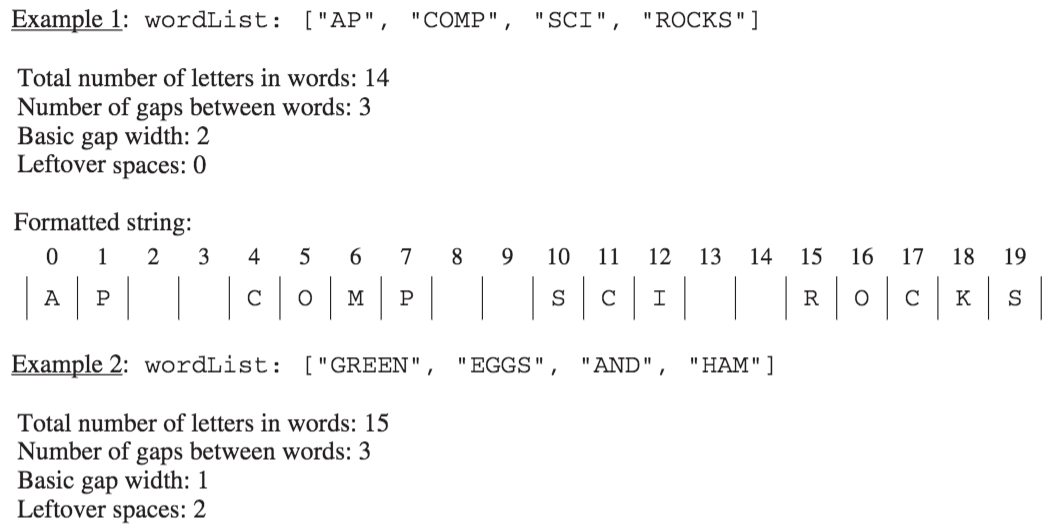
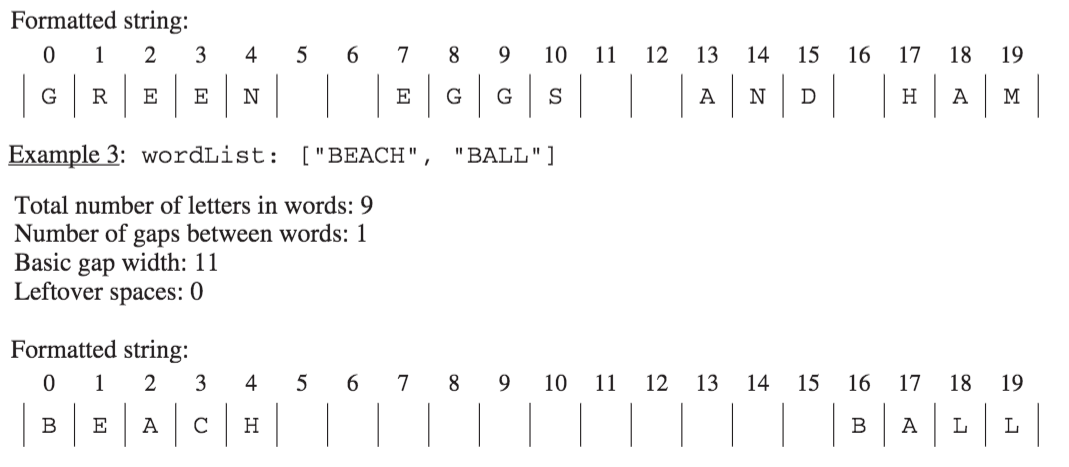
This question involves the process of taking a list of words, called wordList, and producing a formatted string of a specified length. The list wordList contains at least two words, consisting of letters only. When the formatted string is constructed, spaces are placed in the gaps between words so that as many spaces as possible are evenly distributed to each gap. The equal number of spaces inserted into each gap is referred to as the basic gap width. Any leftover spaces are inserted one at a time into the gaps from left to right until there are no more leftover spaces.
The following three examples illustrate these concepts. In each example, the list of words is to be placed into a formatted string of length 20.
Figure 14.2.5.
The leftover spaces are inserted one at a time between the words from left to right until there are no more leftover spaces. In this example, the first two gaps get an extra space.
Figure 14.2.6.
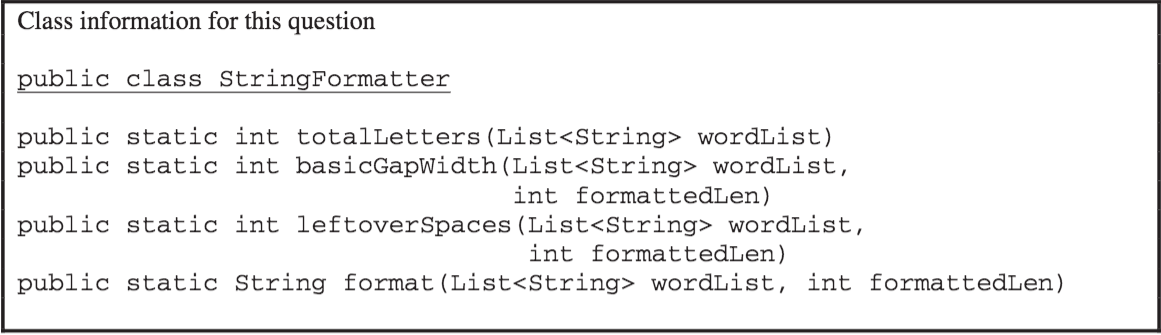
You will implement three static methods in a class named StringFormatter that is not shown.

Subsection 14.2.7.1 Part A

(a) Write the StringFormatter method totalLetters, which returns the total number of letters in the words in its parameter wordList. For example, if the variableList<String> words is [β€œA”, β€œfrog”, β€œis”],then the call StringFormatter.totalLetters(words) returns 7. You may assume that all words in wordList consist of one or more letters.
Complete method totalLetters below.
/** Returns the total number of letters in wordList.
*  Precondition: wordList contains at least two words, consisting of letters only.
*/
public static int totalLetters(List<String> wordList)

Subsection 14.2.7.2 How to Solve Part A

We need to return the total number of letters for all of the strings in wordList. We will need to create an integer variable to keep track of the number of letters and initialize it to 0. Then we will loop through all of the strings in wordList and add the length of the current string to the number of letters. When the loop is finished we will return the number of letters.
Activity 14.2.25.
Which loop would be best for this problem?
  • while
  • A while loop is the best choice when you don’t know the number of times you need to loop.
  • for
  • You could use a for loop, but there is a more concise option since you are not changing any values of wordList.
  • for-each
  • Correct! A for-each loop is the most concise way to access every string in wordList to keep track of numLetters
Activity 14.2.26.
What is the correct way to access the length of a String str?
  • str.size()
  • .size() is not the correct method call to find the length of a string. .size() is used with ArrayLists. Try again!
  • str.length()
  • Correct! str.length() will return the length of String str.
  • str.length
  • Almost! length() is a method call, so parentheses are required.

Subsection 14.2.7.3 Put the Code in Order

Activity 14.2.27.
The following has the correct code to solve this problem, but also contains extra code that isn’t needed in a correct solution. Drag the needed blocks from the left into the correct order on the right and indent them as well. Check your solution by clicking on the Check button. You will be told if any of the blocks are in the wrong or are in the wrong order. You will also be told if the indention is wrong.

Subsection 14.2.7.4 Write the Code

Activity 14.2.28.
Finish writing the totalLetters method below so that it returns the number of letters for all the strings in wordList. The main method below will test your code to check that you solved it correctly.

Subsection 14.2.8 Free Response - StringFormatter B

The following is a free response question from 2016. It was question 4 part B on the exam. You can see all the free response questions from past exams at https://apstudents.collegeboard.org/courses/ap-computer-science-a/free-response-questions-by-year.
This question involves the process of taking a list of words, called wordList, and producing a formatted string of a specified length. The list wordList contains at least two words, consisting of letters only. When the formatted string is constructed, spaces are placed in the gaps between words so that as many spaces as possible are evenly distributed to each gap. The equal number of spaces inserted into each gap is referred to as the basic gap width. Any leftover spaces are inserted one at a time into the gaps from left to right until there are no more leftover spaces.
The following three examples illustrate these concepts. In each example, the list of words is to be placed into a formatted string of length 20.
Figure 14.2.7.

Subsection 14.2.8.1 Part B

  1. Write the StringFormatter method basicGapWidth, which returns the basic gap width as defined above.
Figure 14.2.8.
Assume that totalLetters works as specified regardless of what you wrote in part (a). You must use totalLetters appropriately to receive full credit.
Complete method basicGapWidth below.
/** Returns the basic gap width when wordList is used to produce
*  a formatted string of formattedLen characters.
*  Precondition: wordList contains at least two words, consisting of letters only.
*            formattedLen is large enough for all the words and gaps.
*/
public static int basicGapWidth(List<String> wordList,
                                 int formattedLen)

Subsection 14.2.8.2 How to Solve Part B

To calculate basicGapWidth we need to find the number of spaces left after the characters fill the formattedLen and divide that by the number of gaps between words. We can use totalLetters (written in part A) to get the total number of characters for all the strings in wordList. The number of gaps between words is the number of words in wordList minus 1. The basicGapWidth is the number of spaces left divided by the number of gaps between words. Remember that if we do an integer division any fractional part will be thrown away, which is what we want to happen in this case.
For example, if formattedLen is 20 and wordList is [β€œAP”, β€œCOMP”, β€œSCI”, β€œROCKS”] then the number of spaces left is 20 - 14 = 6 and the number of gaps is 4 - 1 = 3. The result is 6 / 3 = 2.
If formattedLen is 20 and wordList is [β€œGREEN”, β€œEGGS”, β€œAND”, β€œHAM”] then the number of spaces left is 20 - 15 = 5 and the number of gaps is 4 - 1 = 3 so 5 / 3 = 1. There will be two extra spaces left over.
If formattedLen is 20 and wordList is [β€œBEACH”, β€œBALL”] then the number of spaces left is 20 - 9 = 11 and the number of gaps is 2 - 1 = 1 so 11 / 1 = 11.
Activity 14.2.29.
How do you access the number of items in an ArrayList<String> called list?
  • list.length()
  • .length() is used with Arrays to return the number of items. Try again!
  • list.size
  • .size is a method call, so parentheses are required.
  • list.size()
  • Correct! ArrayLists use .size() to return the number of items in a list.
Activity 14.2.30.
True or False: A loop is required to correctly solve this problem.
  • True
  • Incorrect. You do not need to access any of the individual items in wordList.
  • False
  • Correct! All you need is the size of wordList, which you can find without a loop.

Subsection 14.2.8.3 Put the Code in Order

Activity 14.2.31.
The following has the correct code to solve this problem, but also contains extra code that isn’t needed in a correct solution. Drag the needed blocks from the left into the correct order on the right and indent them as well. Check your solution by clicking on the Check button. You will be told if any of the blocks are in the wrong or are in the wrong order. You will also be told if the indention is wrong.

Subsection 14.2.8.4 Write the Code

Activity 14.2.32.
Finish writing the basicGapWidth method below so that it returns the size that the gap should be. The main method below will test your code to check that you solved it correctly.

Subsection 14.2.9 Free Response - Delimiters A

The following is a free response question from 2019. It was question 3 part A on the exam. You can see all the free response questions from past exams at https://apstudents.collegeboard.org/courses/ap-computer-science-a/free-response-questions-by-year.
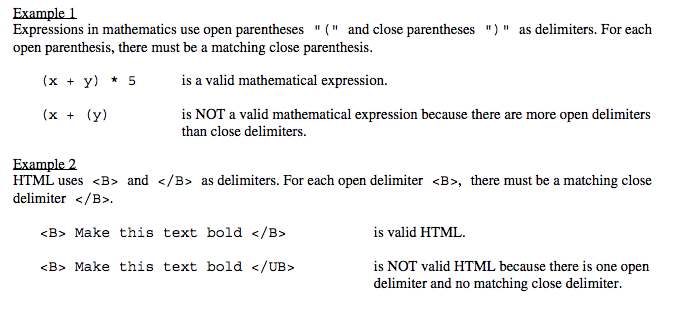
3. Many encoded strings contain delimiters. A delimiter is a non-empty string that acts as a boundary between different parts of a larger string. The delimiters involved in this question occur in pairs that must be balanced, with each pair having an open delimiter and a close delimiter. There will be only one type of delimiter for each string. The following are examples of delimiters.
Figure 14.2.9.
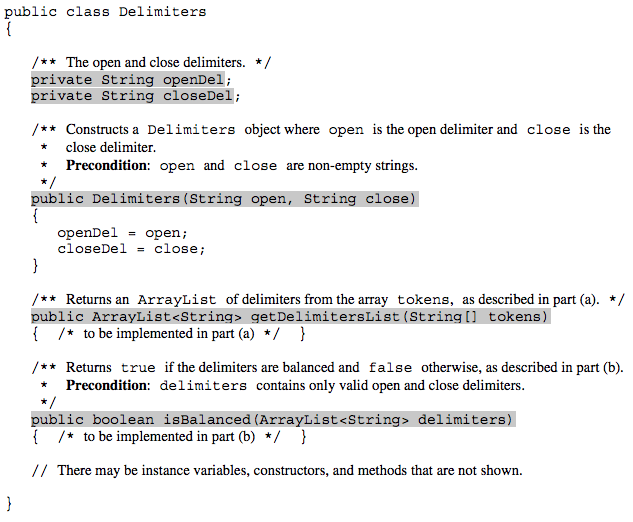
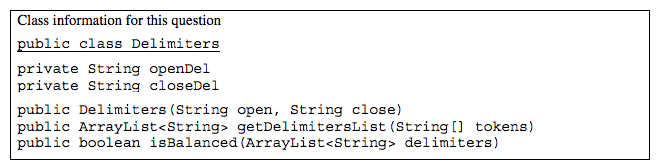
In this question, you will write two methods in the following Delimiters class.
Figure 14.2.10.

Subsection 14.2.9.1 Part A

(a) A string containing text and possibly delimiters has been split into tokens and stored in String[] tokens. Each token is either an open delimiter, a close delimiter, or a substring that is not a delimiter. You will write the method getDelimitersList, which returns an ArrayList containing all the open and close delimiters found in tokens in their original order.
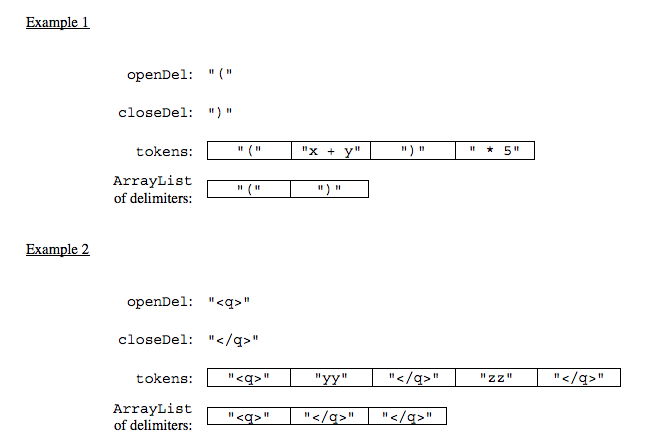
The following examples show the contents of an ArrayList returned by getDelimitersList for different open and close delimiters and different tokens arrays.
Figure 14.2.11.
Figure 14.2.12.

Subsection 14.2.9.2 Check your understanding of the question

There are problems in this section that can help you check your understanding of the question. You can skip these if you think you know what to do already.
Activity 14.2.33.
Activity 14.2.34.
What type is tokens?
  • array
  • tokens is an array of Strings
  • List
  • Check again
  • String
  • Check again
  • ArrayList
  • Check again
Activity 14.2.35.
What type of thing is in tokens?
  • int
  • Check again.
  • String
  • Yes, tokens is an array of strings.
  • List
  • Check again.
  • double
  • Check again.
Activity 14.2.36.
What type of thing does getDelimitersList return?
  • int
  • Check again.
  • String
  • Check again.
  • ArrayList
  • It returns a list of strings, which is actually an ArrayList.
  • double
  • Check again.

Subsection 14.2.9.3 How to Solve Part A

Here is the question again.
A string containing text and possibly delimiters has been split into tokens and stored in String[] tokens. Each token is either an open delimiter, a close delimiter, or a substring that is not a delimiter. You will write the method getDelimitersList, which returns an ArrayList containing all the open and close delimiters found in tokens in their original order.
Activity 14.2.37.
Explain in plain English what your code will have to do to answer this question. Use the variable names given above.
This section contains a plain English explanation of one way to solve this problem as well as problems that test your understanding of how to write the code to do those things.
The method getDelimtersList needs to return an ArrayList of Strings containing all the open and close delimiters found in the tokens array in their original order.
This implies that the code needs to create an empty ArrayList of type String. Let’s call it delList. The code will loop through the strings in the array tokens from the start to the end and if the current string is equal to either the openDel or closeDel it adds that string to the end of delList. Finally it should return delList.
Activity 14.2.38.
Which Java expression correctly creates an empty ArrayList of type String called delList?
  • delList = new ArrayList<String>();
  • You must declare the type for delList
  • ArrayList<String> delList = new ArrayList<String>;
  • You must include the () when creating a new object
  • ArrayList<String> delList = new List<String>();
  • You must create an ArrayList using a concrete subclass like ArrayList
  • ArrayList<String> delList = new ArrayList<String>();
  • The declared type must be the same or a parent class of the actual type.
Activity 14.2.39.
Which loop would be best for this situation?
  • while
  • You can use a while loop, but it would make your code more error prone than another type of loop
  • for
  • You can use a for loop, but it would make your code more error prone than another type of loop
  • for-each
  • Since you need to loop through all the strings in the array tokens in order, a for-each loop would be best
  • nested for loop
  • There is no need for a nested loop in this situation
Activity 14.2.40.
Which code adds item to the end of the list called delList?
  • delList.set(0,item);
  • This would change the value at index 0 to item.
  • delList.add(0,item);
  • This would add item at index 0 and move right any other items in the list
  • delList.remove(item);
  • This would remove item from the list
  • delList.add(item);
  • This adds item to the end of the list
Activity 14.2.41.
Which code correctly checks if token is equal to (has the same characters as) openDel or closeDel?
  • if (token == openDel && token == closeDel)
  • You should use .equals with strings and || for or
  • if (token == openDel || token == closeDel)
  • You should use .equals with strings
  • if (token.equals(openDel) && token.equals(closeDel))
  • You should use || for or not &&
  • if (token.equals(openDel) || token.equals(closeDel))
  • This returns true when openDel or closeDel have the same characters as token

Subsection 14.2.9.4 Write the Code

A string containing text and possibly delimiters has been split into tokens and stored in String[] tokens. Each token is either an open delimiter, a close delimiter, or a substring that is not a delimiter. You will write the method getDelimitersList, which returns an ArrayList containing all the open and close delimiters found in tokens in their original order.
Activity 14.2.42.
Write the method getDelimitersList in the code below. The main method contains code to test your solution.

Subsection 14.2.10 Free Response - Delimiters B

Subsection 14.2.10.1 Part B

(b) Write the method isBalanced, which returns true when the delimiters are balanced and returns false otherwise. The delimiters are balanced when both of the following conditions are satisfied; otherwise they are not balanced.
  1. When traversing the ArrayList from the first element to the last element, there is no point at which there are more close delimiters than open delimiters at or before that point.
  2. the total number of open delimiters is equal to the total number of close delimiters.
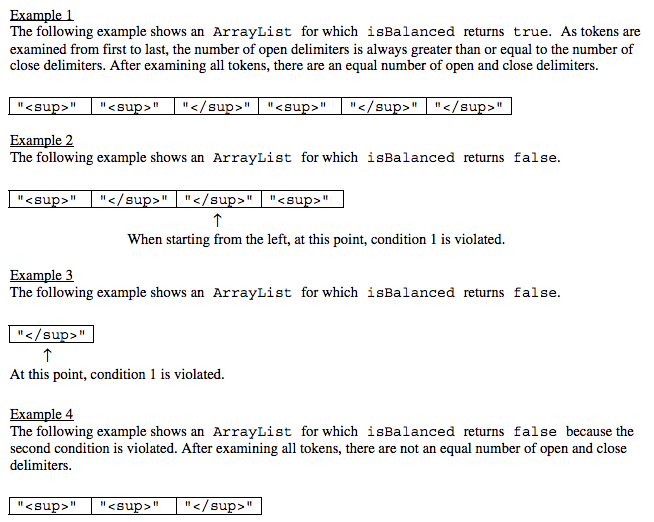
Consider a Delimiters object for which openDel` is "<sup>" and closeDel is "</sup>". The examples below show different ArrayList objects that could be returned by calls to getDelimitersList and the value that would be returned by a call to isBalanced.
Figure 14.2.13.

Subsection 14.2.10.2 Check your understanding of the Question

The problems in this section can help you check your understanding of part B. You can skip these if you think you know what to do already.
Activity 14.2.43.
What type does isBalanced return?
  • String
  • What type are false and true?
  • boolean
  • The values false and true are of type boolean.
  • int
  • In some languages false and true are represented by integers, but not in Java.
  • ArrayList
  • What type are false and true?
Activity 14.2.44.
What is the name of the variable the code will be looping through?
  • openDel
  • openDel holds the open delimiter
  • closeDel
  • closeDel holds the close delimiter
  • Delimiters
  • Delimiters is the class name
  • delimiters
  • delimiters is the variable which is passed to the isBalanced method

Subsection 14.2.10.3 How to Solve Part B

Here is the question again.
Write the method isBalanced, which returns true when the delimiters are balanced and returns false otherwise. The delimiters are balanced when both of the following conditions are satisfied; otherwise they are not balanced.
  1. When traversing the ArrayList<String> delimiters from the first element to the last element, there is no point at which there are more close delimiters than open delimiters at or before that point.
  2. the total number of open delimiters is equal to the total number of close delimiters.
Activity 14.2.45.
Explain in plain English what your code will have to do to answer this question. Use the names given above.
This section contains a plain English explanation of one way to solve this problem as well as problems that test your understanding of how to write the code to do those things.
The method isBalanced will loop through delimiters and keep track of the number of open and close delimiters we have found so far. To do that we can create two integer variables: totalOpen and totalClose and set them to 0 initially. Each time through the loop we will check if the current string which we will call currString is equal to openDel and if so increment totalOpen, otherwise if it is equal to closeDel increment totalClose. Next if totalClose > totalOpen the method should return false. A After the loop return totalOpen == totalClose. This will return true if they are equal and false otherwise.
Activity 14.2.46.
Which loop would be best for this situation?
  • while
  • You can use a while loop, but it would make your code more error prone than another type of loop
  • for
  • You can use a for loop, but it would make your code more error prone than another type of loop
  • for-each
  • Since you need to loop through all the strings in the ArrayList in order, a for-each loop would be best
  • nested for loop
  • There is no need for a nested loop in this situation
Activity 14.2.47.
Which Java expression correctly tests if currString is equal to openDel?
  • if (currString = openDel)
  • You must declare the type for delList
  • if (currString == openDel)
  • You must include the () when creating a new object
  • if (currString.equals(openDel))
  • You must create an ArrayList using a concrete subclass like ArrayList
  • if (currString.equal(openDel))
  • The declared type must be the same or a parent class of the actual type.

Subsection 14.2.10.4 Write the Code

Write the method isBalanced, which returns true when the delimiters are balanced and returns false otherwise. The delimiters are balanced when both of the following conditions are satisfied; otherwise they are not balanced.
  1. When traversing the ArrayList from the first element to the last element, there is no point at which there are more close delimiters than open delimiters at or before that point.
  2. the total number of open delimiters is equal to the total number of close delimiters.
Activity 14.2.48.
Write the method isBalanced in the code below. The main method contains code to test your solution.

Subsection 14.2.11 Free Response - Grid World A

The following is a free response question from 2013. It was question 3 part A on the exam. You can see all the free response questions from past exams at https://apstudents.collegeboard.org/courses/ap-computer-science-a/free-response-questions-by-year.
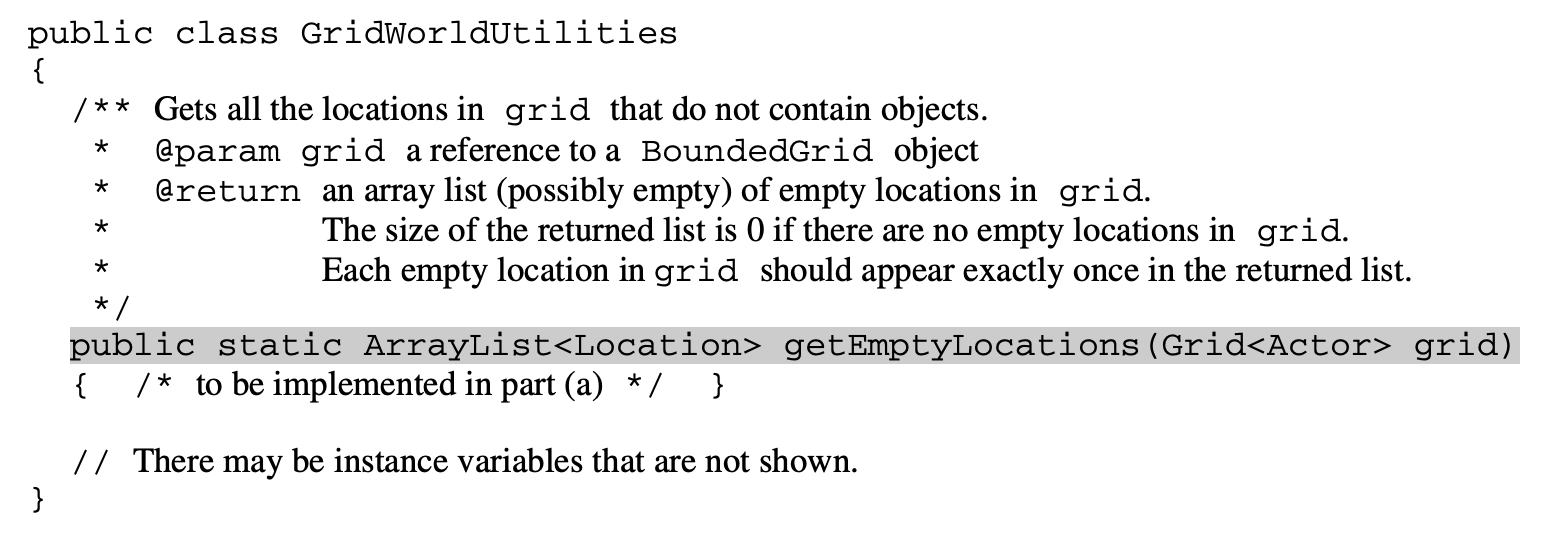
This question involves reasoning about the GridWorld case study that was formerly required knowledge for the APCSA exam. It is no longer expected that you know this information and it will be provided to you in this question. Because there is a lot of extra material that you need to read and understand, this question may seem more challenging and will require more time than a typical FRQ you would expect on your AP exam. It is still good practice nonetheless. In part (a) you will write a method to return an Arraylist of all empty Location objects in a given grid. The GridWorldUtilities class contains static methods. A partial declaration of the GridWorldUtilities class is shown below.
Figure 14.2.14.
In this question, you will write the GridWorldUtilities method getEmptyLocations. If there are no empty locations in grid, the method returns an empty Arraylist. Otherwise, it returns an Arraylist of all empty locations in grid. Each empty location should appear exactly once in the Arraylist.

Subsection 14.2.11.1 Necessary Preliminary Information

The GridWorld case study provided a graphical environment where visual objects inhabited and interacted in a two-dimensional grid (similar to GreenFoot). In this case study, students designed and created Actor objects, added them to Grid objects, and determined whether the Actor objects behaved according to their specifications. Since this case study is no longer in the AP Java curriculum, all the necessary documentation is provided below.
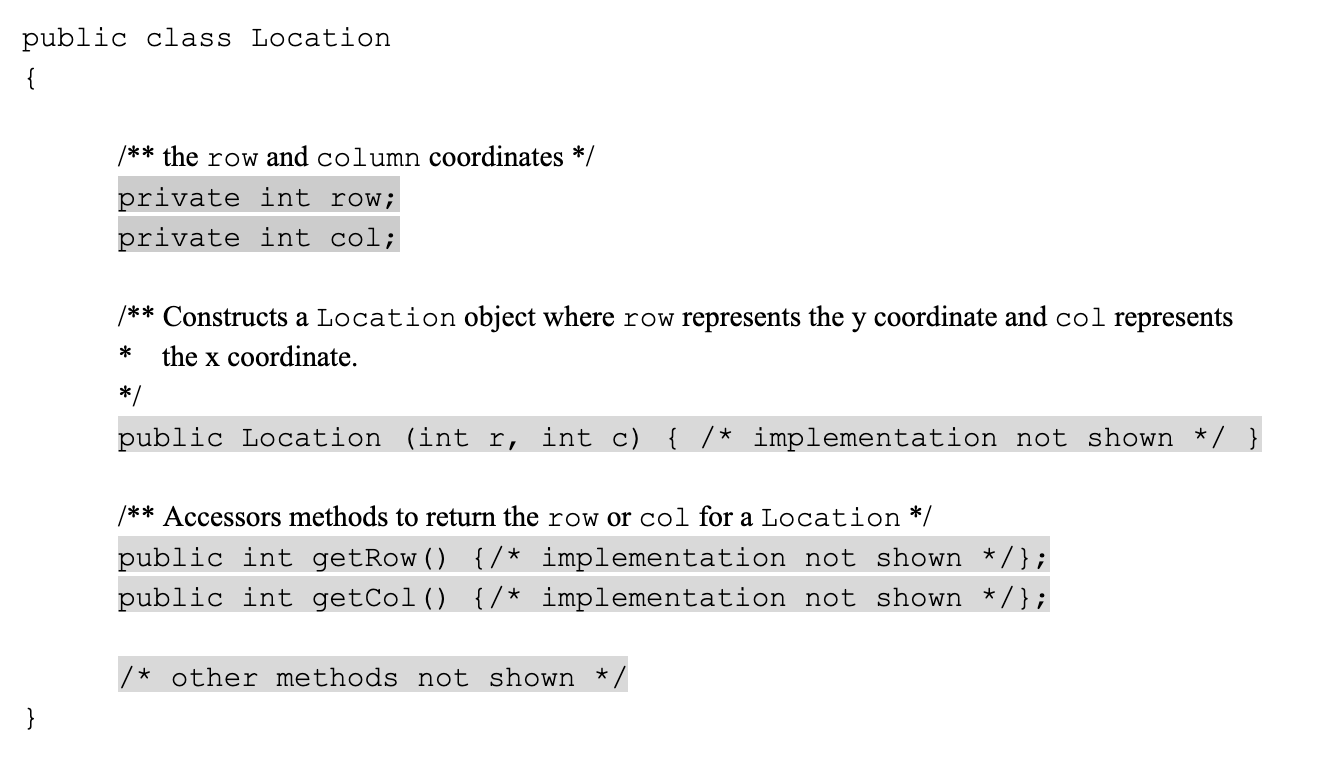
The first necessary class is the Location class. Every actor that appears in the Grid has a Location. The Location class encapsulates the coordinates for an Actor object’s position in a Grid.
Figure 14.2.15.
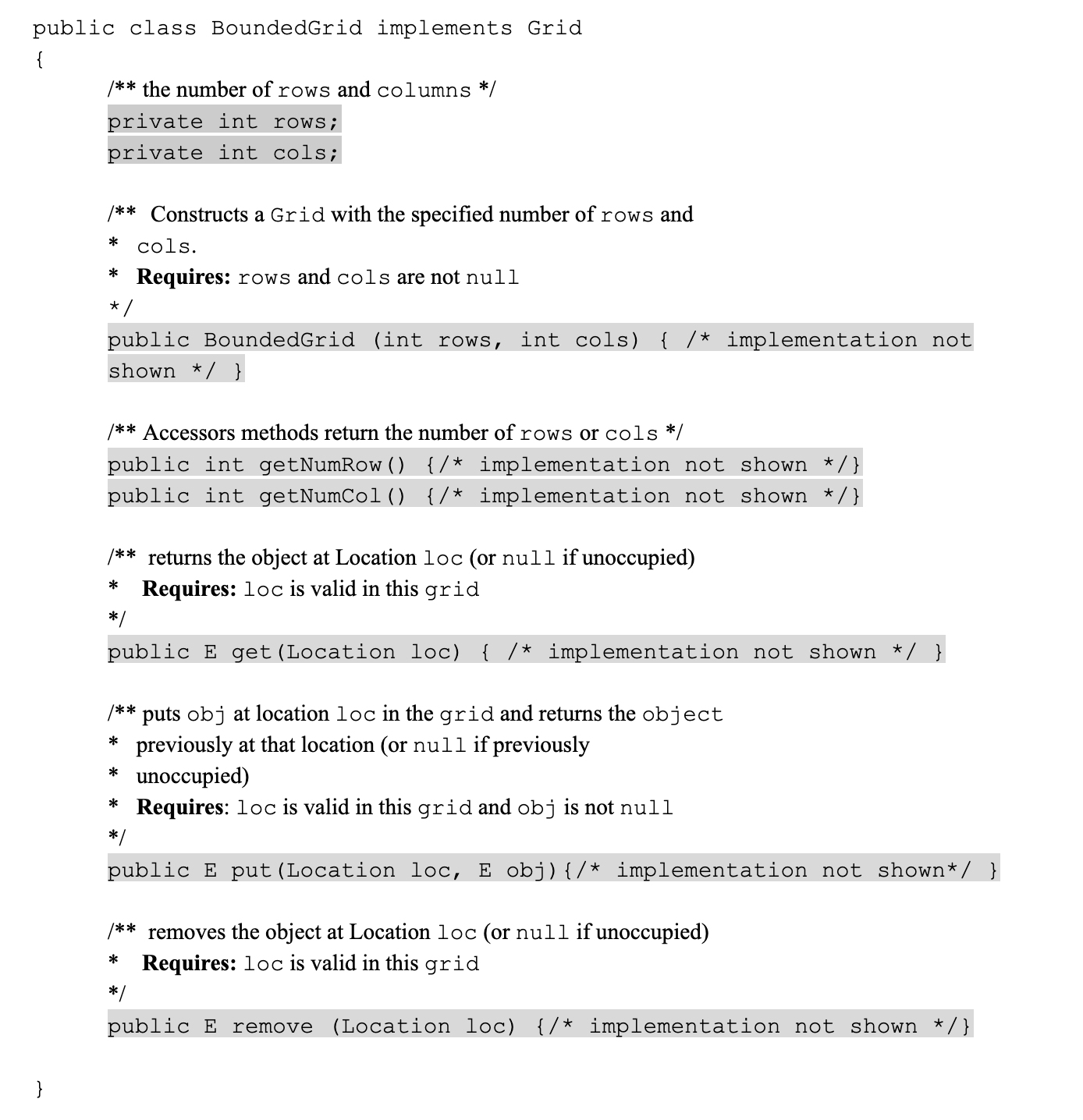
The next important part is the Grid Interface. You may be unfamiliar with interfaces so don’t worry too much about how they work. What you need to know is that the interface Grid<E> specifies the methods for any grid that contains objects of the type E which you choose at its initialization. For part A we will be working with the class BoundedGrid<E> which implements the Grid Interface. For this question, β€œE” will be a β€œLocation”
Figure 14.2.16.

Subsection 14.2.11.2 Check your understanding of the question

The problems in this section are to help you check your understanding and guide you towards a solution. You can skip these if you think you know what to do already.
Activity 14.2.49.
Activity 14.2.50.
In which class is the method getEmptyLocations written?
  • GridWorldUtilities
  • getEmptyLocations is a method inside of GridWorldUtilities.
  • getEmptyLocations
  • getEmptyLocations exists in a class, whereas getEmptyLocations is only a method.
  • BoundedGrid
  • BoundedGrid is not the correct class.
  • Actor
  • Actor is no the correct class.
Activity 14.2.51.
When this method returns an ArrayList, what is the datatype of the objects in the ArrayList?
  • Grid
  • Grid is the type of the parameter.
  • String
  • There are no strings in this problem.
  • Location
  • Correct, the ArrayList returned contains Location objects.
  • Actor
  • This is no the type of object the ArrayList holds.
Activity 14.2.52.
How can one find the height of the grid that is passed to this method?
  • .length
  • This call works for strings, but we aren’t working with strings.
  • .getSize()
  • This is not an applicable method for grid
  • .getHeight()
  • This does not exist.
  • .getNumRows()
  • Correct, this will return the height of the grid.
Activity 14.2.53.
How can one find the width of the grid that is passed to this method?
  • .getNumCols()
  • Correct, this will find the width of the grid.
  • .getNumRows()
  • This will find the height of the grid, but we’re looking for the width.
  • .getWidth()
  • This does not exist.
  • .length
  • This call works for strings, but we aren’t working with strings.

Subsection 14.2.11.3 How to Solve Part A

Here is the question again.
Write the GridWorldUtilities method getEmptyLocations. If there are no empty locations in grid, the method returns an empty Arraylist. Otherwise, it returns an Arraylist of all empty locations in grid. Each empty location should appear exactly once in the Arraylist.
Activity 14.2.54.
Explain in plain English what your code will have to do to answer this question. Use the variable names given above.
This section contains a plain English explanation of one way to solve this problem as well as problems that test your understanding of how to write the code to do those things.
The method getEmptyLocations needs to return an ArrayList of Location objects containing all the places in the grid that are empty.
This implies that the code needs to create an empty ArrayList of type Location. Let’s call it locs. We need to have our program loop through the squares in grid from the start to the end (without going out of bounds). If the current square is empty, we need to add that position to the end of locs. Finally our method should end by returning locs.
Activity 14.2.55.
Which Java expression correctly creates an empty ArrayList of type Location called locs?
  • locs = new ArrayList<Location>();
  • You must declare the type for locs
  • ArrayList<Location> locs = new ArrayList<Location>;
  • You must include the () when creating a new object
  • ArrayList<Location> locs = new List<Location>();
  • You must create an ArrayList using a concrete subclass like ArrayList
  • ArrayList<Location> locs = new ArrayList<Location>();
  • Correct!
Activity 14.2.56.
Which loop would be best for this situation?
  • nested for loop
  • Correct! This method will be the easiest to read and simplest to debug.
  • for
  • you cannot use a single for loop because you need to traverse 2 dimensions
  • for-each
  • you could use a nested for-each loop but it would make your code longer and less efficient, as well as harder to read.
  • while
  • you cannot use a single while loop because you need to traverse 2 dimensions
Activity 14.2.57.
Assuming we have our nested for loop that uses r and c to iterate through the grid, how do we initialize a Location object (called locToCheck) to add our ArrayList locs?
  • locToCheck = new Location (r,c);
  • You need to assign a datatype to locToCheck on the left side of the initialization.
  • location locToCheck = location (r,c);
  • You need to state that you a creating a new object with the keyword, "new".
  • Location locToCheck = new Location (r,c);
  • Correct!
  • location locToCheck = new location (r,c);
  • Watch your capitalization! the Location class needs to be capitalized.
Activity 14.2.58.
How can you check if the current location, β€œlocToCheck” is empty?
  • if (locToCheck == null)
  • locToCheck currently only contains the location in the grid, not what object is actually located there
  • if (grid.get(locToCheck) == null)
  • Correct!
  • if (locs.get(locToCheck) == 0)
  • We want locs to contain all the empty locations so it wouldn’t make sense to call locs.get(locToCheck).
  • if (grid.get(locToCheck) == 0)
  • The grid could contain an integer object equal to 0 so that would mean the grid isn’t empty at that spot.

Subsection 14.2.11.4 Write the Code

In this question, you will write the GridWorldUtilities method getEmptyLocations. If there are no empty locations in grid, the method returns an empty Arraylist. Otherwise, it returns an Arraylist of all empty locations in grid. Each empty location should appear exactly once in the Arraylist.
Write the method getEmptyLocations in the code below.
Activity 14.2.59.
Complete the getEmptyLocations() method below. If there are no empty locations in grid, the method returns an empty Arraylist. Otherwise, it returns an Arraylist of all empty locations in grid. Each empty location should appear exactly once in the Arraylist.
Data: GridWorld.jar
import java.util.ArrayList;

/**
 * Grid provides an interface for a two-dimensional, grid-like
 * environment containing arbitrary objects.
 */
public interface Grid<E>
{
    /**
     * Returns the number of rows in this grid.
     * @return the number of rows, or -1 if this grid is unbounded
     */
    int getNumRows();

    /**
     * Returns the number of columns in this grid.
     * @return the number of columns, or -1 if this grid is unbounded
     */
    int getNumCols();

    /**
     * Checks whether a location is valid in this grid.
     * Precondition: loc is not null
     * @param loc the location to check
     * @return true if loc is valid in this grid,
     * false otherwise
     */
    boolean isValid(Location loc);

    /**
     * Puts an object at a given location in this grid.
     * Precondition: (1) loc is valid in this grid (2)
     * obj is not null
     * @param loc the location at which to put the object
     * @param obj the new object to be added
     * @return the object previously at loc (or null
     * if the location was previously unoccupied)
     */
    E put(Location loc, E obj);

    /**
     * Removes the object at a given location from this grid.
     * Precondition: loc is valid in this grid
     * @param loc the location of the object that is to be removed
     * @return the object that was removed (or null if the location
     *  is unoccupied)
     */
    E remove(Location loc);

    /**
     * Returns the object at a given location in this grid.
     * Precondition: loc is valid in this grid
     * @param loc a location in this grid
     * @return the object at location loc (or null
     *  if the location is unoccupied)
     */
    E get(Location loc);

    /**
     * Gets the locations in this grid that contain objects.
     * @return an array list of all occupied locations in this grid
     */
    ArrayList<Location> getOccupiedLocations();

    /**
     * Gets the valid locations adjacent to a given location in all eight
     * compass directions (north, northeast, east, southeast, south, southwest,
     * west, and northwest).
     * Precondition: loc is valid in this grid
     * @param loc a location in this grid
     * @return an array list of the valid locations adjacent to loc
     * in this grid
     */
    ArrayList<Location> getValidAdjacentLocations(Location loc);

    /**
     * Gets the valid empty locations adjacent to a given location in all eight
     * compass directions (north, northeast, east, southeast, south, southwest,
     * west, and northwest).
     * Precondition: loc is valid in this grid
     * @param loc a location in this grid
     * @return an array list of the valid empty locations adjacent to
     * loc in this grid
     */
    ArrayList<Location> getEmptyAdjacentLocations(Location loc);

    /**
     * Gets the valid occupied locations adjacent to a given location in all
     * eight compass directions (north, northeast, east, southeast, south,
     * southwest, west, and northwest).
     * Precondition: loc is valid in this grid
     * @param loc a location in this grid
     * @return an array list of the valid occupied locations adjacent to
     * loc in this grid
     */
    ArrayList<Location> getOccupiedAdjacentLocations(Location loc);

    /**
     * Gets the neighboring occupants in all eight compass directions (north,
     * northeast, east, southeast, south, southwest, west, and northwest).
     *
     * Precondition: loc is valid in this grid
     * @param loc a location in this grid
     * @return returns an array list of the objects in the occupied locations
     * adjacent to loc in this grid
     */
    ArrayList<E> getNeighbors(Location loc);
}
 // End of Class Grid

// Location Class

/**
 * A Location object represents the row and column of a location
 * in a two-dimensional grid.
 * The API of this class is testable on the AP CSA and AB exams.
 */
public class Location implements Comparable
{
    private int row; // row location in grid
    private int col; // column location in grid

    /**
     * The turn angle for turning 90 degrees to the left.
     */
    public static final int LEFT = -90;
    /**
     * The turn angle for turning 90 degrees to the right.
     */
    public static final int RIGHT = 90;
    /**
     * The turn angle for turning 45 degrees to the left.
     */
    public static final int HALF_LEFT = -45;
    /**
     * The turn angle for turning 45 degrees to the right.
     */
    public static final int HALF_RIGHT = 45;
    /**
     * The turn angle for turning a full circle.
     */
    public static final int FULL_CIRCLE = 360;
    /**
     * The turn angle for turning a half circle.
     */
    public static final int HALF_CIRCLE = 180;
    /**
     * The turn angle for making no turn.
     */
    public static final int AHEAD = 0;

    /**
     * The compass direction for north.
     */
    public static final int NORTH = 0;
    /**
     * The compass direction for northeast.
     */
    public static final int NORTHEAST = 45;
    /**
     * The compass direction for east.
     */
    public static final int EAST = 90;
    /**
     * The compass direction for southeast.
     */
    public static final int SOUTHEAST = 135;
    /**
     * The compass direction for south.
     */
    public static final int SOUTH = 180;
    /**
     * The compass direction for southwest.
     */
    public static final int SOUTHWEST = 225;
    /**
     * The compass direction for west.
     */
    public static final int WEST = 270;
    /**
     * The compass direction for northwest.
     */
    public static final int NORTHWEST = 315;

    /**
     * Constructs a location with given row and column coordinates.
     * @param r the row
     * @param c the column
     */
    public Location(int r, int c)
    {
        row = r;
        col = c;
    }

    /**
     * Gets the row coordinate.
     * @return the row of this location
     */
    public int getRow()
    {
        return row;
    }

    /**
     * Gets the column coordinate.
     * @return the column of this location
     */
    public int getCol()
    {
        return col;
    }

    /**
     * Gets the adjacent location in any one of the eight compass directions.
     * @param direction the direction in which to find a neighbor location
     * @return the adjacent location in the direction that is closest to
     * <tt>direction</tt>
     */
    public Location getAdjacentLocation(int direction)
    {
        // reduce mod 360 and round to closest multiple of 45
        int adjustedDirection = (direction + HALF_RIGHT / 2) % FULL_CIRCLE;
        if (adjustedDirection < 0)
            adjustedDirection += FULL_CIRCLE;

        adjustedDirection = (adjustedDirection / HALF_RIGHT) * HALF_RIGHT;
        int dc = 0;
        int dr = 0;
        if (adjustedDirection == EAST)
            dc = 1;
        else if (adjustedDirection == SOUTHEAST)
        {
            dc = 1;
            dr = 1;
        }
        else if (adjustedDirection == SOUTH)
            dr = 1;
        else if (adjustedDirection == SOUTHWEST)
        {
            dc = -1;
            dr = 1;
        }
        else if (adjustedDirection == WEST)
            dc = -1;
        else if (adjustedDirection == NORTHWEST)
        {
            dc = -1;
            dr = -1;
        }
        else if (adjustedDirection == NORTH)
            dr = -1;
        else if (adjustedDirection == NORTHEAST)
        {
            dc = 1;
            dr = -1;
        }
        return new Location(getRow() + dr, getCol() + dc);
    }

    /**
     * Returns the direction from this location toward another location. The
     * direction is rounded to the nearest compass direction.
     * @param target a location that is different from this location
     * @return the closest compass direction from this location toward
     * target
     */
    public int getDirectionToward(Location target)
    {
        int dx = target.getCol() - getCol();
        int dy = target.getRow() - getRow();
        // y axis points opposite to mathematical orientation
        int angle = (int) Math.toDegrees(Math.atan2(-dy, dx));

        // mathematical angle is counterclockwise from x-axis,
        // compass angle is clockwise from y-axis
        int compassAngle = RIGHT - angle;
        // prepare for truncating division by 45 degrees
        compassAngle += HALF_RIGHT / 2;
        // wrap negative angles
        if (compassAngle < 0)
            compassAngle += FULL_CIRCLE;
        // round to nearest multiple of 45
        return (compassAngle / HALF_RIGHT) * HALF_RIGHT;
    }

    /**
     * Indicates whether some other Location object is "equal to"
     * this one.
     * @param other the other location to test
     * @return true if other is a
     * Location with the same row and column as this location;
     * false otherwise
     */
    public boolean equals(Object other)
    {
        if (!(other instanceof Location))
            return false;

        Location otherLoc = (Location) other;
        return getRow() == otherLoc.getRow() && getCol() == otherLoc.getCol();
    }

    /**
     * Generates a hash code.
     * @return a hash code for this location
     */
    public int hashCode()
    {
        return getRow() * 3737 + getCol();
    }

    /**
     * Compares this location to other for ordering. Returns a
     * negative integer, zero, or a positive integer as this location is less
     * than, equal to, or greater than other. Locations are
     * ordered in row-major order.
     * (Precondition: other is a Location object.)
     * @param other the other location to test
     * @return a negative integer if this location is less than
     * other, zero if the two locations are equal, or a positive
     * integer if this location is greater than other
     */
    public int compareTo(Object other)
    {
        Location otherLoc = (Location) other;
        if (getRow() < otherLoc.getRow())
            return -1;
        if (getRow() > otherLoc.getRow())
            return 1;
        if (getCol() < otherLoc.getCol())
            return -1;
        if (getCol() > otherLoc.getCol())
            return 1;
        return 0;
    }

    /**
     * Creates a string that describes this location.
     * @return a string with the row and column of this location, in the format
     * (row, col)
     */
    public String toString()
    {
        return "(" + getRow() + ", " + getCol() + ")";
    }
}

// End of Class

// BoundedGrid Class

import java.util.ArrayList;

/**
 * A BoundedGrid is a rectangular grid with a finite number of
 * rows and columns.
 * The implementation of this class is testable on the AP CS AB exam.
 */
public class BoundedGrid<E> extends AbstractGrid<E>
{
    private Object[][] occupantArray; // the array storing the grid elements

    /**
     * Constructs an empty bounded grid with the given dimensions.
     * (Precondition: rows > 0 and cols > 0.)
     * @param rows number of rows in BoundedGrid
     * @param cols number of columns in BoundedGrid
     */
    public BoundedGrid(int rows, int cols)
    {
        if (rows <= 0)
            throw new IllegalArgumentException("rows <= 0");
        if (cols <= 0)
            throw new IllegalArgumentException("cols <= 0");
        occupantArray = new Object[rows][cols];
    }

    public int getNumRows()
    {
        return occupantArray.length;
    }

    public int getNumCols()
    {
        // Note: according to the constructor precondition, numRows() > 0, so
        // theGrid[0] is non-null.
        return occupantArray[0].length;
    }

    public boolean isValid(Location loc)
    {
        return 0 <= loc.getRow() && loc.getRow() < getNumRows()
                && 0 <= loc.getCol() && loc.getCol() < getNumCols();
    }

    public ArrayList<Location> getOccupiedLocations()
    {
        ArrayList<Location> theLocations = new ArrayList<Location>();

        // Look at all grid locations.
        for (int r = 0; r < getNumRows(); r++)
        {
            for (int c = 0; c < getNumCols(); c++)
            {
                // If there's an object at this location, put it in the array.
                Location loc = new Location(r, c);
                if (get(loc) != null)
                    theLocations.add(loc);
            }
        }

        return theLocations;
    }

    @SuppressWarnings("unchecked")
    public E get(Location loc)
    {
        if (!isValid(loc))
            throw new IllegalArgumentException("Location " + loc
                    + " is not valid");
        return (E) occupantArray[loc.getRow()][loc.getCol()]; // unavoidable warning
    }

    public E put(Location loc, E obj)
    {
        if (!isValid(loc))
            throw new IllegalArgumentException("Location " + loc
                    + " is not valid");
        if (obj == null)
            throw new NullPointerException("obj == null");

        // Add the object to the grid.
        E oldOccupant = get(loc);
        occupantArray[loc.getRow()][loc.getCol()] = obj;
        return oldOccupant;
    }

    public E remove(Location loc)
    {
        if (!isValid(loc))
            throw new IllegalArgumentException("Location " + loc
                    + " is not valid");

        // Remove the object from the grid.
        E r = get(loc);
        occupantArray[loc.getRow()][loc.getCol()] = null;
        return r;
    }
}

// End of Class

// Class AbstractGrid

import java.util.ArrayList;

/**
 * AbstractGrid contains the methods that are common to grid
 * implementations.
 * The implementation of this class is testable on the AP CS AB exam.
 */
public abstract class AbstractGrid<E> implements Grid<E>
{
    public ArrayList<E> getNeighbors(Location loc)
    {
        ArrayList<E> neighbors = new ArrayList<E>();
        for (Location neighborLoc : getOccupiedAdjacentLocations(loc))
            neighbors.add(get(neighborLoc));
        return neighbors;
    }

    public ArrayList<Location> getValidAdjacentLocations(Location loc)
    {
        ArrayList<Location> locs = new ArrayList<Location>();

        int d = Location.NORTH;
        for (int i = 0; i < Location.FULL_CIRCLE / Location.HALF_RIGHT; i++)
        {
            Location neighborLoc = loc.getAdjacentLocation(d);
            if (isValid(neighborLoc))
                locs.add(neighborLoc);
            d = d + Location.HALF_RIGHT;
        }
        return locs;
    }

    public ArrayList<Location> getEmptyAdjacentLocations(Location loc)
    {
        ArrayList<Location> locs = new ArrayList<Location>();
        for (Location neighborLoc : getValidAdjacentLocations(loc))
        {
            if (get(neighborLoc) == null)
                locs.add(neighborLoc);
        }
        return locs;
    }

    public ArrayList<Location> getOccupiedAdjacentLocations(Location loc)
    {
        ArrayList<Location> locs = new ArrayList<Location>();
        for (Location neighborLoc : getValidAdjacentLocations(loc))
        {
            if (get(neighborLoc) != null)
                locs.add(neighborLoc);
        }
        return locs;
    }

    /**
     * Creates a string that describes this grid.
     * @return a string with descriptions of all objects in this grid (not
     * necessarily in any particular order), in the format {loc=obj, loc=obj,
     * ...}
     */
        public String toString()
        {
            String s = "{";
            for (Location loc : getOccupiedLocations())
            {
                if (s.length() > 1)
                    s += ", ";
                s += loc + "=" + get(loc);
            }
            return s + "}";
        }
}

You have attempted of activities on this page.