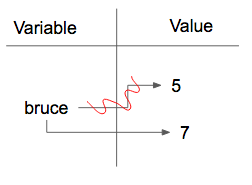
As we have mentioned previously, it is legal to make more than one assignment to the same variable. A new assignment makes an existing variable refer to a new value (and stop referring to the old value).
The first time
bruce is printed, its value is 5, and the second time, its value is 7. The assignment statement changes the value (the object) that
bruce refers to.
Here is what
reassignment looks like in a reference diagram:
It is important to note that in mathematics, a statement of equality is always true. If
a is equal to b now, then
a will always equal to b. In Python, an assignment statement can make two variables refer to the same object and therefore have the same value. They appear to be equal. However, because of the possibility of reassignment, they don’t have to stay that way:
Line 4 changes the value of
a but does not change the value of
b, so they are no longer equal. We will have much more to say about equality in a later chapter.
Subsection 3.14.2 Updating Variables
One of the most common forms of reassignment is an
update where the new value of the variable depends on the old. For example,
This means get the current value of x, add one, and then update x with the new value. The new value of x is the old value of x plus 1. Although this assignment statement may look a bit strange, remember that executing assignment is a two-step process. First, evaluate the right-hand side expression. Second, let the variable name on the left-hand side refer to this new resulting object. The fact that
x appears on both sides does not matter. The semantics of the assignment statement makes sure that there is no confusion as to the result. The visualizer makes this very clear.
Checkpoint 3.14.4.
There was once a (temporary) Runestone exercise here, which would only render in
HTML output, and never in static output forms. That (temporary) device is no longer supported as of 2025-11-04, since the exercise should now be authored in supported PreTeXt syntax. You might alert the author to this situation.
If you try to update a variable that doesn’t exist, you get an error because Python evaluates the expression on the right side of the assignment operator before it assigns the resulting value to the name on the left. Before you can update a variable, you have to
initialize it, usually with a simple assignment. In the above example,
x was initialized to 6.
Updating a variable by adding something is called an
increment; subtracting is called a
decrement. Sometimes programmers talk about incrementing or decrementing without specifying by how much; when they do they usually mean by 1. Sometimes programmers also talk about
bumping a variable, which means the same as incrementing it by 1.
Incrementing and decrementing are such common operations that programming languages often include special syntax for it. In Python
+= is used for incrementing, and
-= for decrementing. In some other languages, there is even a special syntax
++ and
-- for incrementing or decrementing by 1. Python does not have such a special syntax. To increment x by 1 you have to write
x += 1 or
x = x + 1.🔗
Imagine that we wanted to not increment by one each time but instead add together the numbers one through ten, but only one at a time.
After the initial statement, where we assign
s to 1, we can add the current value of
s and the next number that we want to add (2 all the way up to 10) and then finally reassign that that value to
s so that the variable is updated after each line in the code. This will be tedious when we have many things to add together. Later you’ll learn about an easier way to do this kind of task.
Checkpoint 3.14.5.
What is printed when the following statements execute?
x = 12
x = x - 1
print(x)
Checkpoint 3.14.6.
What is printed when the following statements execute?
x = 12
x = x - 3
x = x + 5
x = x + 1
print(x)
Checkpoint 3.14.7.
Construct the code that will result in the value 134 being printed.
mybankbalance = 100
mybankbalance = mybankbalance + 34
print(mybankbalance)
Checkpoint 3.14.8.
Which of the following statements are equivalent?
-
x = x + y
-
x is updated to be the old value of x plus the value of y.
-
y += x
-
y is updated to be the old value of y plus the value of x.
-
x += x + y
-
This updates x to be its old value (because of the +=) plus its old value again (because of the x on the right side) plus the value of y, so it’s equivalent to x = x + x + y
-
x += y
-
x is updated to be the old value of x plus the value of y.
-
x++ y
-
++ is not a syntax that means anything in Python.