Section 1.7 Crafting Solutions
Computational problem solving involves breaking complex problems into manageable steps and organizing those steps into a clear plan. After identifying the inputs, processing, and outputs using the IPO model, the next task is to determine how the processing unfolds: what happens first, what decisions are made along the way, and what actions may repeat. Flowcharts and pseudocode provide two complementary ways to represent this logic, helping us visualize and describe a solution before translating it into code.
Flowcharts are visual representations of the steps involved in solving a problem. They help us see the big picture. Think of them as maps for your mind. They let you see the entire process at a glance, helping you understand how each piece fits together. Imagine being able to visualize your path to the solution—how cool is that?
Flowcharts use various symbols to denote different types of actions or steps in a process, connected by arrows that show the flow of the process. They are an excellent way to communicate ideas and processes to others, even if they do not have a deep technical background. 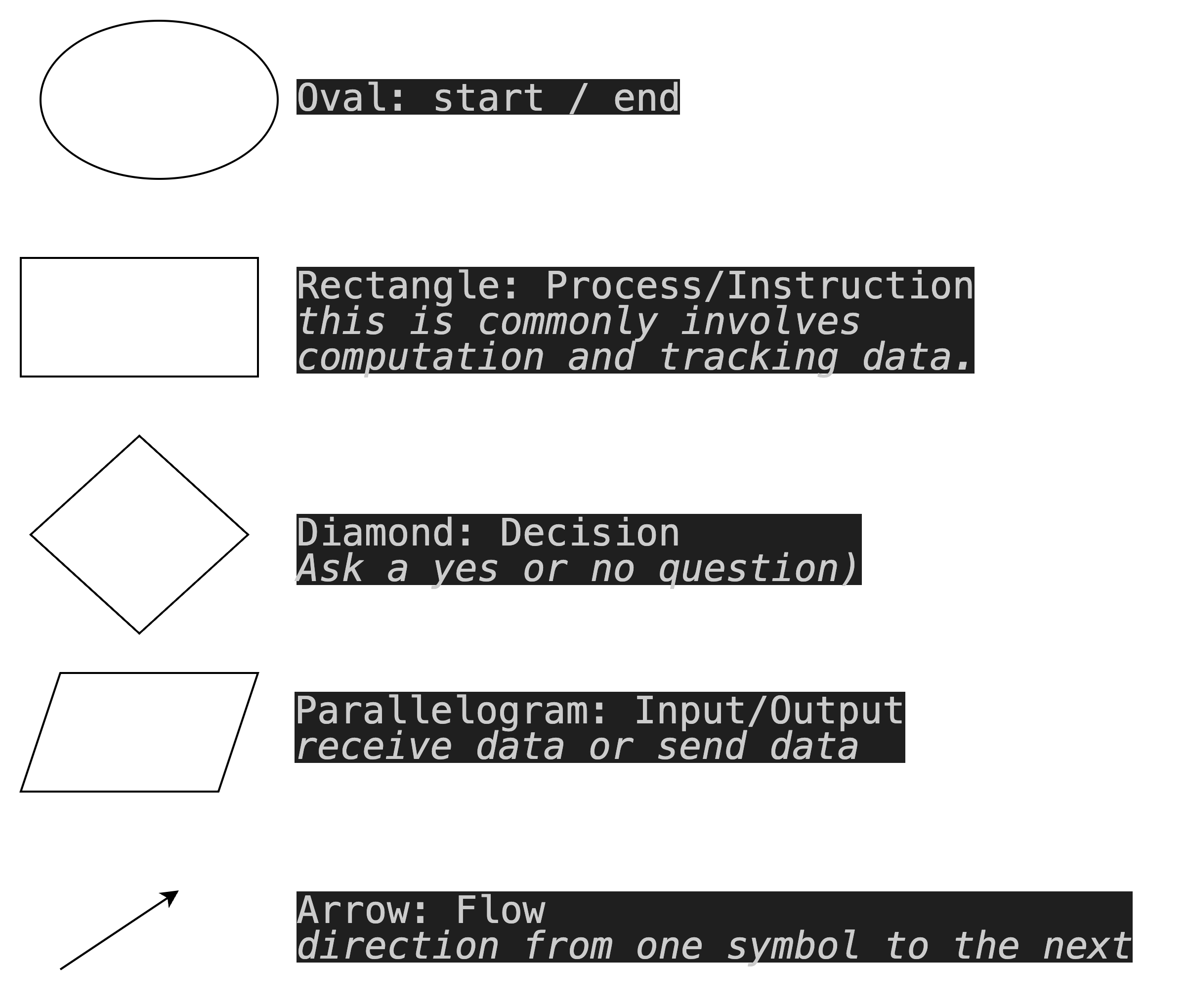
pseudocode, on the other hand, provides a detailed, step-by-step description of each action depicted in the flowchart. It uses a combination of plain language and programming-like constructs to describe the logic behind each step.
It’s a way to describe the steps in solving a problem without worrying about the syntax of a specific programming language. It allows the focus to remain on the logic of the solution rather than the specifics of a programming language. This makes it easier to translate the solution into any programming language later on. Similar to flowcharts pseudocode serves as a form of documentation for algorithms and processes, making it easier to understand, and communicate to others.
Here’s a simple example of a solution to a problem represented in both approaches.
Example: Find the largest number value in a list of numbers.
Flowchart 
Pseudocode
-
Start
-
Initialize the largest number as the first element of the list.
-
For each number in the list:
-
If the current number is greater than the largest number:
-
Update the largest number to be the current number.
-
-
-
Display largest number
-
End
Looking at both representation of the solution we can see that the flowchart shows how to navigate through various action points, and what actions to take based on different conditions while the pseudocode provides a detailed, step-by-step description of the logic behind each action depicted in the flowchart. Using the flowchart we can check that the solution is clear and complete by making sure that all steps and decision points are included and t hat the flow accurately represents the logic for the solution. The pseudocode ensures we have a clear understanding of the problem and the steps required to solve it.
In other words, flowcharts focus on the "what" and "when" of actions, pseudocode emphasizes the "how." These tools are important because we can use them to ensure that the logical flow and structure of the solution are well-defined before actual coding begins.
Here’s why you should be excited about using these tools when creating computational solutions:
-
Starting a new coding project can feel overwhelming, but with flowcharts and pseudocode, you have a roadmap to guide you. As you see your ideas taking shape, your confidence will soar.
-
By planning ahead with these tools, you’ll save time in the long run. You’ll write cleaner code, spend less time debugging, and have more fun experimenting with new ideas.
-
Using flowcharts and pseudocode isn’t just about solving one problem — it’s about developing skills that will make you a better problem solver overall. These tools help you think critically, plan effectively, and communicate your ideas clearly.
You have attempted of activities on this page.

