Section 7.1 Modules
A
module is a file containing Python definitions and statements intended for use in other Python programs. There are many modules that come with Python as part of the
standard library. Using modules allows you to access additional functionality without having to write everything yourself, and it helps keep programs organized by grouping related code together.
To use the code inside a module, we must first import it. Importing a module makes its contents available to our program under a specific name.
import math   # allows us to use the math library providing mathematical functions (square roots, logarithms, factorials, constants)
import random # allows us to use the random library to generate random numbers and make random choices
import time   # allows us to use the time library to measure elapsed time and pause program execution
import os     # allows us to use the os library to interact with the operating system (files, folders, environment)
This statement creates new names (math, random, time, os), that refers to a module object. You can think of this as telling Python where to look when you want to use something defined in one of those modules.
Once a module has been imported, the names it contains do not become part of your program’s main namespace. Instead, they remain inside the module’s own namespace. A namespace is simply a space in which all names are distinct from one another. The same name can exist in different namespaces, but two objects cannot share the same name within a single namespace.
A familiar example of a namespace is the folder structure on your computer. Within a single folder, each file must have a unique name. However, you can have files with the same name in different folders because each folder defines its own namespace. Python modules work in a similar way: each module acts like its own folder, containing names that are distinct within that module.
Another example of a namespace is the set of street names within a city. Many cities have a street called Main Street, but it would be confusing if two streets in the same city had the same name. In contrast, human names are not managed by a system that enforces uniqueness, which is why governments assign unique identifiers, such as a social security number or passport number.
Now that we have introduced what modules are and why they are useful, let’s look at one commonly used module that comes with Python. The math module is part of Python’s standard library and provides functions for many familiar mathematical operations.
Here’san example of importing the
math module and how we can use some the things that are defined inside.
Here we are using
factorial,
exp,
log2, and
sqrt, all of which are defined inside the
math module.
But what if no one had told us about math? How would we know that it exists. How would we know what it can do for us? The answer is to ask for help and the best place to get help about the Python programming environment is to consult with the Python Documentation.
The
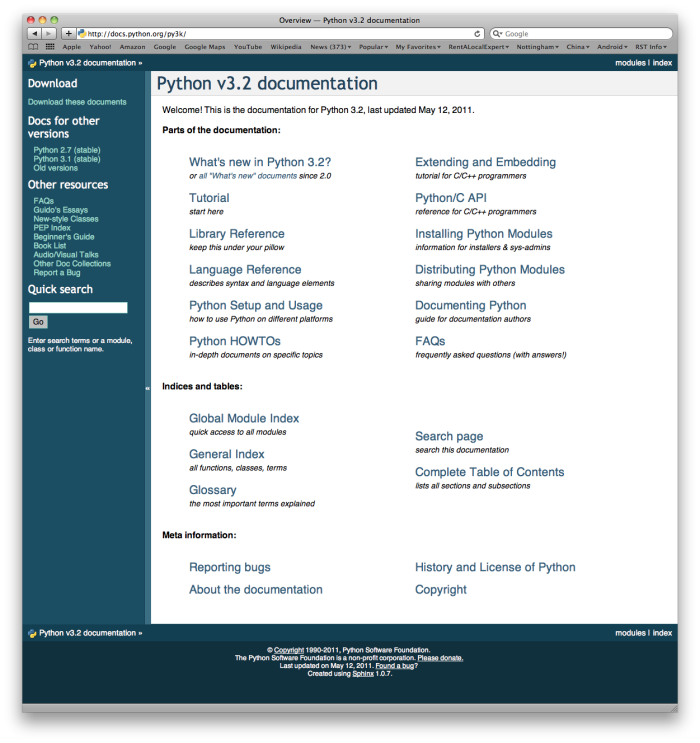
Python Documentation site for Python version 3 (the home page is shown below) is an extremely useful reference for all aspects of Python. The site contains a listing of all the standard modules that are available with Python (see
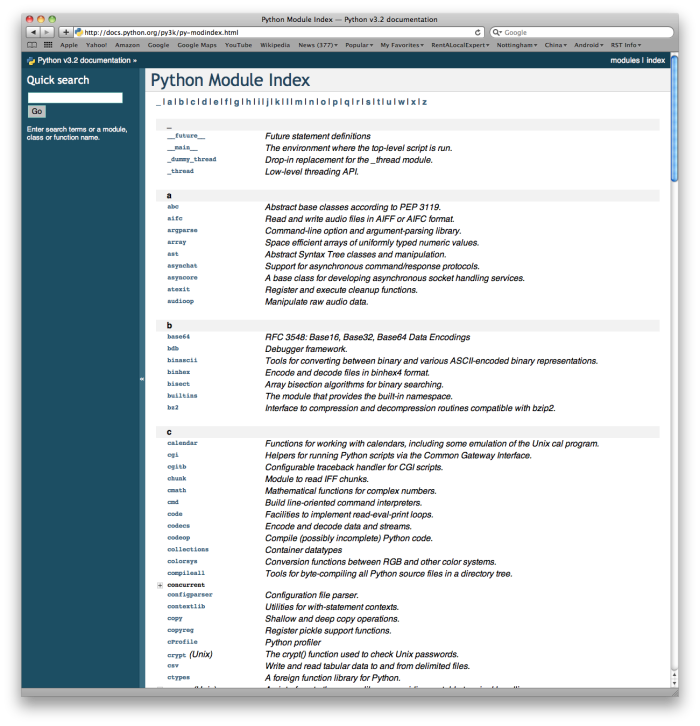
Global Module Index). You will also see that there is a
Language Reference and a
Tutorial (mostly aimed at people who are already familiar with another programming language), as well as installation instructions, how-tos, and frequently asked questions. We encourage you to become familiar with this site and to use it often.
If you have not done so already, take a look at the Global Module Index. Here you will see an alphabetical listing of all the modules that are available as part of the standard library. Find the math module.
You can see that all the math functionality that we have talked about is there. However, there is so much more. Take some time to read through and familiarize yourself with some of the other things that math can do.
In order to use Python modules, you have to import them into a Python program. That happens with an import statement: the word
import, and then the name of the module. The name is case-sensitive. Roughly translated to English, an import statement says "there’s some code in another file; please make its functions and variables available in this file." More technically, an import statement causes all the code in another file to be executed. Any variables that are bound during that execution (including functions that are defined) may then be referred in some way (to be discussed) in the current file. By convention, all
import commands are put at the very top of your file. They can be put elsewhere, but that can lead to some confusions, so it’s best to follow the convention. Where do these other files that you can import come from? It could be a code file that you wrote yourself, or it could be code that someone else wrote and you copied on to your computer. For example, if you have a file
myprog.py in directory
~/Desktop/mycode/, and
myprog.py contains a line of code
import morecode, then the python interpreter will look for a file called
morecode.py, excecute its code, and make its object bindings available for reference in the rest of the code in
myprog.py.
Note that it is
import morecode, not
import morecode.py, but the other file has to be called
morecode.py.
The tests you see in your problem sets are also using a Python module that’s in the standard library, called
unittest. Right now, you can’t see the code that causes those tests to run, because we have hidden it from you, as you progress in learning how to program, you will learn how to write your own Unit Tests for code, and to do so, you will need to write an import statement at the beginning of your programs. Even before you learn how to write your own tests, you will see code for Unit Tests in your problem set files.
Checkpoint 7.1.2.
-
A file containing Python definitions and statements intended for use in other Python programs.
- A module can be reused in different programs.
-
A separate block of code within a program.
- While a module is separate block of code, it is separate from a program.
-
One line of code in a program.
- The call to a feature within a module may be one line of code, but modules are usually multiple lines of code separate from the program
-
A file that contains documentation about functions in Python.
- Each module has its own documentation, but the module itself is more than just documentation.
Checkpoint 7.1.3.
To find out information on the standard modules available with Python you should:
You have attempted
of
activities on this page.