Skip to main content
Contents Calc Dark Mode Prev Next Profile \(\newcommand\DLGray{\color{Gray}}
\newcommand\DLO{\color{BurntOrange}}
\newcommand\DLRa{\color{WildStrawberry}}
\newcommand\DLGa{\color{Green}}
\newcommand\DLGb{\color{PineGreen}}
\newcommand\DLBa{\color{RoyalBlue}}
\newcommand\DLBb{\color{Cerulean}}
\newcommand\ds{\displaystyle}
\newcommand\ddx{\frac{d}{dx}}
\newcommand\os{\overset}
\newcommand\us{\underset}
\newcommand\ob{\overbrace}
\newcommand\obt{\overbracket}
\newcommand\ub{\underbrace}
\newcommand\ubt{\underbracket}
\newcommand\ul{\underline}
\newcommand\tikznode[3][]
{\tikz[remember picture,baseline=(#2.base)]
\node[minimum size=0pt,inner sep=0pt,#1](#2){#3};
}
\newcommand\del{\nabla}
\newcommand\R{\mathbb{R}}
\newcommand\C{\mathcal{C}}
\newcommand\N{\mathcal{N}}
\newcommand\eps{\varepsilon}
\renewcommand\epsilon{\varepsilon}
\renewcommand\subset{\subseteq}
\newcommand\norm[1]{\|{#1}\|}
\newcommand\matrixbrackets[4][1]{
\draw (#3,#2) -- (\fpeval{#3+0.2},#2);
\draw (#3,#1) -- (#3 ,#2);
\draw (#3,#1) -- (\fpeval{#3+0.2},#1);
\draw (#4,#2) -- (\fpeval{#4-0.2},#2);
\draw (#4,#1) -- (#4 ,#2);
\draw (#4,#1) -- (\fpeval{#4-0.2},#1);
}
\tikzstyle{circle node 0}=[fill=white, draw=black, shape=circle, inner sep=0pt]
\tikzstyle{circle node 2}=[fill=white, draw=black, shape=circle, inner sep=2pt]
\tikzstyle{hrect node}=[fill=white, draw=black, inner sep=2pt, outer sep=3pt]
\tikzstyle{vrect node}=[fill=white, draw=black, inner sep=0pt, outer sep=0pt]
\tikzstyle{hidden node 0}=[inner sep=0pt, outer sep=0pt]
\tikzstyle{hidden node 2}=[fill=white, inner sep=2pt, outer sep=2pt]
\tikzstyle{rect node 1}=[fill=white, inner sep=2pt, outer sep=0pt]
\tikzstyle{rect node 2}=[fill=white, draw=black, inner sep=2pt, outer sep=0pt]
\newcommand{\lt}{<}
\newcommand{\gt}{>}
\newcommand{\amp}{&}
\definecolor{fillinmathshade}{gray}{0.9}
\newcommand{\fillinmath}[1]{\mathchoice{\colorbox{fillinmathshade}{$\displaystyle \phantom{\,#1\,}$}}{\colorbox{fillinmathshade}{$\textstyle \phantom{\,#1\,}$}}{\colorbox{fillinmathshade}{$\scriptstyle \phantom{\,#1\,}$}}{\colorbox{fillinmathshade}{$\scriptscriptstyle\phantom{\,#1\,}$}}}
\)
Subsection Main Components
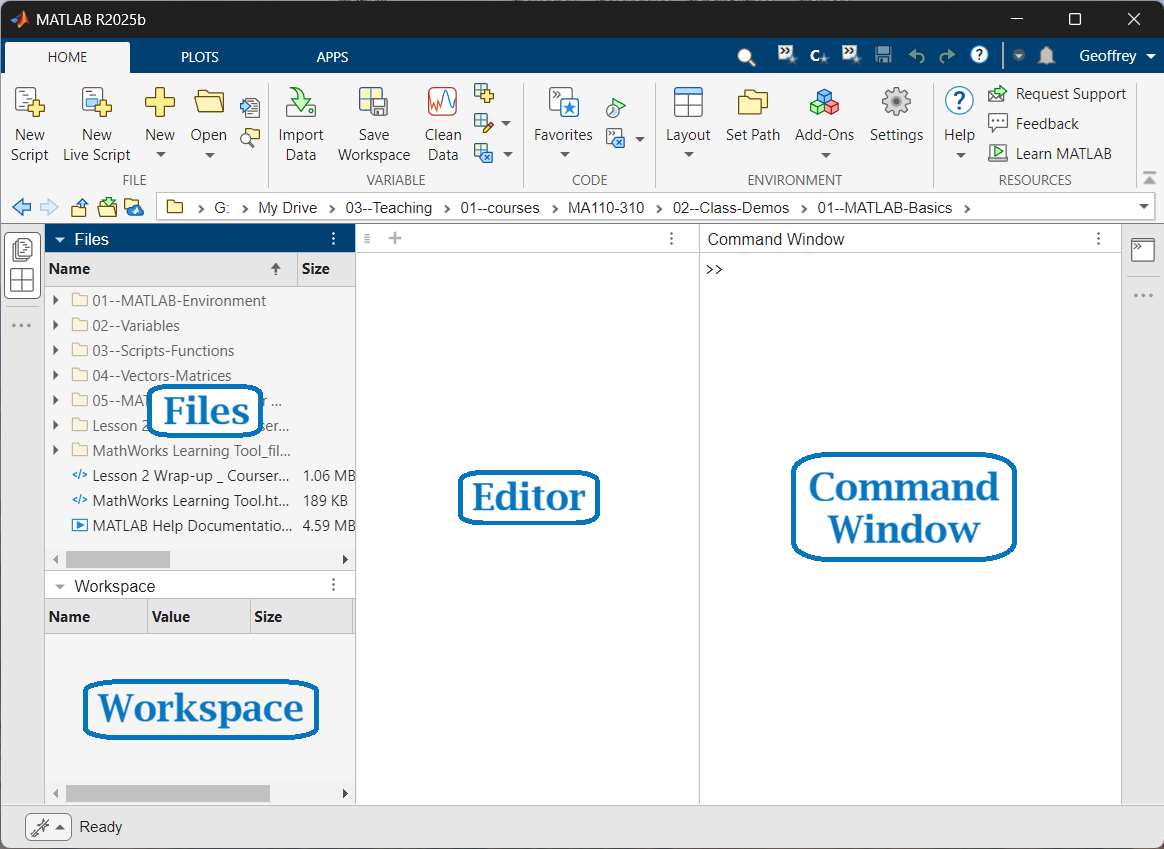
When MATLAB opens, the screen is divided into panels. Each panel has a specific role in how you interact with MATLAB. Although the layout can be customized, the following components are essential.
Files
Shows the current working directory. Files you create or save are placed here by default.
Command Window
The Command Window is where you enter commands at the prompt
>>. MATLAB evaluates each command when you press
Enter .
Workspace
Displays variables currently stored in memory, including their names, sizes, and values.
Editor
Used to write, edit, and debug MATLAB programs and scripts.
Figure 1. Main components of the MATLAB Desktop.
Checkpoint 2 .
Which MATLAB panel shows the variables currently stored in memory?
Files
Workspace
Editor
Command Window