Contents
Dark Mode Prev Up Next Profile
\(\newcommand{\N}{\mathbb N} \newcommand{\Z}{\mathbb Z} \newcommand{\Q}{\mathbb Q} \newcommand{\R}{\mathbb R}
\newcommand{\lt}{<}
\newcommand{\gt}{>}
\newcommand{\amp}{&}
\definecolor{fillinmathshade}{gray}{0.9}
\newcommand{\fillinmath}[1]{\mathchoice{\colorbox{fillinmathshade}{$\displaystyle \phantom{\,#1\,}$}}{\colorbox{fillinmathshade}{$\textstyle \phantom{\,#1\,}$}}{\colorbox{fillinmathshade}{$\scriptstyle \phantom{\,#1\,}$}}{\colorbox{fillinmathshade}{$\scriptscriptstyle\phantom{\,#1\,}$}}}
\)
Section 4.2 Overview of Synchronizing with the Upstream Repository
Now, recall that upstream
main should be the starting point for all new work. So, before you can work on something new, youโll need to ensure that your
main branches look like the upstream
main (i.e. you will synchronize them with the upstream). This is a two-step process. First, you will
pull the upstream
main into your local repository and then you will
push it to your origin.
Figureย 4.2.1 shows how pulling
main from the upstream and then pushing it to your origin synchronizes the
main branches.
Diagram showing that a pull from the upstream main branch has updated the local main branch. And pushing the local main branch to origin has updated the origin main branch. Now all three repositories (upsteam, origin, and local) all have the same sequence of commits.
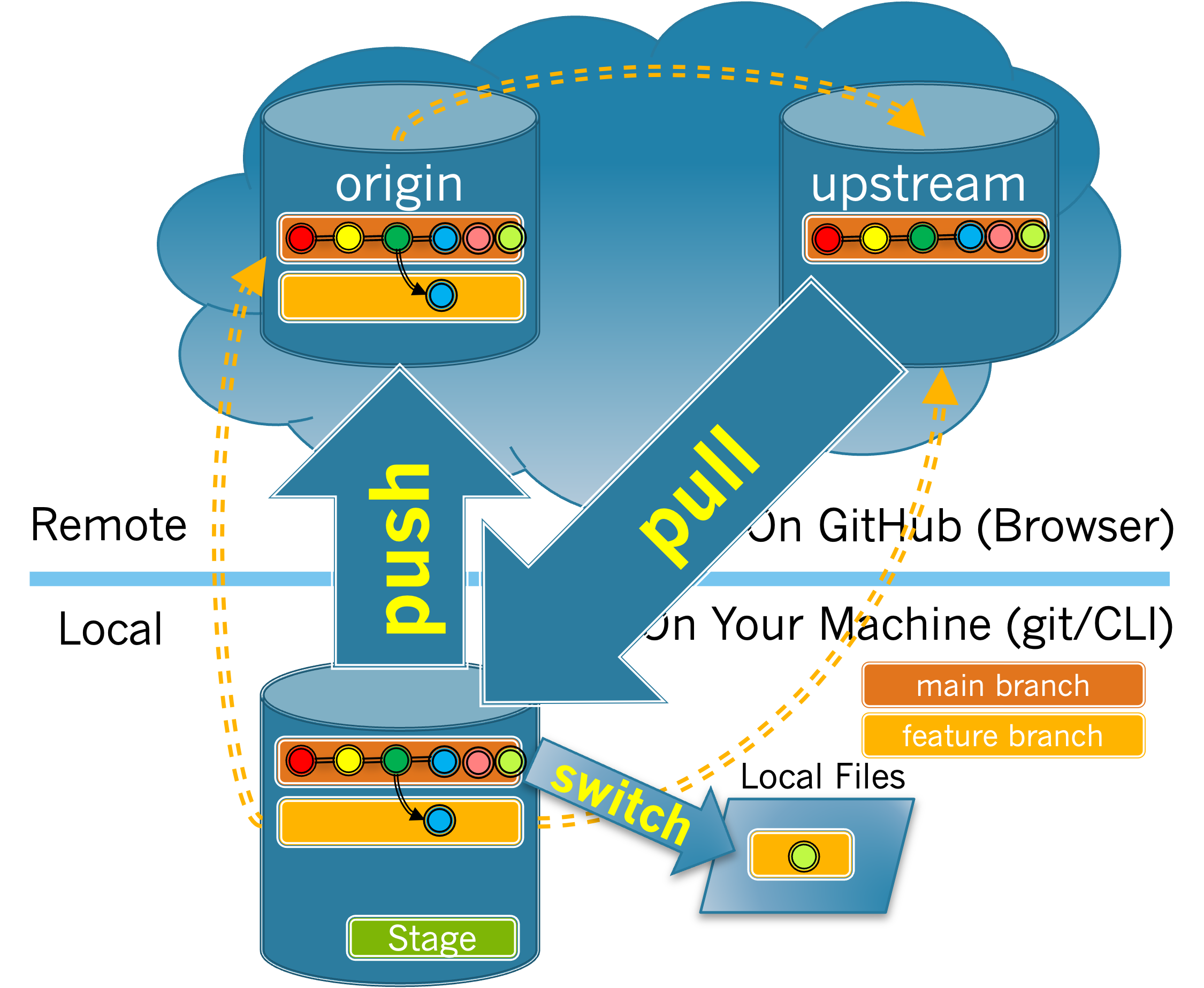
Figure 4.2.1. Synchronizing the local and origin main branches with the upstream.
Exercises
1.
(a)
Which action will copy changes from the upstream repository to your local repository?
Pushing to your origin.
The push operation copies changes from your local repository to a remote repository.
Pulling from your origin.
The pull operation copies changes from a remote repository to your local repo. But which remote repo do you need to copy from?
Pushing to the upstream.
The push operation copies changes from your local repository to a remote repository. But, recall that you do not have permission to push to upstream.
Pulling from the upstream .
Correct!
Switching to your feature branch.
Switching branches does not move information between your local repository and a remote repository.
Hint .
Look back to at the figure to see which arrow goes from the upstream to your local repository.
(b)
Which action copies changes from your local repository to your origin repository?
Pushing to your origin.
Correct!
Pulling from your origin.
Pulling copies changes from a remote repository into your local repository.
Pushing to the upstream.
Pushing copies changes from your local repository to a remote repository. But recall that you do not have permission to push to upstream main.
Pulling from the upstream.
Pulling from the upstream copies changes that have been merged into the upstream to your local repository.
Switching to your feature branch.
Switching branches does not move information between your local repository and a remote repository.
Hint .
Look back to at the figure to see which arrow goes from your local repository to the origin.
You have attempted
of
activities on this page.

